
SwiftPamphletApp

SwiftPamphletApp copied to clipboard
 ming1016
Animation
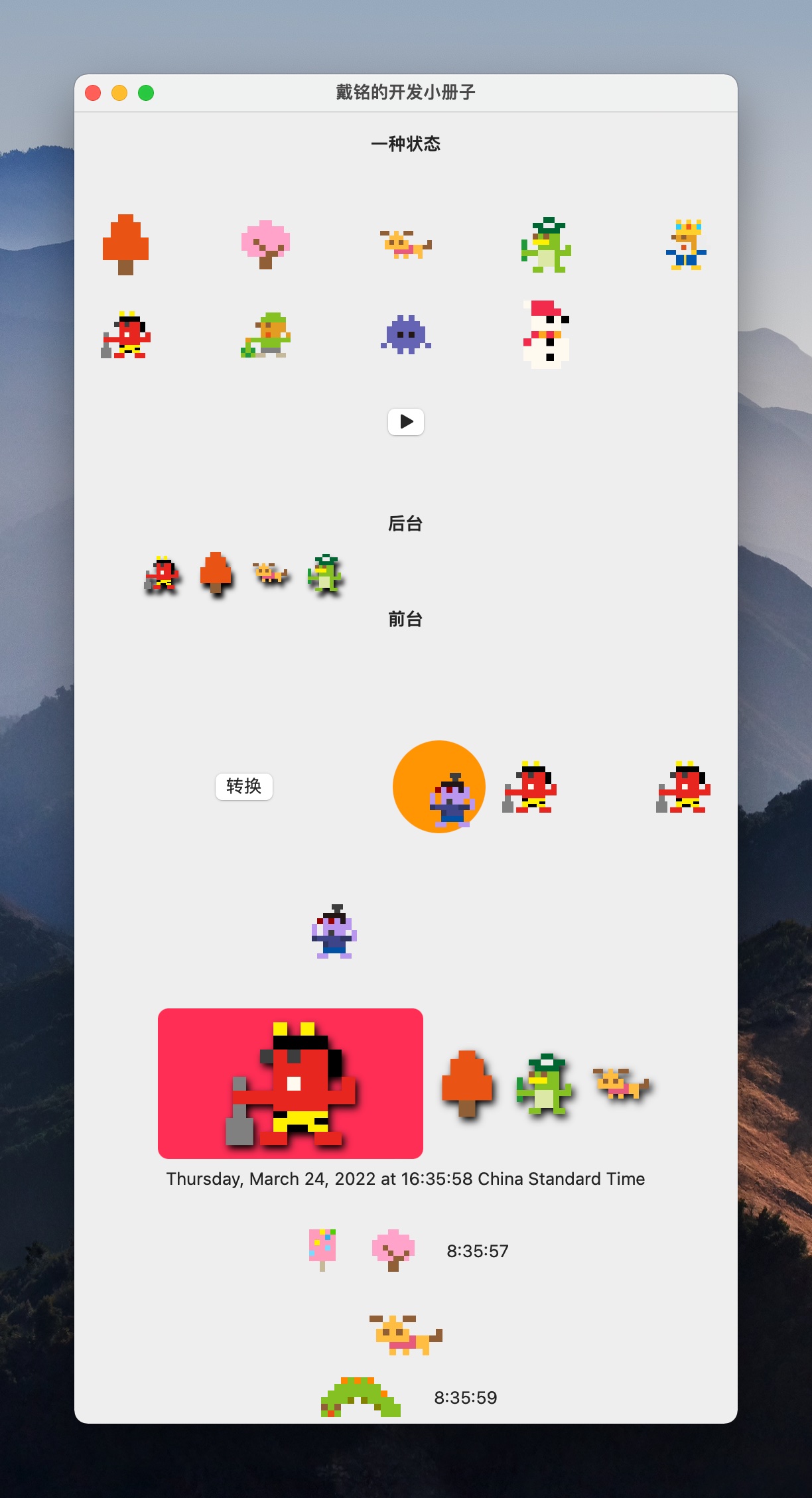
SwiftUI 里实现动画的方式包括有 .animation 隐式动画、withAnimation 和 withTransaction 显示动画、matchedGeometryEffect Hero 动画和 TimelineView 等。
示例代码如下:
struct PlayAnimation: View {
    @State private var isChange = false
    private var anis:[String: Animation] = [
        "p1": .default,
        "p2": .linear(duration: 1),
        "p3": .interpolatingSpring(stiffness: 5, damping: 3),
        "p4": .easeInOut(duration: 1),
        "p5": .easeIn(duration: 1),
        "p6": .easeOut(duration: 1),
        "p7": .interactiveSpring(response: 3, dampingFraction: 2, blendDuration: 1),
        "p8": .spring(),
        "p9": .default.repeatCount(3)
    ]
    @State private var selection = 1

    var body: some View {
        // animation 隐式动画和 withAnimation 显示动画
        Text(isChange ? "另一种状态" : "一种状态")
            .font(.headline)
            .padding()
            .animation(.easeInOut, value: isChange) // 受限的隐式动画,只绑定某个值。
            .onTapGesture {
                // 使用 withAnimation 就是显式动画,效果等同 withTransaction(Transaction(animation: .default))
                withAnimation {
                    isChange.toggle()
                }

                // 设置 Transaction。和隐式动画共存时,优先执行 withAnimation 或 Transaction。
                var t = Transaction(animation: .linear(duration: 2))
                t.disablesAnimations = true // 用来禁用隐式动画
                withTransaction(t) {
                    isChange.toggle()
                }
            } // end onHover

        LazyVGrid(columns: [GridItem(.adaptive(minimum: isChange ? 60 : 30), spacing: 60)]) {
            ForEach(Array(anis.keys), id: \.self) { s in
                Image(s)
                    .resizable()
                    .scaledToFit()
                    .animation(anis[s], value: isChange)
                    .scaleEffect()
            }
        }
        .padding()
        Button {
            isChange.toggle()
        } label: {
            Image(systemName: isChange ? "pause.fill" : "play.fill")
                .renderingMode(.original)
        }

        // matchedGeometryEffect 的使用
        VStack {
            Text("后台")
                .font(.headline)
            placeStayView
            Text("前台")
                .font(.headline)
            placeShowView
        }
        .padding(50)

        // 通过使用相同 matchedGeometryEffect 的 id,绑定两个元素变化。
        HStack {
            if isChange {
                Rectangle()
                    .fill(.pink)
                    .matchedGeometryEffect(id: "g1", in: mgeStore)
                    .frame(width: 100, height: 100)
            }
            Spacer()
            Button("转换") {
                withAnimation(.linear(duration: 2.0)) {
                    isChange.toggle()
                }
            }
            Spacer()
            if !isChange {
                Circle()
                    .fill(.orange)
                    .matchedGeometryEffect(id: "g1", in: mgeStore)
                    .frame(width: 70, height: 70)
            }
            HStack {
                Image("p1")
                    .resizable()
                    .scaledToFit()
                    .frame(width: 50, height: 50)
                if !isChange {
                    Image("p19")
                        .resizable()
                        .scaledToFit()
                        .frame(width: 50, height: 50)
                        .matchedGeometryEffect(id: "g1", in: mgeStore)
                }
                Image("p1")
                    .resizable()
                    .scaledToFit()
                    .frame(width: 50, height: 50)
            }
        }
        .padding()

        // 使用 isSource,作为移动到相同 matchedGeometryEffect id 的方法。
        HStack {
            Image("p19")
                .resizable()
                .scaledToFit()
                .frame(width: isChange ? 100 : 50, height: isChange ? 100 : 50)
                .matchedGeometryEffect(id: isChange ? "g2" : "", in: mgeStore, isSource: false)

            Image("p19")
                .resizable()
                .scaledToFit()
                .frame(width: 100, height: 100)
                .matchedGeometryEffect(id: "g2", in: mgeStore)
                .opacity(0)
        }


        // 点击跟随的效果
        HStack {
            ForEach(Array(1...4), id: \.self) { i in
                Image("p\(i)")
                    .resizable()
                    .scaledToFit()
                    .frame(width: i == selection ? 200 : 50)
                    .matchedGeometryEffect(id: "h\(i)", in: mgeStore)
                    .onTapGesture {
                        withAnimation {
                            selection = i
                        }
                    }
                    .shadow(color: .black, radius: 3, x: 2, y: 3)
            }
        }
        .background(
            RoundedRectangle(cornerRadius: 8).fill(.pink)
                .matchedGeometryEffect(id: "h\(selection)", in: mgeStore, isSource: false)
        )

        // matchedGeometryEffect 还可以应用到 List 中,通过 Array enumerated 获得 index 作为 matchedGeometryEffect 的 id。右侧固定按钮可以直接让对应 id 的视图滚动到固定按钮的位置


        // TimelineView
        TimelineView(.periodic(from: .now, by: 1)) { t in
            Text("\(t.date)")
            HStack(spacing: 20) {
                let e = "p\(Int.random(in: 1...30))"
                Image(e)
                    .resizable()
                    .scaledToFit()
                    .frame(height: 40)
                    .animation(.default.repeatCount(3), value: e)

                TimelineSubView(date: t.date) // 需要传入 timeline 的时间给子视图才能够起作用。

            }
            .padding()
        }

        // matchedGeometryEffect

        /// TimelineScheduler 的使用,TimelineScheduler 有以下类型
        /// .animation:制定更新的频率,可以控制暂停
        /// .everyMinute:每分钟更新一次
        /// .explicit:所有要更新的放到一个数组里
        /// .periodic:设置开始时间和更新频率
        /// 也可以自定义 TimelineScheduler
        TimelineView(.everySecond) { t in
            let e = "p\(Int.random(in: 1...30))"
            Image(e)
                .resizable()
                .scaledToFit()
                .frame(height: 40)
        }

        // 自定义的 TimelineScheduler
        TimelineView(.everyLoop(timeOffsets: [0.2, 0.7, 1, 0.5, 2])) { t in
            TimelineSubView(date: t.date)
        }
    }

    // MARK: - TimelineSubView
    struct TimelineSubView: View {
        let date : Date
        @State private var s = "let's go"
        // 顺序从数组中取值,取完再重头开始
        @State private var idx: Int = 1
        func advanceIndex(count: Int) {
            idx = (idx + 1) % count
            if idx == 0 { idx = 1 }
        }

        var body: some View {
            HStack(spacing: 20) {
                Image("p\(idx)")
                    .resizable()
                    .scaledToFit()
                    .frame(height: 40)
                    .animation(.easeIn(duration: 1), value: date)
                    .onChange(of: date) { newValue in
                        advanceIndex(count: 30)
                        s = "\(date.hour):\(date.minute):\(date.second)"
                    }
                    .onAppear {
                        advanceIndex(count: 30)
                    }

                Text(s)
            }
        }
    }

    // MARK: - 用 matchedGeometryEffect 做动画
    /// matchedGeometryEffect 可以无缝的将一个图像变成另外一个图像。
    @State private var placeStayItems = ["p1", "p2", "p3", "p4"]
    @State private var placeShowItems: [String] = []

    @Namespace private var mgeStore

    private var placeStayView: some View {
        LazyVGrid(columns: [GridItem(.adaptive(minimum: 30), spacing: 10)]) {
            ForEach(placeStayItems, id: \.self) { s in
                Image(s)
                    .resizable()
                    .scaledToFit()
                    .matchedGeometryEffect(id: s, in: mgeStore)
                    .onTapGesture {
                        withAnimation {
                            placeStayItems.removeAll { $0 == s }
                            placeShowItems.append(s)
                        }
                    }
                    .shadow(color: .black, radius: 2, x: 2, y: 4)
            } // end ForEach
        } // end LazyVGrid
    } // private var placeStayView

    private var placeShowView: some View {
        LazyVGrid(columns: [GridItem(.adaptive(minimum: 150), spacing: 10)]) {
            ForEach(placeShowItems, id: \.self) { s in
                Image(s)
                    .resizable()
                    .scaledToFit()
                    .matchedGeometryEffect(id: s, in: mgeStore)
                    .onTapGesture {
                        withAnimation {
                            placeShowItems.removeAll { $0 == s }
                            placeStayItems.append(s)
                        }
                    }
                    .shadow(color: .black, radius: 2, x: 0, y: 2)
                    .shadow(color: .white, radius: 5, x: 0, y: 2)
            } // end ForEach
        } // end LazyVGrid
    } // end private var placeShowView

} // end struct PlayAnimation

// MARK: - 扩展 TimelineSchedule
extension TimelineSchedule where Self == PeriodicTimelineSchedule {
    static var everySecond: PeriodicTimelineSchedule {
        get {
            .init(from: .now, by: 1)
        }
    }
}

// MARK: - 自定义一个 TimelineSchedule
// timeOffsets 用完,就会再重头重新再来一遍
struct PCLoopTimelineSchedule: TimelineSchedule {
    let timeOffsets: [TimeInterval]

    func entries(from startDate: Date, mode: TimelineScheduleMode) -> Entries {
        Entries(last: startDate, offsets: timeOffsets)
    }

    struct Entries: Sequence, IteratorProtocol {
        var last: Date
        let offsets: [TimeInterval]
        var idx: Int = -1
        mutating func next() -> Date? {
            idx = (idx + 1) % offsets.count
            last = last.addingTimeInterval(offsets[idx])
            return last
        }
    } // end Struct Entries
}

// 为自定义的 PCLoopTimelineSchedule 做一个 TimelineSchedule 的扩展函数,方便使用
extension TimelineSchedule where Self == PCLoopTimelineSchedule {
    static func everyLoop(timeOffsets: [TimeInterval]) -> PCLoopTimelineSchedule {
        .init(timeOffsets: timeOffsets)
    }
}
