
SwiftPamphletApp

SwiftPamphletApp copied to clipboard
Published
8 months ago
•
 ming1016
ming1016
ProgressView
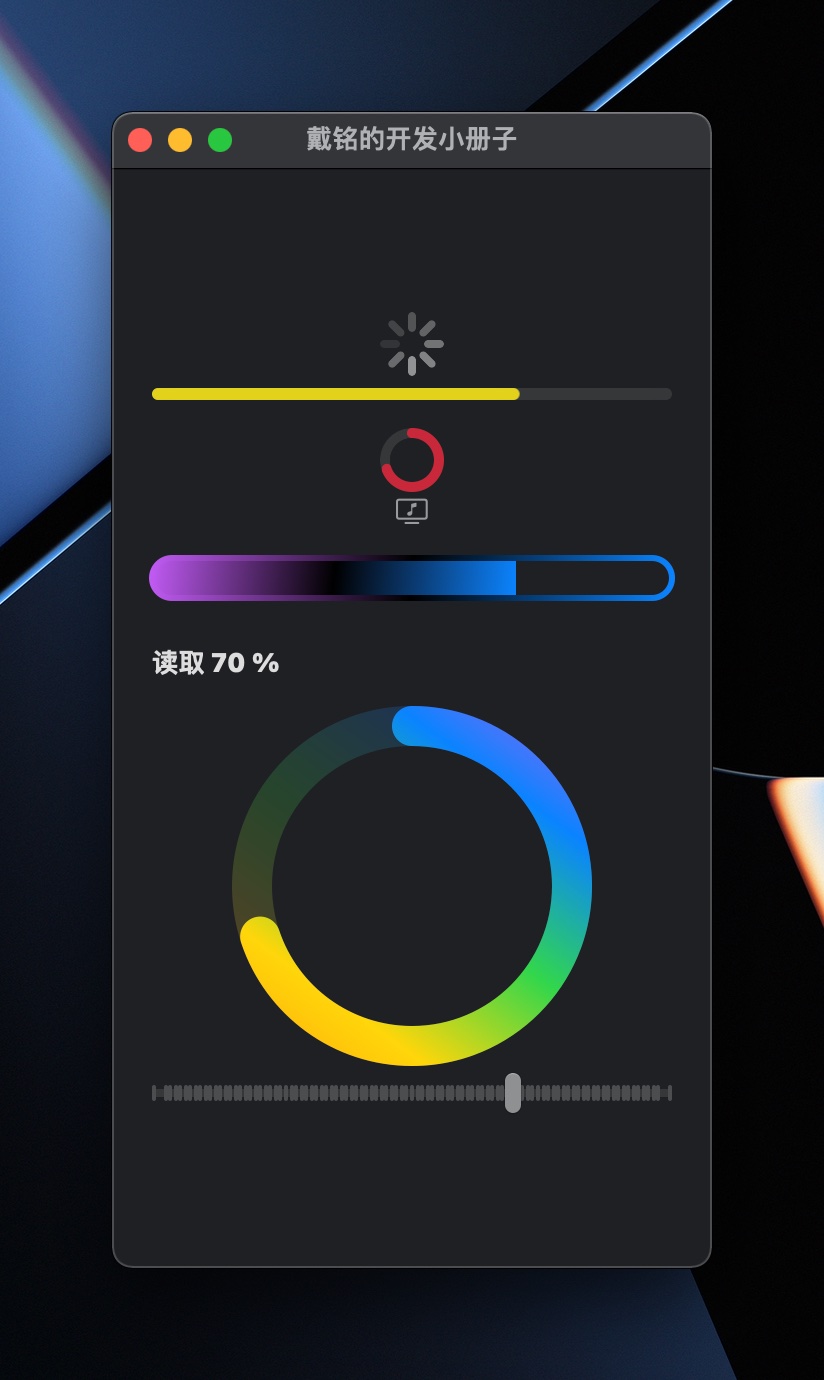
用 ProgressViewStyle 协议,可以创建自定义的进度条视图。在 WatchOS 上会多一个 Guage 视图。
struct PlayProgressView: View {
    @State private var v: CGFloat = 0.0
    var body: some View {
        VStack {
            // 默认旋转
            ProgressView()

            // 有进度条
            ProgressView(value: v / 100)
                .tint(.yellow)

            ProgressView(value: v / 100) {
                Image(systemName: "music.note.tv")
            }
            .progressViewStyle(CircularProgressViewStyle(tint: .pink))

            // 自定义样式
            ProgressView(value: v / 100)
                .padding(.vertical)
                .progressViewStyle(PCProgressStyle1(borderWidth: 3))

            ProgressView(value: v / 100)
                .progressViewStyle(PCProgressStyle2())
                .frame(height:200)

            Slider(value: $v, in: 0...100, step: 1)
        }
        .padding(20)
    }
}

// 自定义 Progress 样式
struct PCProgressStyle1: ProgressViewStyle {
    var lg = LinearGradient(colors: [.purple, .black, .blue], startPoint: .topLeading, endPoint: .bottomTrailing)
    var borderWidth: Double = 2

    func makeBody(configuration: Configuration) -> some View {
        let fc = configuration.fractionCompleted ?? 0

        return VStack {
            ZStack(alignment: .topLeading) {
                GeometryReader { g in
                    Rectangle()
                        .fill(lg)
                        .frame(maxWidth: g.size.width * CGFloat(fc))
                }
            }
            .frame(height: 20)
            .cornerRadius(10)
            .overlay(
                RoundedRectangle(cornerRadius: 10)
                    .stroke(lg, lineWidth: borderWidth)
            )
            // end ZStack
        } // end VStack
    }
}

struct PCProgressStyle2: ProgressViewStyle {
    var lg = LinearGradient(colors: [.orange, .yellow, .green, .blue, .purple], startPoint: .topLeading, endPoint: .bottomTrailing)

    var borderWidth: Double = 20

    func makeBody(configuration: Configuration) -> some View {
        let fc = configuration.fractionCompleted ?? 0

        func strokeStyle(_ g: GeometryProxy) -> StrokeStyle {
            StrokeStyle(lineWidth: 0.1 * min(g.size.width, g.size.height), lineCap: .round)
        }

        return VStack {
            GeometryReader { g in
                ZStack {
                    Group {
                        Circle()
                            .trim(from: 0, to: 1)
                            .stroke(lg, style: strokeStyle(g))
                            .padding(borderWidth)
                            .opacity(0.2)
                        Circle()
                            .trim(from: 0, to: fc)
                            .stroke(lg, style: strokeStyle(g))
                            .padding(borderWidth)
                    }
                    .rotationEffect(.degrees(90 + 360 * 0.5), anchor: .center)
                    .offset(x: 0, y: 0.1 * min(g.size.width, g.size.height))
                }

                Text("读取 \(Int(fc * 100)) %")
                    .bold()
                    .font(.headline)
            }
            // end ZStack
        } // end VStack
    }
}
