
SwiftPamphletApp

SwiftPamphletApp copied to clipboard
 ming1016
TextField
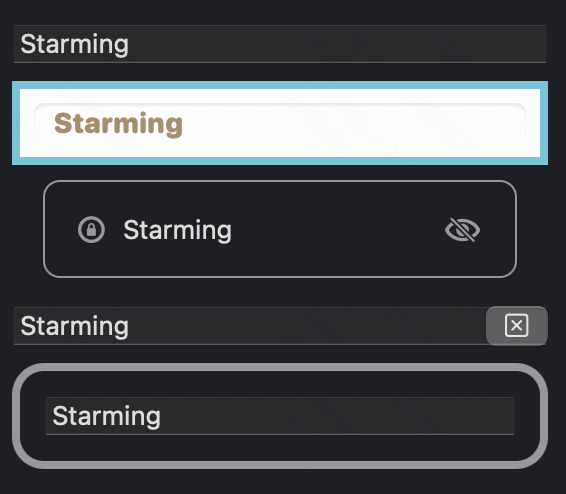
使用方法如下:
struct PlayTextFieldView: View {
    @State private var t = "Starming"
    @State private var showT = ""
    @State private var isEditing = false
    var placeholder = "输入些文字..."

    @FocusState private var isFocus: Bool

    var body: some View {
        VStack {
            TextField(placeholder, text: $t)

            // 样式设置
            TextField(placeholder, text: $t)
                .padding(10)
                .textFieldStyle(.roundedBorder) // textFieldStyle 有三个预置值 automatic、plain 和 roundedBorder。
                .multilineTextAlignment(.leading) // 对齐方式
                .font(.system(size: 14, weight: .heavy, design: .rounded))
                .border(.teal, width: 4)
                .background(.white)
                .foregroundColor(.brown)
                .textCase(.uppercase)

            // 多视图组合
            HStack {
                Image(systemName: "lock.circle")
                    .foregroundColor(.gray).font(.headline)
                TextField(placeholder, text: $t)
                    .textFieldStyle(.plain)
                    .submitLabel(.done)
                    .onSubmit {
                        showT = t
                        isFocus = true
                    }
                    .onChange(of: t) { newValue in
                        t = String(newValue.prefix(20)) // 限制字数
                    }
                Image(systemName: "eye.slash")
                    .foregroundColor(.gray)
                    .font(.headline)
            }
            .padding()
            .overlay(
                RoundedRectangle(cornerRadius: 8)
                    .stroke(.gray, lineWidth: 1)
            )
            .padding(.horizontal)

            Text(showT)


            // 自定义 textFieldStyle 样式
            TextField(placeholder, text: $t)
                .textFieldStyle(PClearTextStyle())
                .focused($isFocus)
        }
        .padding()
    } // end body
}

struct PClearTextStyle: TextFieldStyle {
    @ViewBuilder
    func _body(configuration: TextField<_Label>) -> some View {
        let mirror = Mirror(reflecting: configuration)
        let bindingText: Binding<String> = mirror.descendant("_text") as! Binding<String>
        configuration
            .overlay(alignment: .trailing) {
                Button(action: {
                    bindingText.wrappedValue = ""
                }, label: {
                    Image(systemName: "clear")
                })
            }

        let text: String = mirror.descendant("_text", "_value") as! String
        configuration
            .padding()
            .background(
                RoundedRectangle(cornerRadius: 16)
                    .strokeBorder(text.count > 10 ? .pink : .gray, lineWidth: 4)
            )
    } // end func
}
目前iOS 和 iPadOS上支持的键盘有:
- asciiCapable:能显示标准 ASCII 字符的键盘
- asciiCapableNumberPad:只输出 ASCII 数字的数字键盘
- numberPad:用于输入 PIN 码的数字键盘
- numbersAndPunctuation:数字和标点符号的键盘
- decimalPad:带有数字和小数点的键盘
- phonePad:电话中使用的键盘
- namePhonePad:用于输入人名或电话号码的小键盘
- URL:用于输入URL的键盘
- emailAddress:用于输入电子邮件地址的键盘
- twitter:用于Twitter文本输入的键盘,支持@和#字符简便输入
- webSearch:用于网络搜索词和URL输入的键盘
可以通过 keyboardType 修改器来指定。
