

 minecraft-dev
Double-clicking on navigation bar when NBT file is opened creates uncloseable tabs
Opening an NBT file replaces the navigation bar containing the actual file location with file.nbt.nbtt.
(original, possible to see when selecting the file in the project tree)
 (the one visible when clicking on the editor pane)
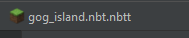
Double-clicking on the navigation bar results in a broken file editor tab showing up. It is linked with the original file, so editing the old tab will affect the new tab. However, the new tab is quite hard to close.

x, middle click, and right click -> close don't work- right click -> close all/other tabs close all applicable tabs to the left of the broken one
- Switching branches works - I got rid of the tab by switching the branch twice, then rolling back the workspace after second switch.
Discovered this when I was trying to go to the file on the project file tree by using the navigation bar.
- Plugin version: 2021.2-1.5.15
- Target platform: Fabric
IntelliJ IDEA 2021.2.3 (Community Edition) Build #IC-212.5457.46, built on October 12, 2021 Runtime version: 11.0.12+7-b1504.40 amd64 VM: OpenJDK 64-Bit Server VM by JetBrains s.r.o. Windows 10 10.0 GC: G1 Young Generation, G1 Old Generation Memory: 2042M Cores: 8 Non-Bundled Plugins: org.toml.lang (0.2.155.4114-212), PMD-IDEA (1.7.0), com.github.b3er.idea.plugins.arc.browser (0.23), com.demonwav.minecraft-dev (2021.2-1.5.15), org.jetbrains.kotlin (212-1.5.31-release-546-IJ4638.7), izhangzhihao.rainbow.brackets (6.21) Kotlin: 212-1.5.31-release-546-IJ4638.7
