

 milesial
When I change the dataset, the code of 'loss = criterion(masks_pred, true_masks)' of train.py put error
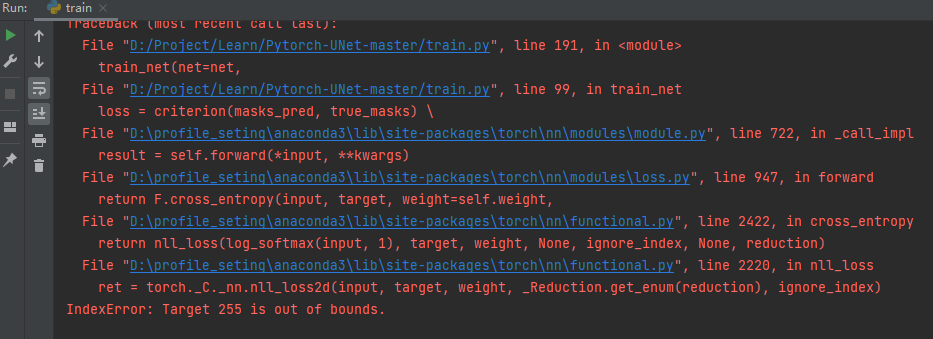

The target class 255 is bigger than the number of classes you specified for the network, you should fix your mask preprocessing.

Hi! Dear wanrin: Have you solved this problem? If it has been solved, please tell me how to solve this problem, I will be grateful to you!


your mask images should divide 255 to normalize
目标类 255 大于您为网络指定的类数,您应该修复掩码预处理。
我不会修改代码啊 怎么修复掩码预处理呢 谢谢


I was able to solve the problem thanks to my pycham debugger... In fact, the backround of the masks should be counted as a class .. so if you had two classes on your given set, you would then have to put number_class = 3 In addition, it will be necessary to put the masks at the level of the grids. With opencv , you can put it like this: img = cv2.cvtColor(img, cv2.COLOR_BGR2GRAY)

I have this exact same error. I am slightly confused by the discussion in this thread. Is the problem in the preprocessing method in data_loading.py? If so where?

So I found the solution to the problem I was having. It turns out I had two separate issues.
My first problem was that the masks you use have to be "black and white" only two colors. I thought my masks were black and white however after running image.getcolors() on the one of my masks it revealed that there were layers of grey between my whites and blacks. I had to use a image editing software called imagej (https://imagej.net/software/fiji/) to remove these layers of grey.
My second issue was that my images were not in the right mode for PIL. You can check the mode your image is in by using the command image.mode. If you test one of the Carvana masks you can see that their images are in mode "P". My masks were in mode "L". You can change the mode an image is in by using image.convert(). However for some reason for my case changing my masks to mode "P" did not solve my problem, but changing them to mode "1" did fix the issue.