

 microsoft
WSLg only loads 1 monitor when there's several
Environment
Windows build number: Windows [version 10.0.21364.1000]
Your Distribution version: Ubuntu20.04 (wsl 2)
Your WSLg version: 1.0.17.1
Steps to reproduce
Set up a second monitor on windows. The "mutliple screen" option in "display settings" won't change anything to the bug, any option will do the same with wslg.
Expected behavior
wslg should load all monitors so that we can start our apps on the desired monitor.
Actual behavior
wslg will setup only 1 wayland monitor, so we can't, for example, define the "WAYLAND-DISPLAY" variable to "wayland-1", because there is only "wayland-0". If we choose the fullscreen option in a linux program, it will appear in our main screen, where we have all our icons.


Thanks, the log shows there is only one monitor is reported from Windows side to WSLg.
[21:12:49.433] disp_monitor_validate_and_compute_layout:---OUTPUT--- [21:12:49.433] rdpMonitor[0]: x:0, y:0, width:1366, height:768, is_primary:1 [21:12:49.433] rdpMonitor[0]: weston x:0, y:0, width:1366, height:768 [21:12:49.433] rdpMonitor[0]: physicalWidth:344, physicalHeight:194, orientation:0 [21:12:49.433] rdpMonitor[0]: desktopScaleFactor:100, deviceScaleFactor:100 [21:12:49.433] rdpMonitor[0]: scale:1, clientScale:1.00
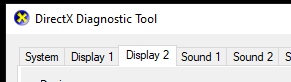
Would you please run dxdiag on Windows and check if there is more than 1 display tab like ...
Is the second monitor usable on Windows ?
Oh sorry I selected "display only on screen 1" to test if screen two would work this way, and it seems like it prevented weston from loading this one... I put back the windows side to "extend display" and then here is a good log file. The two screen are usable on windows, but only one wayland file is created
 weston.log
[22:09:59.914] 	rdpMonitor[0]: weston x:0, y:0, width:1366, height:768
[22:09:59.914] 	rdpMonitor[0]: physicalWidth:344, physicalHeight:194, orientation:0
[22:09:59.914] 	rdpMonitor[0]: desktopScaleFactor:100, deviceScaleFactor:100
[22:09:59.914] 	rdpMonitor[0]: scale:1, clientScale:1.00
[22:09:59.914] 	rdpMonitor[1]: x:1366, y:0, width:1280, height:1024, is_primary:0
[22:09:59.914] 	rdpMonitor[1]: weston x:1366, y:0, width:1280, height:1024
[22:09:59.914] 	rdpMonitor[1]: physicalWidth:380, physicalHeight:300, orientation:0
[22:09:59.914] 	rdpMonitor[1]: desktopScaleFactor:100, deviceScaleFactor:100
[22:09:59.914] 	rdpMonitor[1]: scale:1, clientScale:1.00```
OK, Just for clarification, do you see multiple monitors are listed with "xrandr" ? and if you can run "weston-info", please check if all monitors are exposed in wl_output and xdg_output_v1 ? thanks!
xrandr: all here
XWAYLAND0 connected 1366x768+0+0 (normal left inverted right x axis y axis) 344mm x 194mm
XWAYLAND1 connected 1280x1024+1366+0 (normal left inverted right x axis y axis) 380mm x 300mm
xdg: all here
        xdg_output_v1
                output: 20
                name: 'rdp-1'
                logical_x: 1366, logical_y: 0
                logical_width: 1280, logical_height: 1024
        xdg_output_v1
                output: 11
                name: 'rdp-0'
                logical_x: 0, logical_y: 0
                logical_width: 1366, logical_height: 768
interface: 'wp_presentation', version: 1, name: 5
        presentation clock id: 4 (CLOCK_MONOTONIC_RAW)
wl output: all here
interface: 'wl_output', version: 3, name: 11
        x: 0, y: 0, scale: 1,
        physical_width: 344 mm, physical_height: 194 mm,
        make: 'weston', model: 'rdp',
        subpixel_orientation: unknown, output_transform: normal,
        mode:
                width: 1366 px, height: 768 px, refresh: 60.000 Hz,
                flags: current preferred
interface: 'wl_output', version: 3, name: 20
        x: 1366, y: 0, scale: 1,
        physical_width: 380 mm, physical_height: 300 mm,
        make: 'weston', model: 'rdp',
        subpixel_orientation: unknown, output_transform: normal,
        mode:
                width: 1280 px, height: 1024 px, refresh: 60.000 Hz,
                flags: current preferred
The thing is, graphical programs are wonking with WAYLAND_DISPLAY=wayland-0, but not wayland-1, but as you can see I trully have two screen (can even take a real pic of them x))
Second screen is plugged in my laptop through vga (yeah, still have a vga connector on my laptop)
I just noticed that there's also only one file in X11-unix^^ don't know if it's the same type of problem

@Guarmanda that's by design. We're running a single instance of Wayland and X for the whole desktop. So there is a single socket exposed, the that one compositor instance is handling all of your monitors.
Could you help us understand which application in particular are giving you problem?

Well, every of them are starting on my main screen, and if I set an app to full screen, (for example, weston has a fullscreen option) it will set to full screen only, and every time, on my main screen only. Never on secondary screen.
And obviously, I usually already have something open, on my main screen (that's also the screen where all my icons are, on windows desktop)
@Guarmanda I was trying to reproduce your issue as a feature, but don't know how, could you please tell me how to do that?
Because my main monitor is at HiDPI, while wslg does not scale the GUIs according to HiDPI settings in windows, so I would like WSL GUIs only be able to access the 2nd monitor, but not all. Could this be an option?

@suxpert , thanks for reporting! I would like to ask a few questions.
First, WSLg does support HiDPI, but it has certain limitations. Are you encountering any of those limitations? The limitations are 1. certain complex multiple monitors layout is not supported, this case, it ends up no-scaling at all. 2. fractional scaling is not enabled by default, thus scaling is supported in 100 increment, for example, if Windows setting has 150, then it ends up 100 scaling, and 250 is rounded to 200. 3) scaling quality is not really great. Or do you see any other problem?
Second, it's possible to support WSLg to use only certain monitor(s) (as long as it's contiguous if more than 1) as WSLg can simply limits the workspace coordinate to particular monitor(s), but how to express "which" monitor(s) to be available is not easy, but if this is what you would like to have, please submit separate feature request. If more people upvote it, we can consider.
Thanks!
@hideyukn88, thanks for your reply, to be clear, here are what I've meet:
I have a UHD monitor (3840x2160) as the main monitor, which is scaled at 150% (recommended by windows), and an ultrawide screen (WQHD, 3440x1440) as secondary monitor without scaling. You see, these monitors are not well aligned because both the resolution and the scaling factor are different.
I've noticed that 150% scaling is not well supported by WSLg, and without scaling, GUI will be too small to recognize on the main screen. So, I would like to open all GUIs directly onto the 2nd screen, instead of manually move to it from the main screen, and then resize the window. And I think this can be easily done via limit WSLg on only 1 monitor.
Since WSLg did recognize two monitors (xrandr), I suppose wayland-0 was the combined screen area. So, can we set wayland-0 to only one of the monitors (or some other complex regions, e.g., defined by PowerToys)?
@suxpert, I have the same issue with similar displays. Did you find any solution?

@YuriyMironenko Nope, I moved back to TigerVNC these days, where the tranditional Tcl/tk windows work way better than in WSLg.
A tcl/tk window opened under WSLg will create any menu as a new window unrelated to the main window, sometimes can not be found on the screen, this is unacceptable.
@suxpert, thanks for your time to trying out WSLg. As you pointed, currently WSLg expose entire Window's desktop, regardless how many monitors there, as a single screen to Wayland (and then X11) because it's a single desktop in Windows.
Reducing the complexity, it is not preferable to expose each individual monitor as separate screen to Linux side, but as I mentioned above, it possible to control which contiguous monitor(s) to be exposed to Linux side, if this helps.
Regarding to 150% scaling, have you tried out to enable fractional scaling ? please refer https://github.com/microsoft/wslg/issues/23.
Regarding to parent/child window relationship issue with tcl/tk, would you please provide us a bit more details ? and for window is not visible on screen, could it be due to window be placed outside of desktop region, like reported as https://github.com/microsoft/wslg/issues/332 ? would you please check using xwininfo ?
Again, thank you very much for trying out WSLg!
Hi, i had a similar issue with a 3-monitor-setup on win11 with idea only, which I know is very specific, but maybe it helps troubleshooting.
I figured that it worked once I moved the idea-window to center of my 2nd screen and resized it so that it fits easily. On the next start it appeared correctly where I closed it before. I think the position is resetted because the last position was illegal from a wslg/x11 perspective or if the window was in "maximized"-state, than the last position isn't considered and just positioned at 0,0 and maximized (never closed maximize lol)
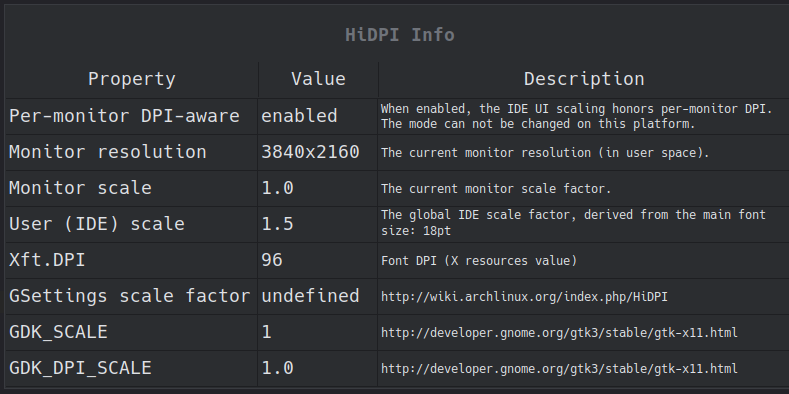
Regarding idea, which really is the only gui application I use, the setup is much easier if you pretend you don't need scaling and scale using the main font-size although it feels weird :)
scale_factor * 12 = font_size,
e.g in my case for 150% :
1.5 * 12 = 18 // Settings -> Appearance -> font size
There is an action "show hdpi info" to see what configuration is used in idea, this is how it looks like:
Further configs of which I am not entirely sure if it is needed:
# .wslgconfig
WESTON_RDP_DISABLE_HI_DPI_SCALING=true
WESTON_RDP_DISABLE_FRACTIONAL_HI_DPI_SCALING=true
WESTON_RDP_DEBUG_DESKTOP_SCALING_FACTOR=100
# env vars
DISPLAY=:0
WAYLAND_DISPLAY=wayland-0
QT_SCALE_FACTOR=1
GDK_SCALE=1
GDK_DPI_SCALE=1

@hideyukn88, sorry for the lated response. I've been leaving from insider dev-channel for a while, so I'm not confident that the issue still exists in the latest version.
Here are the details about the issue I mentioned before, I'll show my environment, the steps to reproduce, and some other tests I have done. I've described the issue as follows, which MIGHT be improper after detailed testing.
A tcl/tk window opened under WSLg will create any menu as a new window unrelated to the main window, sometimes can not be found on the screen
Environment:
Windows 11 22H2 (22624.1391) (beta-channel)
wsl --version
WSL 版本: 1.1.3.0
内核版本: 5.15.90.1
WSLg 版本: 1.0.49
MSRDC 版本: 1.2.3770
Direct3D 版本: 1.608.2-61064218
DXCore 版本: 10.0.25131.1002-220531-1700.rs-onecore-base2-hyp
Windows版本: 10.0.22624.1391
Distro
 ~: neofetch
                   -`                    litux@Thinter
                  .o+`                   -------------
                 `ooo/                   OS: Arch Linux on Windows 10 x86_64
                `+oooo:                  Kernel: 5.15.90.1-microsoft-standard-WSL2
               `+oooooo:                 Uptime: 31 secs
               -+oooooo+:                Packages: 230 (pacman)
             `/:-:++oooo+:               Shell: zsh 5.9
            `/++++/+++++++:              Terminal: Windows Terminal
           `/++++++++++++++:             CPU: Intel i5-10500 (12) @ 3.096GHz
          `/+++ooooooooooooo/`           GPU: d29e:00:00.0 Microsoft Corporation Basic Render Driver
         ./ooosssso++osssssso+`          Memory: 338MiB / 3801MiB
        .oossssso-````/ossssss+`
       -osssssso.      :ssssssso.
      :osssssss/        osssso+++.
     /ossssssss/        +ssssooo/-
   `/ossssso+/:-        -:/+osssso+-
  `+sso+:-`                 `.-/+oso:
 `++:.                           `-/+/
 .`                                 `/
WSLg version
~: cat /mnt/wslg/versions.txt
WSLg ( x86_64 ): 1.0.49+Branch.main.Sha.32eaeea0d48ad0f6dcdc8cae3e2a9218358f300a
Mariner: VERSION="2.0.20221010"
DirectX-Headers:
mesa:
pulseaudio: 2f0f0b8c3872780f15e275fc12899f4564f01bd5
FreeRDP: c574044a10003e50453acb4cf42801c5833fb572
Weston: 3ff4250b28aefbcfefdd869cb997d0591c06b6d8
How to reproduce
I met this issue when I'm using tksurfer under WSLg, and I've reproduced it for several times. Here are the steps:
- Install freesurfer to wsl distro by simply download and extract the tar ball to, e.g.,
/opt/freesurfer - Setup the environment:
export FREESURFER_HOME="/opt/freesurfer"
source "$FREESURFER_HOME/SetUpFreeSurfer.sh"

export TCL_LIBRARY="$FREESURFER_HOME/lib/tktools/tcl8.4"
export TK_LIBRARY="$FREESURFER_HOME/lib/tktools/tk8.4"
export TIX_LIBRARY="$FREESURFER_HOME/lib/tktools/tix8.1"
export BLT_LIBRARY="$FREESURFER_HOME/lib/tktools/blt2.4"
- Run
tksurferwith example data, you will see it open two tcl/tk windows, the main control window under the render window.
tksurfer bert lh inflated
- Try click on the menu of the main window, you'll probably see something like following, as I've mentioned before:
https://user-images.githubusercontent.com/1191414/225190113-625998cc-63e6-4186-b382-0056b78c795c.mp4
Additional info
I've also tested some simple tcl/tk scripts, and found that they worked pretty well (with tcl/tk version 8.6 from distro's pkg repo). So, the issue might not be quite related to tcl/tk.
Regarding to xwininfo, I failed clicking on the "invisible" window, when the "invisible" window is there, xwininfo show an error: Can't grab the mouse.
I don't know if the issue should be opened separately, or might be related to e.g., #10 et al.?
I'm experiencing this same issue (With TKSurfer) on an Ubuntu 22.04 LTS install.

I'm experiencing an issue (don't know if it is related) with WSLg windows created on the second monitor not being clickable (doesn't respond to mouse events) when I use PowerToys option to move new windows to the active monitor set.

I am just here to upvote. I want this feature too. I would love to have the full linux world inside my windows via wsl. That would be smth.

Multidisplay with WSLg is terrible: (Win11 build26100, Ubuntu 24.04 ) I can start with 3 screens and all is fine, then I take the laptop out so I only use the primary screen. I can then see the windows on the taskbar, but if I press them Nothing show up. I go back and insert the other screen and they now sho up on display1 (the laptop display), But I can move the windows out of screen1. They were on screen 2 and screen3 before. If I close them any other windows popping up will not be able to leave windows1.
Only solution is to shut down the program and start over. So never change display config while having WSLg windows open.
