
wslg
 wslg copied to clipboard
 microsoft
Context menu doesn't respect screen bounds
Note to contributors: I'm unsubscribing from this issue. If you implement a solution and want to ask a user to verify it, then please ping any of the rest of the users in this thread, thanks.
Environment
Windows build number: 10.0.22000.0
Your Distribution version: Ubuntu 21.04
Your WSLg version: 1.0.26
Steps to reproduce
Open a GUI app which supports opening context menu and right click on it. (I've checked with Nautilus and Sublime Merge.)
Expected behavior
Context menu should appear inside the screen.
Actual behavior
Context menu are not trying to position themselves inside the screen and are always opened to the right of the cursor. Screenshots are of right edge of the screen:

Nautilus

Sublime Merge

@ajitid, thanks for reporting the issue, 1.0.26 is old version, would you please update to the latest WSLg (by wsl --update) and check again, below is taken from the latest version, thanks!
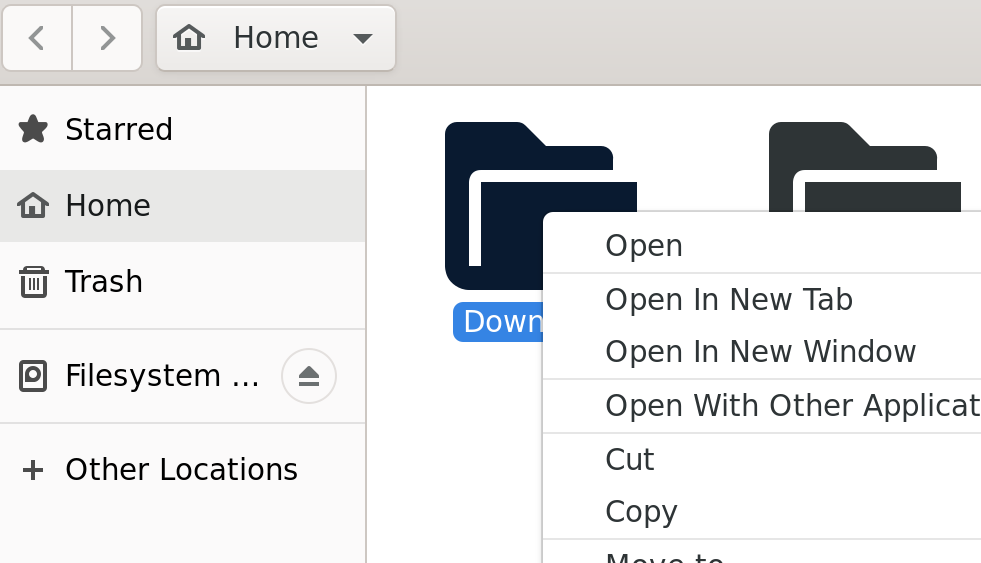

wsl --update tells me that I don't have any update.
Checking for updates...
No updates are available.
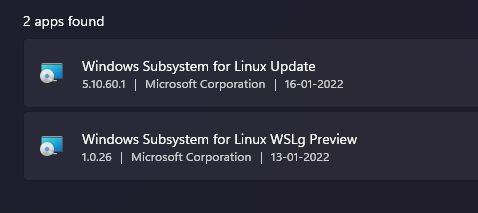
Kernel version: 5.10.60.1
I'm attaching a screenshot of Apps and Features incase I picked the version wrong:-
Here's a GIF that might explain the issue better:-
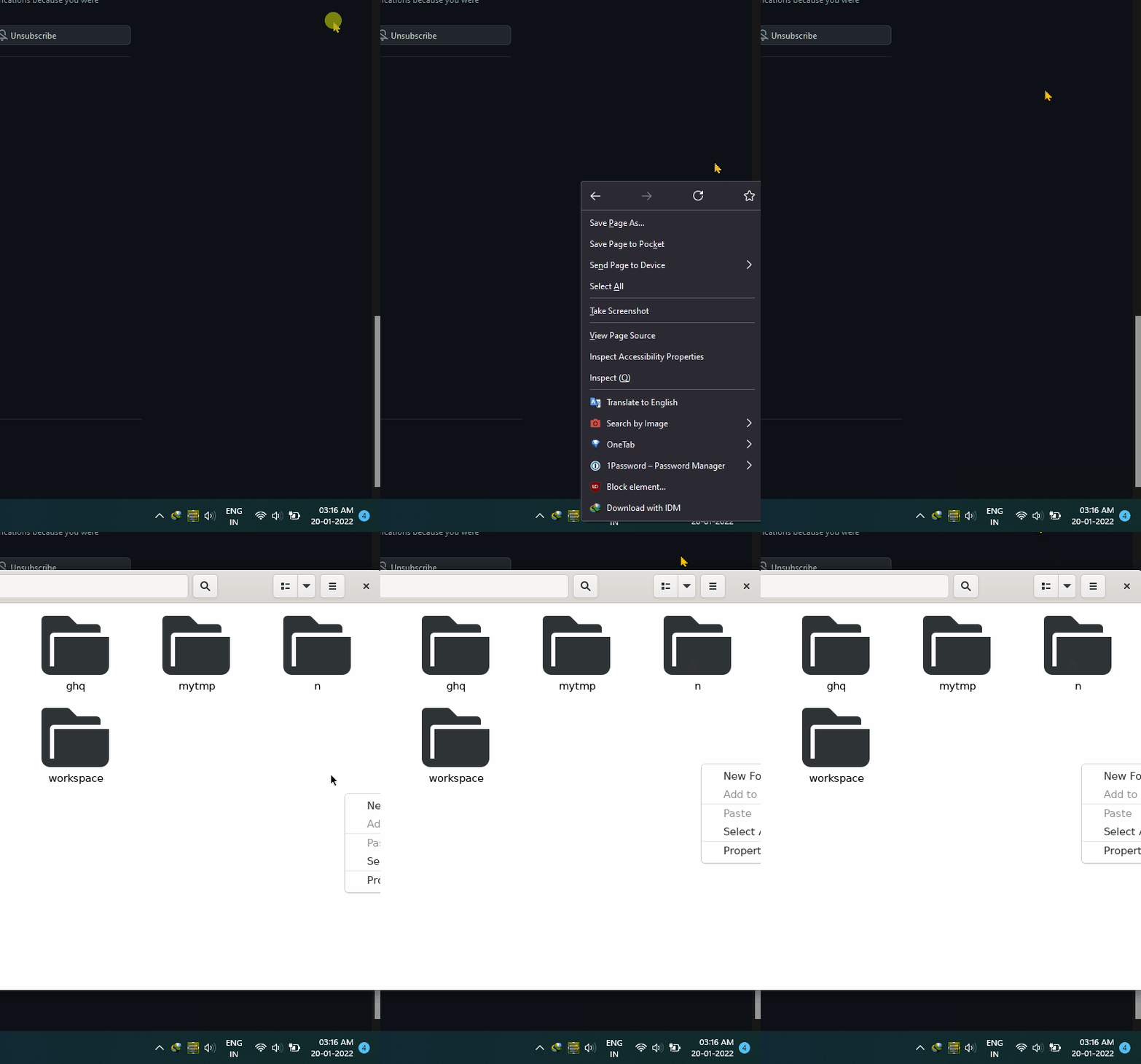
As my windows are sticking to right edge of the screen, when I right click on Firefox (Windows) you can see it tries to put context menu inside the screen. But when I try to do the same in Nautilus (Ubuntu) it doesn't takes screen bounds into consideration and hence opens context menu as usual, to cursor's right. This results in context menu going partially off the screen.
@ajitid He's referring to the beta releases. You can update to the latest beta (1.0.28) by downloading and running the MSI for your architecture (probably x64) from the releases page. For me, my context menus do not cross the monitor's border on 1.0.28, tested in Nautilus and Microsoft Edge. I didn't test on 1.0.26 though so I don't know if the update fixed it or if it was always working.
You can also alternatively update your whole WSL installation (and thereby updating WSLg as well) to an even later WSLg version (1.0.30) by downloading the msixbundle from the WSL releases page, and installing it by running Add-AppxPackage path\to\msixbundle in an admin Powershell window.

Thanks @PeterNjeim. I've udpated to latest beta. (I tried upgrading to latest WSL first but running the Add-AppxPackage first, but it didn't do anything for me.)
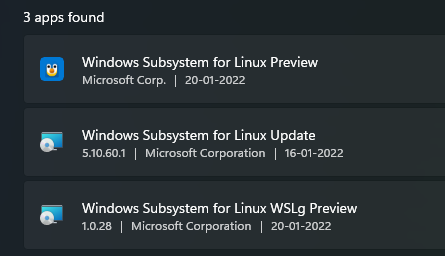
Unfortunately, I'm still facing the same issue.
@ajitid For me it also doesn't show the updated versions in the settings app, but the updated versions do show up in WSL itself, by running cat /mnt/wslg/versions.txt and uname -a. Here's mine: WSLg ( x86_64 ): 1.0.30+Branch.main.Sha.18884f996f5e851af4842010b434db17d3caa7aa and Linux Peter-PC 5.10.81.1-microsoft-standard-WSL2. As you can see, these are the beta versions from the WSL msixbundle.
Regardless, it seems that this bug is actually specific to your system, not WSL itself as it works fine for me. I don't know what could be causing it though. I'm using an AMD Vega iGPU (on my R5 4650G) if that means anything.
For me it also doesn't show the updated versions in the settings app, but the updated versions do show up in WSL itself, by running cat /mnt/wslg/versions.txt and uname -a.
You are right, I can see the updated version there.
I'll keep the issue open in case others also encounter this. Again, thanks for your help Peter!
I have the same issue and upgrading to WSLg 1.3.0 as described in https://github.com/microsoft/wslg/issues/641#issuecomment-1017059179 doesn't help.
In my case it's Sublime Text's context menu and language menu (or any menu at the bottom of the screen really) that don't respect screen boundaries.
I hesitated opening an issue about this here because I'm not sure if it's actually a WSLg issue or a Sublime Text issue (it also happens in Sublime Merge for me, and I don't have any other Linux GUI application to test with installed right now).
I guess I should open an issue there (if there isn't one already).

@ajitid @Bocom
I think I figured out the issue! I'm using zsh for my shell, but I setup this thing that lets me use systemd on WSL, but that was back when I was using bash, so I always type bash after starting a WSL shell so that I can get into "bash mode" while still having the zsh features (autocomplete mainly) (note that if I type bash a second time, it'll open up the proper bash shell, without zsh or powerlevel10k). Turns out, when I run nautilus within a regular zsh shell, the context menu will clip off the screen, but when I run it within bash, it'll properly move the context menu within the screen bounds. When I try to run microsoft edge within zsh, it'll just open bash for me, and I'll have to type microsoft-edge a second time to open it for real.
Another issue I've seen with zsh: I can't even right click the title bar in nautilus. I can right click the title bar in bash though.
Also, zsh seems to have a nice, rounded border with no padding:
 while bash seems to have a white padding:

Maybe WSLg isn't properly initializing the window frame on zsh.
Are you using something other than bash by any chance?
hey @Bocom, if you're creating an issue on Sublime Merge/Text repo then do please mention this issue. This would help us to track it if it actually turns out being a Sublime issue.
@PeterNjeim I'm using fish shell, though I could confirm I always see the first screenshot you sent (with zsh) in all three — Fish, Bash and opening Files (Nautilus) using start menu.
Please note that sublime-merge has no issue for me, installed using snap and on bash.
Alright some new information: running nautilus as root in zsh changes the border to the white square bash border, and works properly. Can you test that yourself?
Yep, can confirm I can see borders when running using sudo su and context menu remains in screen bounds.
Some more details I've discovered: the sudo/bash mode has a very large margin when doing a window screenshot of the nautilus window, while the zsh version has a smaller margin. The font is different, the context menu is different, even what buttons are available is different between the two modes (not even minimize and maximize buttons in zsh mode). The bash right-click menu has no margin around it and has no rounded corners, while the zsh one has rounded corners and a thin margin when doing a window screenshot of it.
sudo/bash:
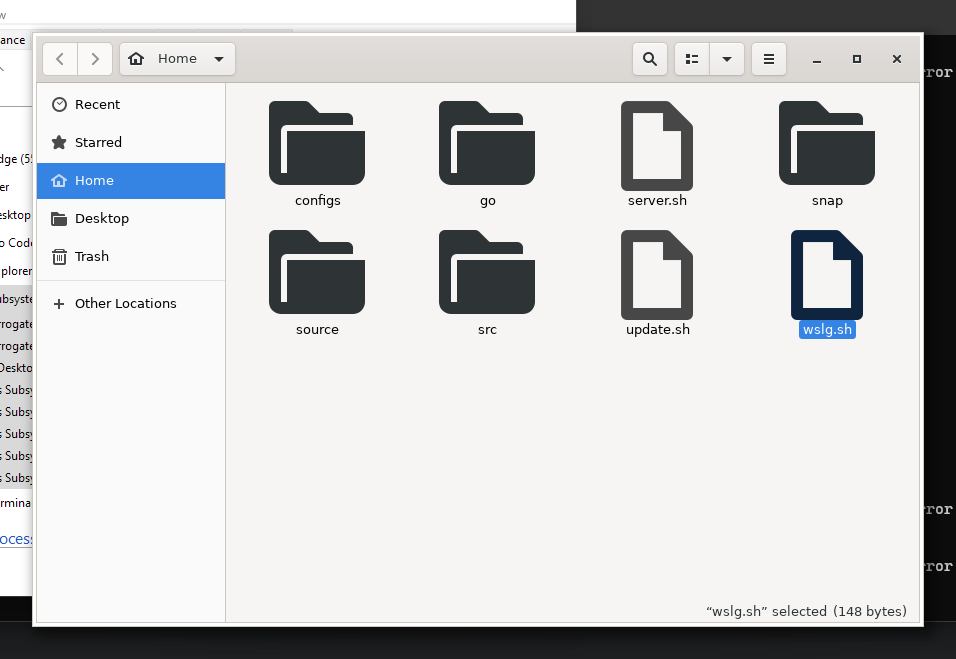
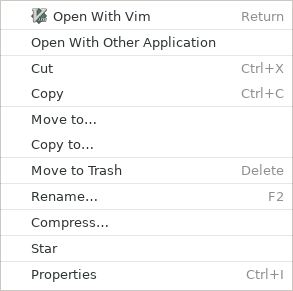
zsh:
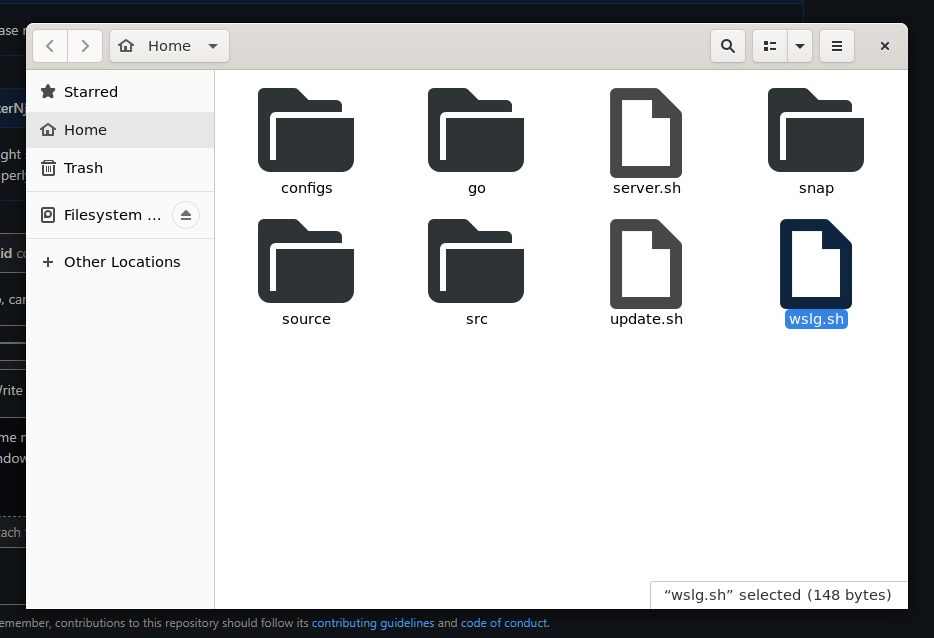
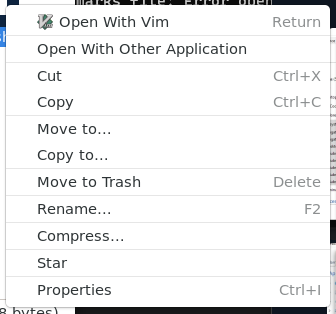
Even more information (possibly the answer): when using xlsclients, the sudo/bash mode properly shows nautilus:
Peter-PC org.gnome.Nautilus
while using the zsh mode, xlsclients does not recognize nautilus.
This means sudo/bash mode is running nautilus in XWayland mode, while zsh is running it in Wayland mode.
@ajitid @Bocom The solution is to set the environment variable GDK_BACKEND to x11. Tested and working in zsh using export GDK_BACKEND=x11. Please try and see if it works.
To revert back, set it to wayland instead. Note that doing this in bash will make bash fail with "cannot find display: :0" error.
I don't think this issue should be closed though, because it is indiciative of an issue with Wayland in WSLg, and should still be resolved.
using export GDK_BACKEND=x11. Please try and see if it works.
Can confirm that it works. Yes, I'll keep the issue open as it still is a workaround for the time being
@PeterNjeim I think you're manually exporting DISPLAY variable in your .bashrc (or in any other bash config file) which is causing "cannot find display: :0" error.
By choosing not to export DISPLAY variable, WSLg will no longer function, as every application will simply say "cannot open display:" (without the ":0" this time) (whether in x11 or wayland).
By choosing not to export DISPLAY variable, WSLg will no longer function, as every application will simply say "cannot open display:" (without the ":0" this time) (whether in x11 or wayland).
I meant that you maybe are manually exporting DISPLAY variable in bashrc as apps run in the same way in bash as they do in my fish shell.
I'm not exporting it in bashrc, but I do manually export it when it's unset. Regardless, manually vs automatically exporting something doesn't change anything, it's just an environment variable. Something about my bash installation is not allowing me to use wayland (probably systemd). I notice that when GDK_BACKEND is set to nothing in zsh (after a shell restart), wayland will be chosen, while if I do the same for bash, x11 will be chosen. In your case, wayland is chosen for both shells (replacing zsh with fish), meaning wayland isn't recognized by my bash shell for some reason. Note that the DISPLAY variable it also set in my zsh shell.
My bash shell logs in via loginctl, this is not the case with zsh. This could very well be the reason. Regardless, my issue is not related to this one, so we shouldn't talk about it here.
The solution is to set the environment variable
GDK_BACKENDtox11. Tested and working in zsh usingexport GDK_BACKEND=x11. Please try and see if it works.To revert back, set it to
waylandinstead. Note that doing this in bash will make bash fail with "cannot find display: :0" error.
Can confirm that this fixed it for me. The changes to the window chrome are a bit of a bummer, but at least it works properly.
I guess this means that there's some Wayland weirdness, then? I'm not super familiar with GDK and X11/Wayland programming, so I can only go on the fact that the X11 backend works fine. That's good information though.
set export GDK_BACKEND=wayland in .zshrc solved my interface bug and now i can use themes.
After set environment variable and run source .zshrc i have display :0 problemn. But, after reboot wsl everything worked fine, both in zsh and bash.
UPDATE:
set WAYLAND_DISPLAY="wayland-1" causes the error display :0 for me

I did some tests and found that:
- if i only set
GDK_BACKEND=x11,GDK_BACKEND=waylandor if I don't set anything:- interface boarder and themes :white_check_mark:
- my keyboard type ptBr abnt2 :x:
- If i only set
WAYLAND_DISPLAY="wayland-1"in my.zshrc- interface boarder and themes :x:
- my keyboard type ptBr abnt2 :white_check_mark:
- if i set both:
DISPLAY :0 ERROR
Try export DISPLAY not work, the DISPLAY when every work fine is:
 ❯ echo $DISPLAY
:0
When i get DISPLAY ERROR i try set many DISPLAYS, anyone work:
#export DISPLAY=:0
#export DISPLAY=$(cat /etc/resolv.conf | grep nameserver | awk '{print $2}'):0
#export DISPLAY="$(grep nameserver /etc/resolv.conf | sed 's/nameserver //'):0.0"
#export DISPLAY=$(ip route|awk '/^default/{print $3}'):0.0
With them it would either give display error or the terminal would crash
Hello Roberto, are you sure you're replying to the right issue? Your comments don't seem to be related to the right-click menu appearing out of the screen bounds
Hi, Peter, i have the same behavior you report in https://github.com/microsoft/wslg/issues/641#issuecomment-1025228843 and DISPLAY :0 with the wayland, with the exception of the menu appearing out of the screen bounds, this was solved with the update.
Still seeing the bug on versions below:
PS C:\Users\cseba> wsl --version
WSL version: 0.56.1.0
Kernel version: 5.10.93.2
WSLg version: 1.0.30
MSRDC version: 1.2.2924
Direct3D version: 1.601.0
Windows version: 10.0.22000.556
Can confirm that adding GDK_BACKEND=x11 fixes the context menu bug but makes the overall look uglier(big boxes around the windows, different cursor).

Any news? exporting GDK_BACKEND=x11 only works on a few programs. Some (for example Qt Creator, which is unusable because of this issue) are unaffected
wsl --version
Versione WSL: 0.64.0.0
Versione kernel: 5.10.102.1
Versione WSLg: 1.0.40
Versione MSRDC: 1.2.3213
Versione Direct3D: 1.601.0
Versione DXCore: 10.0.25131.1002-220531-1700.rs-onecore-base2-hyp
versione Windows: 10.0.22000.795

I can also confirm that GDK_BACKEND=x11 certainly helps, though in eclipse it is still not perfect; sometimes the menus still drop off the bottom of the screen for some reason. In particular, sub-menus suffer from this more. I also noted that it works worse when using GDK_DPI_SCALE=1.1, which I need to make the UI readable in GDK mode. This is now on the latest version of WSL and WSLg:
WSL version: 0.65.3.0
Kernel version: 5.15.57.1
WSLg version: 1.0.41
MSRDC version: 1.2.3213
Direct3D version: 1.601.0
DXCore version: 10.0.25131.1002-220531-1700.rs-onecore-base2-hyp
Windows version: 10.0.22000.856

Here is a screenshot:

I think the issue here is that the taskbar isn't being respected. I believe that the bottom of the menu roughly aligns with the bottom of the screen. Indeed, setting the taskbar to autohide and then using a different monitor, I can see the bottom of the menu and it attaches to the bottom of the screen.