

 microsoft
GTK apps running WSL have no window decorator; Qt (and other?) apps are fine
Version
Microsoft Windows [Version 10.0.22000.258]
WSL Version
- [X] WSL 2
- [ ] WSL 1
Kernel Version
5.10.16.3-microsoft-standard-WSL2
Distro Version
Ubunto 20.04
Other Software
All GTK applications (Geany, Gedit, Meld, etc)
Repro Steps
- Create a fresh Windows 11 install
- Install WSL2 with
wsl --install(default Ubuntu 20.04 install) sudo apt updatesudo apt upradesudo apt install geany gedit meld- Run any of those GTK apps and the don't get window decorators
sudo apt install kateto check a Qt app- Note that
kateruns perfectly with window decorators
Expected Behavior
I expect to see proper window decorators like what you get for a non-GTK app. i.e. Window close, maximize, etc. Shoudl looks like this (with kate, a Qt app, as an example):
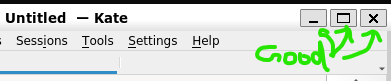
Actual Behavior
None of the gtk apps get proper window decorators. Here is meld as an example:

In addition, code knows there are no window decorators. Here is some console output when you run meld and try and compare some files (or just text):
$ meld
Traceback (most recent call last):
  File "/usr/lib/python3/dist-packages/meld/diffgrid.py", line 34, in do_realize
    self._handle1.realize(self)
  File "/usr/lib/python3/dist-packages/meld/diffgrid.py", line 270, in realize
    attr.cursor = Gdk.Cursor.new_for_display(widget.get_display(),
TypeError: constructor returned NULL
Traceback (most recent call last):
  File "/usr/lib/python3/dist-packages/meld/diffgrid.py", line 46, in do_map
    self._handle1.set_visible(True)
  File "/usr/lib/python3/dist-packages/meld/diffgrid.py", line 288, in set_visible
    self._window.show()
AttributeError: 'NoneType' object has no attribute 'show'
Traceback (most recent call last):
  File "/usr/lib/python3/dist-packages/meld/diffgrid.py", line 201, in do_size_allocate
    self._handle1.set_visible(mapped and wlink1 > 0)
  File "/usr/lib/python3/dist-packages/meld/diffgrid.py", line 288, in set_visible
    self._window.show()
AttributeError: 'NoneType' object has no attribute 'show'
Traceback (most recent call last):
  File "/usr/lib/python3/dist-packages/meld/diffgrid.py", line 232, in do_draw
    self._handle1.draw(context)
  File "/usr/lib/python3/dist-packages/meld/diffgrid.py", line 305, in draw
    alloc = self._widget.get_allocation()
AttributeError: 'NoneType' object has no attribute 'get_allocation'
Traceback (most recent call last):
  File "/usr/lib/python3/dist-packages/meld/diffgrid.py", line 201, in do_size_allocate
    self._handle1.set_visible(mapped and wlink1 > 0)
  File "/usr/lib/python3/dist-packages/meld/diffgrid.py", line 288, in set_visible
    self._window.show()
AttributeError: 'NoneType' object has no attribute 'show'
Traceback (most recent call last):
  File "/usr/lib/python3/dist-packages/meld/diffgrid.py", line 232, in do_draw
    self._handle1.draw(context)
  File "/usr/lib/python3/dist-packages/meld/diffgrid.py", line 305, in draw
    alloc = self._widget.get_allocation()
<snip>
Diagnostic Logs
No response

I think that it's not WSLg bug. It works like that by design. Apps created for GNOME environment doesn't use minimization or maximization buttons. You can try to install GNOME Tweaks and change option to show them back. https://elearning.wsldp.com/fedora-linux/fedora-gnome-3-minimize-button/ -> it's instructions for Fedora but should be similar on Ubuntu.

I think that it's not WSLg bug. It works like that by design. Apps created for GNOME environment doesn't use minimization or maximization buttons. You can try to install GNOME Tweaks and change option to show them back. https://elearning.wsldp.com/fedora-linux/fedora-gnome-3-minimize-button/ -> it's instructions for Fedora but should be similar on Ubuntu.
Unfortunately this didn't quite fix it for me. The buttons are indeed there at the top right corner of Meld window, but I still get the errors repeatedly printed to the console. However, for me this only seems to concern Meld, but not GEdit. Also, in Meld, the errors don't appear right away, but only after I select files to compare: it's working alright, showing the files side by side, but also starts spamming the console with the errors.

After a while Meld becomes unresponsive and console displays this:
Traceback (most recent call last):
  File "/usr/lib/python3/dist-packages/apport_python_hook.py", line 118, in apport_excepthook
  File "/usr/lib/python3/dist-packages/apport/report.py", line 649, in add_proc_info
  File "/usr/lib/python3/dist-packages/apport/report.py", line 1777, in get_logind_session
OSError: [Errno 24] Too many open files: 'cgroup'
I've had to stop using Meld entirely with WSLG because, whatever it is doing, it causes WSLG mouse interaction to fail completely, forcing me to restart wsl every time. I've been documenting this in #354 (which is probably not a great place for it).
I use Meld quite a lot so this almost has me switching back to X410 which was reliable for me for years. I never had these problems there. I've not switched back yet, but mostly because I'm extremely busy and am worried about how X410 and WSLG will interact and I don't want to wrestle with that right now. Definitely seriously missing Meld, though. :(
Hi there, I am running Ubuntu in WSL 2.0 and was missing the minimize and maximus buttons in certain applications, too. I found a simple solution here: https://askubuntu.com/questions/651347/how-to-bring-back-minimize-and-maximize-buttons-in-gnome-3
In a command line, run:
gsettings set org.gnome.desktop.wm.preferences button-layout ":minimize,maximize,close"
The missing buttons show up in Meld, LibreOffice, etc.

It's indeed not a wsl bug, gnome apps doesn't use these buttons by default. The errors you are seeing on console are not related and I can't reproduce it. Could you please update meld to latest stable version (3.20.4) and check if the problem persist?

After a while Meld becomes unresponsive and console displays this:
Traceback (most recent call last):
  File "/usr/lib/python3/dist-packages/apport_python_hook.py", line 118, in apport_excepthook
  File "/usr/lib/python3/dist-packages/apport/report.py", line 649, in add_proc_info
  File "/usr/lib/python3/dist-packages/apport/report.py", line 1777, in get_logind_session
OSError: [Errno 24] Too many open files: 'cgroup'
I am experiencing the same thing, were you able to find a solution? I am on 3.20.2, did you see any improvement with the latest stable version (3.20.4)?

It's indeed not a wsl bug, gnome apps doesn't use these buttons by default. The errors you are seeing on console are not related and I can't reproduce it. Could you please update meld to latest stable version (3.20.4) and check if the problem persist?
@ShyPixie For me meld succeeds in file comparisons, but fails with the same symptoms in folder comparisons. Perhaps you're able to reproduce that way?
$ meld <folder1> <folder2>
Traceback (most recent call last):
  File "/usr/lib/python3/dist-packages/meld/diffgrid.py", line 34, in do_realize
    self._handle1.realize(self)
  File "/usr/lib/python3/dist-packages/meld/diffgrid.py", line 270, in realize
    attr.cursor = Gdk.Cursor.new_for_display(widget.get_display(),
TypeError: constructor returned NULL
...

I encountered the same issue. Following this example https://github.com/matplotlib/matplotlib/issues/19405#issuecomment-770244923, I was able to resolve it with the following patch:
diff --git a/meld/diffgrid.py b/meld/diffgrid.py
index c03e4ab7..05fab041 100644
--- a/meld/diffgrid.py
+++ b/meld/diffgrid.py
@@ -278,9 +278,8 @@ class HandleWindow():
                            Gdk.EventMask.ENTER_NOTIFY_MASK |
                            Gdk.EventMask.LEAVE_NOTIFY_MASK |
                            Gdk.EventMask.POINTER_MOTION_MASK)
-        attr.cursor = Gdk.Cursor.new_for_display(widget.get_display(),
-                                                 Gdk.CursorType.
-                                                 SB_H_DOUBLE_ARROW)
+        attr.cursor = Gdk.Cursor.new_from_name(widget.get_display(),
+                                               "ew-resize")
         attr_mask = (Gdk.WindowAttributesType.X |
                      Gdk.WindowAttributesType.Y |
                      Gdk.WindowAttributesType.CURSOR)
For the Ubuntu package version, the file is at /lib/python3/dist-packages/meld/diffgrid.py. I will try to get this into meld.
The folder comparison still didn't display anything for me, with lots of errors along the lines of
gi.repository.GLib.GError: gtk-icon-theme-error-quark: Icon 'folder' not present in theme Adwaita (0)
To resolve this, all I had to do was install gnome-icon-theme. Now, meld is working perfectly for me.

Same issue here...
using meld with comparing two files I get a ton of error messages
Traceback (most recent call last):
  File "/usr/lib/python3/dist-packages/meld/diffgrid.py", line 232, in do_draw
    self._handle1.draw(context)
  File "/usr/lib/python3/dist-packages/meld/diffgrid.py", line 305, in draw
    alloc = self._widget.get_allocation()
AttributeError: 'NoneType' object has no attribute 'get_allocation'
Traceback (most recent call last):
  File "/usr/lib/python3/dist-packages/meld/diffgrid.py", line 232, in do_draw
    self._handle1.draw(context)
  File "/usr/lib/python3/dist-packages/meld/diffgrid.py", line 305, in draw
    alloc = self._widget.get_allocation()
AttributeError: 'NoneType' object has no attribute 'get_allocation'

This is a bug, but it exists in the packaging of WSL Distributions, not WSLg or WSL itself.
There is a simple resolution:
Aparently it is because the distribution is missing some config files needed by Gnome apps.
sudo apt install gnome-tweaks
Run gnome-tweaks as a user then simply close it.
I honestly think this is not gnome-tweaks being missing causing the issue, rather installing it loads many deps and running it writes the missing config files.
This is a bug but needs moving to another project. No idea where.....

There is a simple resolution: Aparently it is because the distribution is missing some config files needed by Gnome apps.
sudo apt install gnome-tweaksRungnome-tweaksas a user then simply close it.
I thought I'd give this a go, but it does not help much. Output when trying this for me is:
$ gnome-tweaks
WARNING : Shell not installed or running

(gnome-tweaks:29850): dconf-WARNING **: 21:58:40.982: failed to commit changes to dconf: Could not connect: No such file or directory

(gnome-tweaks:29850): dconf-WARNING **: 21:58:40.982: failed to commit changes to dconf: Could not connect: No such file or directory
Traceback (most recent call last):
  File "/usr/lib/python3/dist-packages/gtweak/app.py", line 50, in do_activate
    self.win = Window(self, model)
  File "/usr/lib/python3/dist-packages/gtweak/tweakview.py", line 58, in __init__
    self._model.load_tweaks(self)
  File "/usr/lib/python3/dist-packages/gtweak/tweakmodel.py", line 107, in load_tweaks
    mods = __import__("gtweak.tweaks", globals(), locals(), tweak_files, 0)
  File "/usr/lib/python3/dist-packages/gtweak/tweaks/tweak_group_general.py", line 54, in <module>
    IgnoreLidSwitchTweak(),
  File "/usr/lib/python3/dist-packages/gtweak/tweaks/tweak_group_general.py", line 28, in __init__
    GetterSetterSwitchTweak.__init__(self, _("Suspend when laptop lid is closed"), **options)
  File "/usr/lib/python3/dist-packages/gtweak/widgets.py", line 469, in __init__
    sw.set_active(self.get_active())
  File "/usr/lib/python3/dist-packages/gtweak/tweaks/tweak_group_general.py", line 31, in get_active
    return not self._sync_inhibitor()
  File "/usr/lib/python3/dist-packages/gtweak/tweaks/tweak_group_general.py", line 42, in _sync_inhibitor
    bus = Gio.bus_get_sync(Gio.BusType.SESSION, None)
gi.repository.GLib.GError: g-io-error-quark: Could not connect: No such file or directory (1)
Similarly, when I try @jnettels good suggestion for the window decorator settings for min/max buttons, I get another dconf error and no useful results:
$ gsettings set org.gnome.desktop.wm.preferences button-layout ":minimize,maximize,close"

(process:29862): dconf-WARNING **: 22:01:15.653: failed to commit changes to dconf: Could not connect: No such file or directory
Unclear why dconf is not present/running. That's my next step.
Both gnome-tweaks and gsettings solutions worked for me after a WSL restart.

For the dconf issue, you need to make sure that the X11 forwarding host is correct. I currently run this in my Debian ~/.bashrc file:
export DISPLAY="`grep nameserver /etc/resolv.conf | sed 's/nameserver //'`:0"
Which gives me the WSL->Windows gateway IP address:
ian@concept:~$ echo $DISPLAY
172.28.16.1:0
I had some warnings in the console when running gnome-tweaks:
ian@concept:~$ gnome-tweaks
WARNING : Error getting shell mode
CRITICAL: Error getting shell version
WARNING : Could not list shell extensions
Traceback (most recent call last):
  File "/usr/lib/python3/dist-packages/gtweak/tweaks/tweak_group_appearance.py", line 144, in __init__
    extensions = self._shell.list_extensions()
                 ^^^^^^^^^^^^^^^^^^^^^^^^^^^^^
  File "/usr/lib/python3/dist-packages/gtweak/gshellwrapper.py", line 76, in list_extensions
    return self._proxy.proxy_extensions.ListExtensions()
           ^^^^^^^^^^^^^^^^^^^^^^^^^^^^^^^^^^^^^^^^^^^^^
  File "/usr/lib/python3/dist-packages/gi/overrides/Gio.py", line 349, in __call__
    result = self.dbus_proxy.call_sync(self.method_name, arg_variant,
             ^^^^^^^^^^^^^^^^^^^^^^^^^^^^^^^^^^^^^^^^^^^^^^^^^^^^^^^^
gi.repository.GLib.GError: g-dbus-error-quark: GDBus.Error:org.freedesktop.DBus.Error.ServiceUnknown: The name org.gnome.Shell was not provided by any .service files (2)
However, it works and I was able to add the Minimise and Maximise buttons to a gnome window

The Gnome-Tweaks solution did not fix my issue. I did restart WSL and attempted setting the DISPLAY environment variable as above, but no dice. When I edited diffgrid.py per dornED's comment above, the errors went away.

Also want to confirm that it seems like the Gdk.Cursor patching above (given by @dornED) does the final trick. Awesome!
It is worth mentioning that I do have all the other things above done (gnome-tweaks, gnome-icon-theme, etc) done as well, so it isn't clear if the Gdk.Cursor patch does all... but it certainly solves the usability problem. Meld now works without spewing errors, and without eventually crippling mouse interaction for WSLG apps.
I actually want that GTK apps style on all the other apps, how can I do it?
