

 microsoft
Desktop support for WSLg
Is your feature request related to a problem:
I hate that i need to use default windows desktop and i really want that virtual env experience.
Describe the solution you'd like:
a window representing a destkop like windows sandbox or a dedicated command or icon to switch from linux to windows
Describe alternatives you've considered:
none
Additional context:
No response

It is possible to change the view like full desktop mode with WSL2_WESTON_SHELL_OVERRIDE=desktop-shell environment variable. More info can be found here https://github.com/microsoft/wslg/wiki/WSLg-Configuration-Options-for-Debugging

While the wiki lists such an option, naïvely putting
[system-distro-env]
WSL2_WESTON_SHELL_OVERRIDE=desktop-shell
is not good enough, as the wiki alludes to - but weston.rdp is a mystery?
With just the config listed above, after wsl --shutdown I get a flickering mouse cursor, a flicker msdtc app - and no content on screen.
Is there some additional magic that I could try? I do understand that this may not be a supported approach, just would like to explore it.

There is another option which is not documented in wiki but mentioned in the code. If you are using latest versions WSL from Windows Store, the following option may work:
[system-distro-env]
WSL2_RDP_CONFIG_OVERRIDE=wslg_desktop.rdp
Add those lines in C:\Users\<your-user-name>\.wslgconfig file. Then wsl.exe --shutdown and start wsl.
That option was added in this commit https://github.com/microsoft/wslg/commit/690c91c25400bc53aab708187452d4b31d991023. I am not sure if it is meant for all users. There will a full window with close and minimize buttons above.
https://github.com/microsoft/wslg/tree/435b42ad093d8c9e785b57f2455098db2e3508c0/package is interesting; with that, the rather terse comment on the wiki (remoteapplicationprogram:s:dummy-entry) actually makes sense, to the extent that
[system-distro-env]
WSL2_WESTON_SHELL_OVERRIDE=desktop-shell
WSL2_RDP_CONFIG_OVERRIDE=wslg_desktop.rdp
actually produces a fully fledged session window, with what appears to be the default Weston server - and a horribly janky mouse cursor:
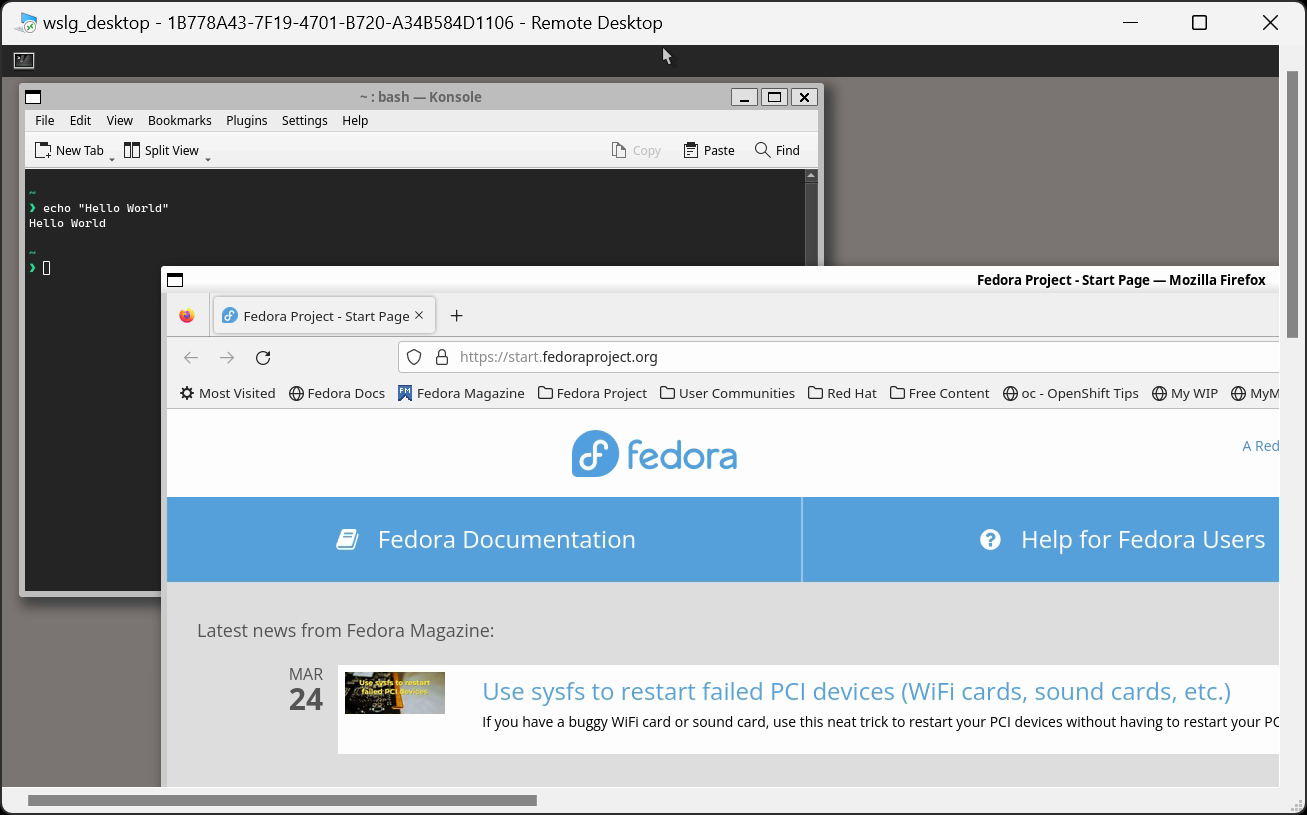
This does not seem to be all that useful, though, because of the jankiness, the server not resizing with the mstsc window, ... . But its cute :)
The cursor may be able to get corrected with the following environment variable WLR_NO_HARDWARE_CURSORS=1
In sway for RDP, this env variable is used WLR_LIBINPUT_NO_DEVICES=1
How did you get Konsole and Firefox installed?
I had the same issue in Hyper-V with the cursor on Wayfire

re: the UI things - I simply installed https://github.com/WhitewaterFoundry/Fedora-Remix-for-WSL and did sudo dnf install ...; the dependencies worked out. I have systemd enabled, I believe.
On Ubuntu, it's the same story, IIRC - but there, by default, you'd have to have systemd enabled, due to Ubuntu's decision to ship Firefox as a snap (- or you simply ignore what Ubuntu want and enable some proper PPA for the native Firefox)
TL;DR: Just use your package manager, possibly install any dependencies that the distro did not define well.