

 microsoft
Will not install Python 3.10 since it thinks a newer version is on my system - but there isn't
Brief description of your issue
I'm trying to install Python 3.10 but winget refuses, telling me I have a newer version:

I don't. I only have Python 2.
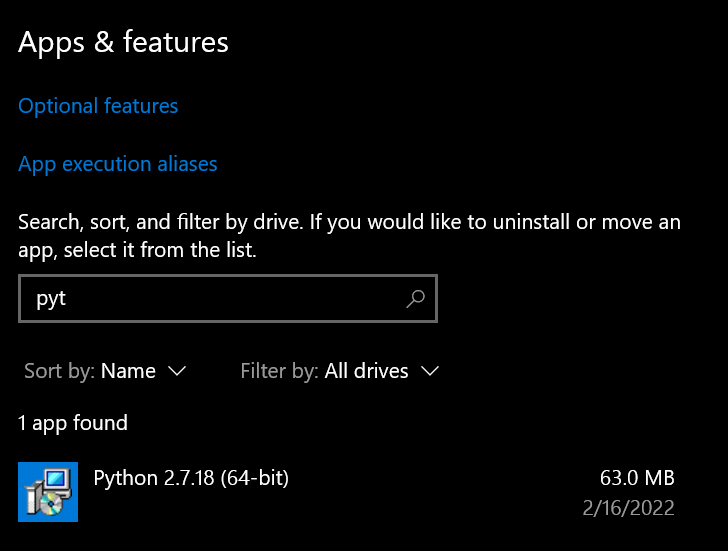
Steps to reproduce
winget install Python.Python.3.10 -i --scope machine -s winget
Expected behavior
Winget installs Python 3.10 on my system OR gives me more info on this "newer" version it thinks is on my system.
Actual behavior
Winget fails to install Python 3.10.
Environment
Windows Package Manager v1.4.10173
Copyright (c) Microsoft Corporation. All rights reserved.

Windows: Windows.Desktop v10.0.19044.2486
System Architecture: X64
Package: Microsoft.DesktopAppInstaller v1.19.10173.0

Logs: %LOCALAPPDATA%\Packages\Microsoft.DesktopAppInstaller_8wekyb3d8bbwe\LocalState\DiagOutputDir

User Settings: %LOCALAPPDATA%\Packages\Microsoft.DesktopAppInstaller_8wekyb3d8bbwe\LocalState\settings.json

Links
---------------------------------------------------------------------------
Privacy Statement   https://aka.ms/winget-privacy
License Agreement   https://aka.ms/winget-license
Third Party Notices https://aka.ms/winget-3rdPartyNotice
Homepage            https://aka.ms/winget
Windows Store Terms https://www.microsoft.com/en-us/storedocs/terms-of-sale

Downloaded 3.10.9 from python.org and that installed just fine.
@rkeithhill-keysight as a workaround until matching logic is improved, you can add "--force" to force an install.

—force will work. Similar issue I’ve faced with devs having multiple versions installed. The python installers are not nice, they leave quite a number of uninstall keys in the registry sometimes leaving them behind even after uninstall.

@cgerke is that something that can have an Issue created for Python to address in their install/uninstall scenarios?
See https://github.com/python/cpython/issues/99685 which explains what I’ve seen. It’s generally about scope of install. 99% of the time only a problem for enterprise users sharing machines or installing the software themselves rather than using the enterprise deployment (Intune, sccm)