

 microsoft
Anaconda uninstall issue
Brief description of your issue
(1/20) Found Anaconda3 [Anaconda.Anaconda3] Version 2022.05
This application is licensed to you by its owner.
Microsoft is not responsible for, nor does it grant any licenses to, third-party packages.
Successfully verified installer hash
Starting package uninstall...
An unexpected error occurred while executing the command:
0x800401f5 : Application not found
Steps to reproduce
❯ winget upgrade --include-unknown --all
Expected behavior
Upgrade to work or continue
Actual behavior
Failure to upgrade remaining packages
Environment
Windows Package Manager (Preview) v1.3.692-preview
Copyright (c) Microsoft Corporation. All rights reserved.

Windows: Windows.Desktop v10.0.22621.1
Package: Microsoft.DesktopAppInstaller v1.18.692.0

Logs: %LOCALAPPDATA%\Packages\Microsoft.DesktopAppInstaller_8wekyb3d8bbwe\LocalState\DiagOutputDir

Links
---------------------------------------------------------------------------
Privacy Statement   https://aka.ms/winget-privacy
License Agreement   https://aka.ms/winget-license
Third Party Notices https://aka.ms/winget-3rdPartyNotice
Homepage            https://aka.ms/winget
Windows Store Terms https://www.microsoft.com/en-us/storedocs/terms-of-sale

What version of Anaconda are you upgrading from? I'm having issues replicating this with 2021.11.

What version of Anaconda are you upgrading from? I'm having issues replicating this with 2021.11.
Try installing the Latest-2 version, editing the manifest for 2021.11 to just use Install, running upgrade -m
Edit: Or install 2021.11, then manually delete the files but leave the ARP entry
I’m thinking this is a weird case where its detecting two entries for Anaconda, but the old entry has already been “uninstalled”, or rather, the files have been removed but the registry key hasn’t been deleted. IIRC, “0x800401f5 : Application not found” is the same as when contol panel says “An error occurred while trying to uninstall


I’m thinking this is a weird case where its detecting two entries for Anaconda, but the old entry has already been “uninstalled”, or rather, the files have been removed but the registry key hasn’t been deleted. IIRC, “0x800401f5 : Application not found” is the same as when contol panel says “An error occurred while trying to uninstall . It may have already been uninstalled. Would you like to remove from the Add or Remove Programs list?”
Looks like you are right:
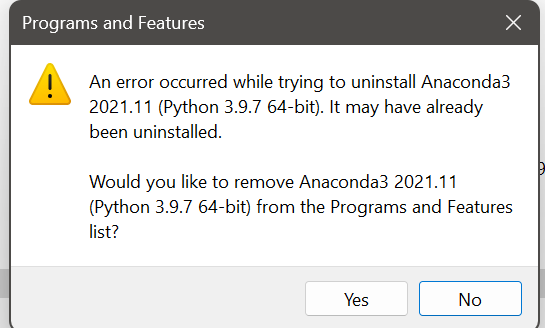
I think winget upgrade --all should not be blocked by one program failing to update, which is really annoying in such a case.
In any case, manually uninstalling it from the control panel fixed this issue.
I think
winget upgrade --allshould not be blocked by one program failing to update, which is really annoying in such a case.
- See open issue #1080
In any case, manually uninstalling it from the control panel fixed this issue.
bit late to the party, but i had a similar issue (different program though). I tried uninstalling it using "Apps & features", which does not remove it entirely if the uninstaller is missing. but using the control panel instead did work (as you can click "remove" after the uninstall fails).

Same.
bit late to the party, but i had a similar issue (different program though). I tried uninstalling it using "Apps & features", which does not remove it entirely if the uninstaller is missing. but using the control panel instead did work (as you can click "remove" after the uninstall fails).
Control panel save my life.

