

 microsoft
winget upgrade <list(package_names)>
Description of the new feature / enhancement
winget upgrade is expecting exactly one pacakge name to perform a specifc update.
It would be nice to change the syntax to accept a list/sequence/array of package names instead so multiple specific pacakges can be upgrade with 1 command ony instead of repeating for each single pacakge to be upgraded.
Proposed technical implementation details
multiple package to be installed with winget upgrade, for eg:
winget upgrade package1 package2 package3
Having a syntax that could be synthetized as :
winget upgrade [[-q] <query>] [<options>] <package1> [<package2> ... <packageN>]
there is a conflict with the -v | --version option that can't be really used.
so eventually the [<options>] field could be paired with each <package> field, or better extrapolate the version from options:
winget upgrade [[-q] <query>] [<options>] [<version>]<package1> [<version2> <package2> ... <versionN> <packageN>]
or simply change the version (-v) syntax to use column : symbol after the package to specify the version:
eg:
package1:1.0.0 or pacakge1:latest <- :latest is default so can be omitted => package1
winget upgrade [[-q] <query>] [<options>] <package1[:version]> [<package2[:version]> ... <packageN[:version]>]

another possibility is to do not touch upgrade command and create a sibling wrapper command upgrades (note the s), that is accepting a list of packages and pipeline them one at time to the upgrade command
in this way it would like to call winget upgrade multiple time eventually.
I like the idea, though I'd suggest to make such upgrades command actually upgrade everything (if no list of packages is provided). Something like apt dist-upgrade or pacman -Syu on Linux. Listing everything manually is painful.
What about making 2 issues?
- make
upgrade,installanduninstallaccept more than one argument (because installing 50 packages one by one on a new machine is also painful) - make
upgradeactually update everything if no arguments are provided (or create a separate command)

I like the idea, though I'd suggest to make such
upgradescommand actually upgrade everything (if no list of packages is provided). Something likeapt dist-upgradeorpacman -Syuon Linux. Listing everything manually is painful.What about making 2 issues?
- make
upgrade,installanduninstallaccept more than one argument (because installing 50 packages one by one on a new machine is also painful)- make
upgradeactually update everything if no arguments are provided (or create a separate command)
-
the problem with install uninstall is that it might requires to click on the UAC or something else, accepting licenses. but would be interesting as well. (this might extends as well sometimes to the update so.... actually could be a problem... 😄 )
-
upgrade can upgrade all already with
--alloption.
I like the idea, though I'd suggest to make such
upgradescommand actually upgrade everything (if no list of packages is provided). Something likeapt dist-upgradeorpacman -Syuon Linux. Listing everything manually is painful. What about making 2 issues?
- make
upgrade,installanduninstallaccept more than one argument (because installing 50 packages one by one on a new machine is also painful)- make
upgradeactually update everything if no arguments are provided (or create a separate command)1. the problem with install uninstall is that it might requires to click on the UAC or something else, accepting licenses. but would be interesting as well. (this might extends as well sometimes to the update so.... actually could be a problem... smile ) 2. upgrade can upgrade all already with `--all` option.
- This can be solved with accepting licenses one after another, then it could work in the background, popping up the UAC when needed. And if it's not possible, the possibility to provide more than one query, then doing it the same way like now (i.e. accept licence, UAC and so on.. one after another) would be an improvement for me.
- Yeah, I've just noticed my mistake. Thanks
I like the idea, though I'd suggest to make such
upgradescommand actually upgrade everything (if no list of packages is provided). Something likeapt dist-upgradeorpacman -Syuon Linux. Listing everything manually is painful. What about making 2 issues?
- make
upgrade,installanduninstallaccept more than one argument (because installing 50 packages one by one on a new machine is also painful)- make
upgradeactually update everything if no arguments are provided (or create a separate command)1. the problem with install uninstall is that it might requires to click on the UAC or something else, accepting licenses. but would be interesting as well. (this might extends as well sometimes to the update so.... actually could be a problem... smile ) 2. upgrade can upgrade all already with `--all` option.
- This can be solved with accepting licenses one after another, then it could work in the background, popping up the UAC when needed. And if it's not possible, the possibility to provide more than one query, then doing it the same way like now (i.e. accept licence, UAC and so on.. one after another) would be an improvement for me.
- Yeah, I've just noticed my mistake. Thanks
yes could have accept licenses like a --accept-license option to do automatically or something. and UAC just triggering the first time and keep using it (like giving the sudo permission), not sure if there might be any security implication doing this anyway.
I'd like to second this request. Specifically, I need to keep NodeJS LTS at a lower version because we haven't upgraded from 14 LTS to the latest 16 LTS yet, and won't be for some time (16 doesn't even enter Maintenance only mode until September, so we won't look at updating to it until then).
I'd like to do winget upgrade --all --not --id 'OpenJS.NodeJS.LTS" or something to that effect, but at least doing winget upgrade PackageA PackageB PackageC is better than manually running them one at a time.
A second option I could see is to lock my package. So I might run something like winget lock --id 'OpenJS.NodeJS.LTS' and then winget upgrade --all would skip over that particular package. Not sure if any other package managers have that kind of thing though.
As a workaround, I'm wondering if query has support to do this, or if I can write a simple script to take the results from winget upgrade default usage and run upgrade one at a time -- is there a way to just get the Id column output from winget upgrade?
I'm not really seeing a full description of the --query parameters. Can I do something like winget upgrade -q "PackageA|PackageB|PackageC" or possibly winget upgrade --all --query '^OpenJS.NodeJS.LTS (assuming ^ would mean negation in the query)?

Yes, yes, please. 👍🏼👍🏼 ... I was just coming to post this suggestion. upgrade --all is annoying right now, because there's numerous packages that fail/don't upgrade properly (e.g. Microsoft.EdgeWebView2Runtime and Microsoft.dotnet), so doing --all is annoying because it tries to upgrade them and I get UAC and other user prompts, and then still have them in the list anyway.
So, to only deal with the installs that work, without doing multiple commands, I wanted to just do something like
winget upgrade Dropbox.Dropbox Microsoft.dotnetRuntime.3-x64
, and was very surprised that that did not work.
Maybe the --query parameter would help for this? As @davvolun mentioned, does -q support any kind of advanced pattern matching that could be used to pull a list of items that aren't all simply variants of the same substring? Based on the docs here, it doesn't look like it.

Maybe that can be expanded to support standard RegEx matching? Then like davvolun said, it could be used to specify options (or even fancier matches), such as
winget upgrade -q (Dropbox.Dropbox)|(Microsoft.dotnetRuntime.3-x64)

I hope this will be added. Until then, I've created a small ps-function which can be added to the profile.
function wgetup {
    $cmd = ""
    $args = $args | ?{$_ -ne ""}
    foreach ($arg in $args) {
        $cmd += "winget upgrade $arg; "
    }
    Invoke-Expression $cmd
}
Usage: wgetup package1 package2 package3
It isn't fancy nor professional, but for private use, it does the job.

Team, please understand the convenience offered by these two commands in linux world and imitate the same with winget. Users will be okay with whatever approach you take to achieve it. But we need these features as soon as possible, you can't keep discussing this for months and years. Please!!
- It only installs what i want, same way we want winget to upgrade only the packages that we want to upgrade.
apt install git npm
- Here is another scenario that saves me from accepting UAC popup 10 times or more and I get things done with a simple single line command.
sudo apt upgrade -y

@pavangayakwad
2. Here is another scenario that saves me from accepting UAC popup 10 times or more and I get things done with a simple single line command.
sudo apt upgrade -y
This can be solved by packages like gsudo but remember that achieving the unix feeling ain't as easy as it may seem. It depends also on the app devs and whether they provide some other way to install their apps (instead of the GUI installers). But UAC prompts should disappear with sudo for Windows programs.
Though I agree that lack of response for need no.1 is sad.
I just want to voice my support for this and add my insignificant chaotic pieces to the debate ;)
I think multiple packages support for upgrade/install/uninstall is immensely useful, and coming from Chocolatey world, this missing feature is one of the main reasons I still didn't completely switch to winget
I know that winget has many specifics, and I will not pretend I understand all the implications, but I think you can take plenty of inspiration from Chocolatey because they've been there
- I think to make it so
upgradeaccept more packages is much better than introducing new special commandupgrades- It's much more intuitive and flexible to use only one command
- it's standard for all win/linux package managers (AFAIK). It would be unwise to go against the flow in this case, it would be simply confusing and winget-specific
- I use lots of install/upgrade scripts that are constantly evolving. The potential need for changing command from
upgradetoupgradesand back based on the number of packages to upgrade/install/... is an unpleasant thought. Even without scripts involved, the same thing applies to day-to-day ad-hoc upgrades etc
- licenses - chocolatey has AFAIK 2 options
--accept-licenseparameter- you can persist your preference by
choco feature enable -n allowGlobalConfirmation,and the license confirmation is away for good
- this is more like nice-to-have, but you can prevent a package from upgrading by
choco pin <package>. Such package is ignored when runningchoco upgrade all - regarding UAC - I think this issue is not something that should stand in the way of implementing multi-upgrade/install. UAC is simply there, and there is no easy solution, but you can always work around that, and winget will probably not resolve that in some new way so I think you shouldn't let it stand in the way. I think Chocolatey also does not care too much ;)
gsudois great, I use it all the time- for bigger installs/upgrades it is better (at least for me) to run shell instance (whether is it conemu/win-terminal/...) in an elevated mode or use something like
gsudo pwshprior to running the upgrades, so the whole session is elevated and I only get one UAC prompt at the start of the session, do what I need and exit the session. So this is not winget-specific, it's damn Microsoft Windows, I hate UAC ;)

I just want to voice my support for this and add my insignificant chaotic pieces to the debate ;)
I think multiple packages support for
upgrade/install/uninstallis immensely useful, and coming from Chocolatey world, this missing feature is one of the main reasons I still didn't completely switch to wingetI know that winget has many specifics, and I will not pretend I understand all the implications, but I think you can take plenty of inspiration from Chocolatey because they've been there
I think to make it so
upgradeaccept more packages is much better than introducing new special commandupgrades
- It's much more intuitive and flexible to use only one command
- it's standard for all win/linux package managers (AFAIK). It would be unwise to go against the flow in this case, it would be simply confusing and winget-specific
- I use lots of install/upgrade scripts that are constantly evolving. The potential need for changing command from
upgradetoupgradesand back based on the number of packages to upgrade/install/... is an unpleasant thought. Even without scripts involved, the same thing applies to day-to-day ad-hoc upgrades etclicenses - chocolatey has AFAIK 2 options
--accept-licenseparameter- you can persist your preference by
choco feature enable -n allowGlobalConfirmation,and the license confirmation is away for goodthis is more like nice-to-have, but you can prevent a package from upgrading by
choco pin <package>. Such package is ignored when runningchoco upgrade allregarding UAC - I think this issue is not something that should stand in the way of implementing multi-upgrade/install. UAC is simply there, and there is no easy solution, but you can always work around that, and winget will probably not resolve that in some new way so I think you shouldn't let it stand in the way. I think Chocolatey also does not care too much ;)
gsudois great, I use it all the time- for bigger installs/upgrades it is better (at least for me) to run shell instance (whether is it conemu/win-terminal/...) in an elevated mode or use something like
gsudo pwshprior to running the upgrades, so the whole session is elevated and I only get one UAC prompt at the start of the session, do what I need and exit the session. So this is not winget-specific, it's damn Microsoft Windows, I hate UAC ;)
Nice points but it looks like you are more oriented (and biased) to use unix systems (Linux, MacOS) rather the Microsoft based ones, and tools like chocolately and gsudo. Then there is no really need to use Winget (and Powershell) i think.
So I am not sure anymore what are the points on your comment that could help improve Winget.
Besides,
to upgrade multiple pacakges without upgrading all (--all) it would be enough that there is an easy way to retrieve the list of IDs of the pacakges instead of the Name | Id | Version | Available | Source table.
so it is very trivial how to upgrade multiple packages in a for loop.
Said so, going a step further, it is still trivial to have a list of pacakges to upgrade and create a for loop to upgrade them.
Because when you want to upgrade some packages you must know their names/ids and have a list of them anyway. So here there is just the simple trade-off of built-in an internal winget loop or doing it from the CLI with a script calling winget multiple times and each time with just 1 package to upgrade.
* this is more like nice-to-have, but you can prevent a package from upgrading by `choco pin <package>`.
Such package is ignored when running `choco upgrade all`
This would actually be a really cool feature though.... cuz there definitely are apps that I generally only want to update when I'm ready to deal with them manually, and when they show up, they completely kill the usefulness of upgrade --all
I would say though, that if this option were added, the item should still show in the list when you do a winget upgrade, but it should be indicated by some glyph in the result output or something, such as this example, to indicate that it is has an update, but will not be processed by --all (NOTE: the mocked-up first column, with the indicator)
PS C:\> winget upgrade
P   Name                                            Id                                Version          Available     Source
--------------------------------------------------------------------------------------------------------------------------
     Microsoft .NET SDK 5.0.214 (x64)                Microsoft.DotNet.SDK.5            5.0.214          5.0.408       winget
     Microsoft Windows Desktop Runtime - 6.0.7 (x86) Microsoft.DotNet.DesktopRuntime.6 6.0.7            6.0.8         winget
     Windows Software Development Kit - Windows 10.… Microsoft.WindowsSDK              < 10.0.22000.832 10.0.22621.1  winget
     Microsoft .NET SDK 6.0.108 (x64)                Microsoft.DotNet.SDK.6            6.0.108          6.0.400       winget
     Microsoft Visual Studio Code (User)             Microsoft.VisualStudioCode        1.70.0           1.70.1        winget
     Microsoft Visual C++ 2015-2019 Redistributable… Microsoft.VC++2015-2022Redist-x64 14.29.30139.0    14.32.31332.0 winget
◉   Adobe Acrobat DC (64-bit)                       Adobe.Acrobat.Reader.64-bit       22.001.20169     22.002.20191  winget
     Microsoft ASP.NET Core 6.0.7 - Shared Framewor… Microsoft.DotNet.AspNetCore.6     6.0.7            6.0.8         winget
     Microsoft .NET SDK 6.0.303 (x64)                Microsoft.DotNet.SDK.6            6.0.303          6.0.400       winget
     Microsoft .NET SDK 6.0.203 (x64)                Microsoft.DotNet.SDK.6            6.0.203          6.0.400       winget
10 upgrades available.
PS C:\>
@eidylon besides forcing to prevent an app to update could have security risk associated to it. And i think it won't be implemented for the MS Winget.
besides, even in this case could be an exclude list, right?
just posting 2 silly scripts to do the "winget upgrades" and winget upgrade --all but except the excluded ones:
winget_upgrade.ps1
write-host "Updating winget upgrade list..."
winget.exe upgrade
for ( $i = 0; $i -lt $args.count; $i++ ) {
    write-host "$i/$($args.count). Upgrading $($args[$i])..."
    winget.exe upgrade "$($args[$i])"
}
./winget_upgrade.ps1 git.git 7zip.7zip
winget_upgrade_all_except.ps1
write-host "Updating winget upgrade list..."
$OUTPUT=winget.exe upgrade
# Write-Host $LIST

Write-Host "Filtering list..."
$LIST= [System.Collections.ArrayList]::new()
for ($i = 4; $i -lt $OUTPUT.count-1; $i++ ) {
    $LIST.Add(($OUTPUT[$i][47..80] -Join "").trim())
}

Write-Host "Excluding pacakges..."
### below is case-sensitive might be unwanted
# for($j=0; $j -lt $args.count; $j++) {
#     $List.Remove($args[$j])
# }

# this loops can be improved
for($i=0; $i -lt $LIST.count; $i++) {
    for($j=0; $j -lt $args.count; $j++) {
        if ($($LIST[$i]) -eq $($args[$j])) {
            Write-Host "Excluding: $($LIST[$i])"
            $LIST.RemoveAt($i)
            $i--
            continue;
        }

    }
}


Write-Host $LIST
Write-Host "*********"

for ($i = 0; $i -lt $LIST.count; $i++ ) {

    write-host "$i/$($LIST.count). Upgrading $($LIST[$i])..."
    winget.exe upgrade "$($LIST[$i])"
}
./winget_upgrade_all_except.ps1 git.git 7zip.7zip
NOTE/DISCLAIMER: Those scripts are not fully tested and there is room for improvements, but they are to give the idea for some basic use cases to overcome the limitation of winget upgrade single-package (and eventually avoid to ask for feaeture that can be implemented with a wrapper script).
So I am not sure anymore what are the points on your comment that could help improve Winget.
My bad cause I tend to convolute text with many points, but my main point is that I as a developer think that winget upgrade package1 package2 package3 is a great idea and IMHO it's better than new command winget upgrades or creating wrapper for-loop scripts.
I personally simply think this should be in the winget toolbox as it would make it more usable and convenient and more people would end using winget. I don't care about the fact that it's the way linux package managers do it. But they do it for a reason - it's about convenience and usability - it's a good feature ;)
Scripting it
Of course, I can do own ./winget_upgrade.ps1 package1 package2 it with a simple PowerShell script with for loop but you can say that about many things. I see you have C++ background - C++ many years ago was able to do all the things it can do now, but the C++ standard is still evolving - it's among other things also about usability, syntactic sugar and convenience ;)
So the fact something is easily scriptable shouldn't prevent the implementation of good convenient features directly into the software. In linux with Bash you can script anything much like with PowerShell but that did not prevent package managers to implement ... upgrade package1 package2 ...
You can stop reading here, the rest is just my graphomania in the driver seat
WinGet vs Chocolatey, unix vs win
Nice points but it looks like you are more oriented (and biased) to use unix systems (Linux, MacOS) rather the Microsoft based ones, and tools like chocolately and gsudo.
That's an assumption. I'm a backend developer so I have to use unix-like systems a lot but I'm using MS operation systems for 25 years and I very much prefer them for my workstations, and I own a few rusty ms windows administration certificates cause ms windows support was my first job. But one thing I always didn't like about windows was the way software is installed and managed. And it's a big issue for me as a polyglot developer and photography/movie/music creating enthusiast - I use tons of win software. And that's where chocolatey/scoop and later winget changed the game.
Then there is no really need to use Winget (and Powershell) i think.
Why? I know why I need/want to use Winget and prefer it over Chocolatey and why I use many Powershell scripts. And winget is very similar to winget, winget and chocolatey are both similar to unix package managers and to each other.
Yes there are important technical/conceptual differences, but from the user's point of view that's more or less implementation detail. As an end-user absolutely don't care. All I care about is the easier automated way of managing software and tooling ux. Whether it is similar to unix or not, I personally don't care.
Chocolatey was a life-saver back then. But it has its own big problems - outdated scripted packages with silent maintainers pales in comparison to much better winget github declarative manifests. I also like winget more simply because it is an MS tool and in the case of such core functionality, I gravitate to in-house solutions. And in contrast to chocolatey free version there is very active winget development and winget is magnitudes faster.
@eidylon besides forcing to prevent an app to update could have security risk associated to it. And i think it won't be implemented for the MS Winget.
I think that as an admin of my software stack, I should be responsible for my security risks. Using package manager means I'm not a regular windows user and I should be able to evaluate security risks related to preventing some package upgrades.
besides, even in this case could be an exclude list, right?
When you have a big stack of installed software, exclude list specified in every winget upgrade all (via wrapper script or not) means you have to remember exclusions. Being able to specify and persist locked packages configuration means you can forget about them but possibly query them in case you need the list of locked ones
I personally simply think this should be in the winget toolbox as it would make it more usable and convenient and more people would end using winget. I don't care about the fact that it's the way linux package managers do it. But they do it for a reason - it's about convenience and usability - it's a good feature ;)
Isn't the reason why i have also opened the issue in the first place? 🙂 (besides linux pacakges have differences from installing a self-contained app with its own insalller)
@eidylon besides forcing to prevent an app to update could have security risk associated to it. And i think it won't be implemented for the MS Winget.
I think that as an admin of my software stack, I should be responsible for my security risks. Using package manager means I'm not a regular windows user and I should be able to evaluate security risks related to preventing some package upgrades.
yes you are, but the aspect of a general utility software in a commercial closed software, it is not just based on your preferences and power users, but to prevent and reduce malfunctions, extreme like a disasters in the public internet or what so ever as you can be just another node to be used "to hack the planet" or doing malicious activity.
put it simply: the game here (general use case) is greater than just you and me to do what we want with our own software. On the other hand, there is open source software to have full control, if you'd like, to even to recompile the kernel or patch it as you wish and/or not run any updates at all.
When you have a big stack of installed software, exclude list specified in every
winget upgrade all(via wrapper script or not) means you have to remember exclusions. Being able to specify and persist locked packages configuration means you can forget about them but possibly query them in case you need the list of locked ones
sorry, but i don't see the point here how it fits in this issue winget upgrade <list(package_names)> , i mean we still miss the "basic feature", don't we? 😄
So, maybe opening a new issue/feature-request just forthat feature as it can be independent from doing a winget upgrade pkg1 pkg2 ... ?
despite that, i don't think it requires neither too much to change/create a script to have a .txt file as list of pinned pacakges and read from that instead of stdio. (and version 2 can automatically manage the list of pinned pacakges in a .txt file while you are persistining through the input with another side utility like winget_pin.ps1 for .eg. that will do the pin management)
furthermore preload that list before calling the other scripts to avoid to accidentally update a "pinned package. just as an e.g.
And you just open the .txt file. same thing (or in v2 use the other script to just display those pinned packages)
Again, it make sense to have is own issue/feature-request as it can be done independently of this specific open issue here

Came here just to express my surprise that this isn't supported by default! This is such expected behavior from anyone coming from *nix or Choc that I can only assume there is a good reason it isn't supported?


Hey all, we've just added multiple packages to the winget install command.
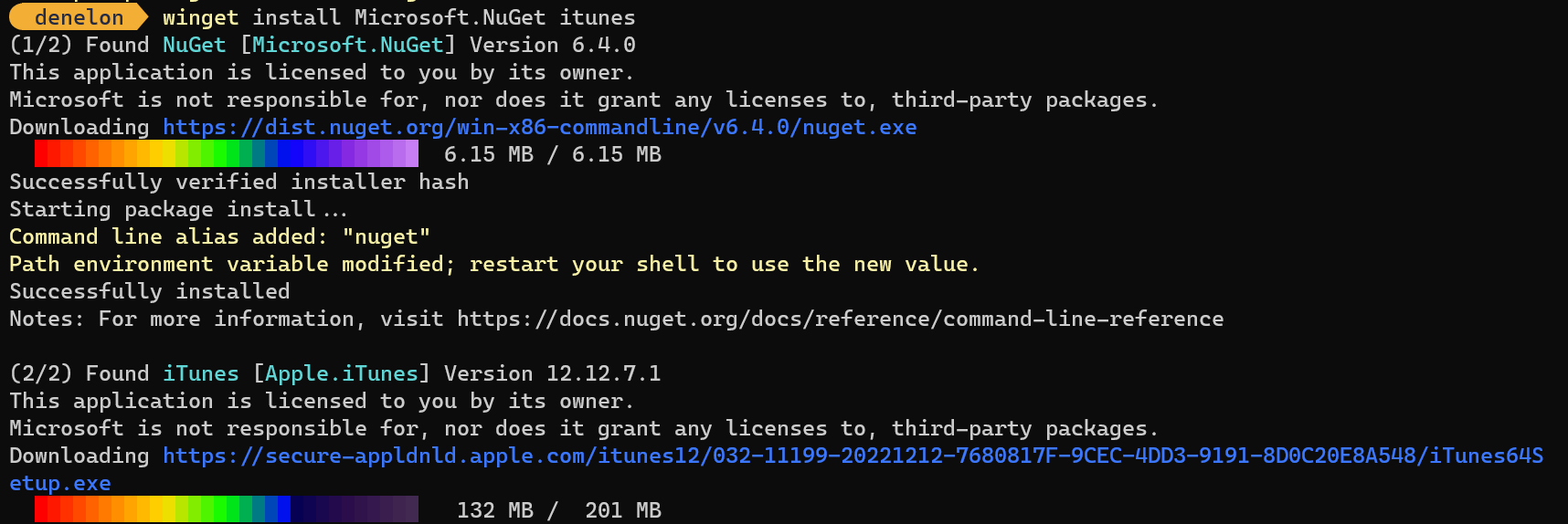
We already had winget import which is why that feature was relatively low in priority.
Some of the arguments don't make sense when installing multiple packages (like "--override") and we've reworked how some of the arguments are handled to give improved behavior and output.
We've also released the experimental support for winget pin in the latest preview release.
Given winget pin it may be easier to achieve the desired result for this Issue with winget upgrade --all. I'm aware of several installers that don't give enough or the correct data for pinning to work properly, but we're continuing to improve the product.
We've shared how we reason about the Roadmap so you can understand how we prioritize work.

@denelon what is the point of pinning a pacakge when a pacakge can be upgraded by windows update service or some apps even auto updates like edge and so on? besides isn't a possible security risk pinning a pacakge?
winget cant help it if the package or anther part of the system updates the package themselves, the pin is there to make sure winget doesn't do it, that's it.
yes, but its a security risk to pin a package in apt or any other package manager as well, winget is no different here

Hey all, we've just added multiple packages to the
winget installcommand.We already had
winget importwhich is why that feature was relatively low in priority.Some of the arguments don't make sense when installing multiple packages (like "--override") and we've reworked how some of the arguments are handled to give improved behavior and output.
We've also released the experimental support for
winget pinin the latest preview release.Given
winget pinit may be easier to achieve the desired result for this Issue withwinget upgrade --all. I'm aware of several installers that don't give enough or the correct data for pinning to work properly, but we're continuing to improve the product.We've shared how we reason about the Roadmap so you can understand how we prioritize work.
great news, greatly appreciated, thanks!
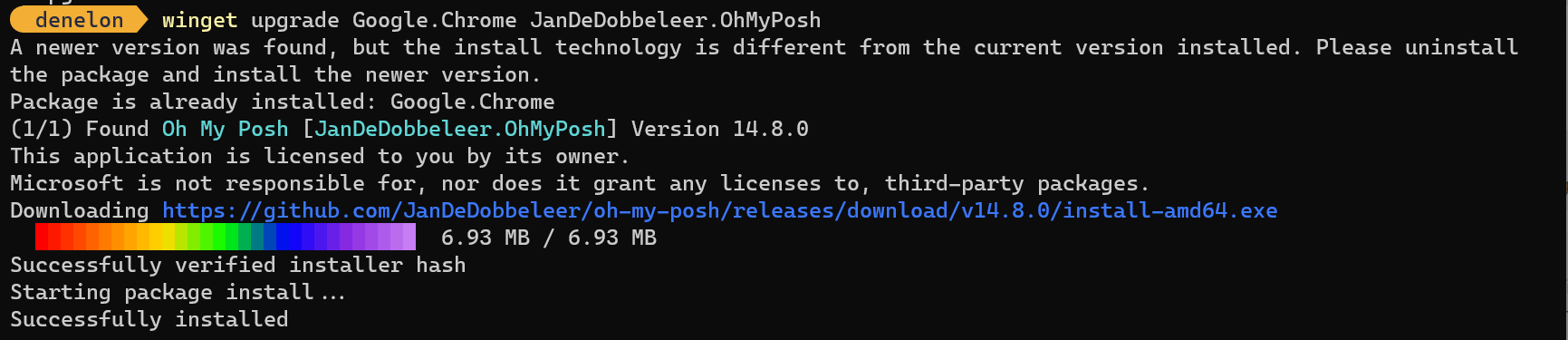
Could you explain what I'm doing wrong @denelon?
> winget upgrade --id OpenJS.NodeJS --id Microsoft.VisualStudioCode
Windows Package Manager v1.8.1791
Copyright (c) Microsoft Corporation. All rights reserved.

Argument provided more times than allowed: 'id'
winget upgrade --id OpenJS.NodeJS works fine.
