
winget-cli
 winget-cli copied to clipboard
 microsoft
Installer failed with exit code: 2008
Brief description of your issue
I am checking the options and how to use the Winget commands to upgrade applications and when trying to use the upgrade command for Windows ADK, that is the one Winget is showing me available, I am getting the error. I searched for that error here but I am not seeing it, so not sure if this is a known issue or something new
Steps to reproduce
PS C:\Windows\system32> winget upgrade Name Id Version Available Source
Windows Assessment and Deployment Kit Microsoft.WindowsADK 10.1.14393.0 10.1.22000.1 winget 1 upgrades available. PS C:\Windows\system32> winget upgrade --id Microsoft.WindowsADK Found Windows Assessment and Deployment Kit [Microsoft.WindowsADK] Version 10.1.22000.1 This application is licensed to you by its owner. Microsoft is not responsible for, nor does it grant any licenses to, third-party packages. Downloading https://download.microsoft.com/download/1/f/d/1fd2291e-c0e9-4ae0-beae-fbbe0fe41a5a/adk/adksetup.exe ██████████████████████████████ 2.08 MB / 2.08 MB Successfully verified installer hash Starting package install... Installer failed with exit code: 2008
Expected behavior
Get the application updated
Actual behavior
getting 2008 exit code error
Environment
PS C:\Windows\system32> winget --info
Windows Package Manager v1.1.12986
Copyright (c) Microsoft Corporation. All rights reserved.

Windows: Windows.Desktop v10.0.18363.1977 (1909)
Package: Microsoft.DesktopAppInstaller v1.16.12986.0

Steps to replicate:
PS M:\> winget install Microsoft.WindowsADK --version 10.1.19041.1
Found Windows Assessment and Deployment Kit - Windows 10 [Microsoft.WindowsADK] Version 10.1.19041.1
This application is licensed to you by its owner.
Microsoft is not responsible for, nor does it grant any licenses to, third-party packages.
Downloading https://download.microsoft.com/download/8/6/c/86c218f3-4349-4aa5-beba-d05e48bbc286/adk/adksetup.exe
  ██████████████████████████████  1.84 MB / 1.84 MB
Successfully verified installer hash
Starting package install...
Successfully installed
PS M:\> winget upgrade Microsoft.WindowsADK
Found Windows Assessment and Deployment Kit [Microsoft.WindowsADK] Version 10.1.22000.1
This application is licensed to you by its owner.
Microsoft is not responsible for, nor does it grant any licenses to, third-party packages.
Downloading https://download.microsoft.com/download/1/f/d/1fd2291e-c0e9-4ae0-beae-fbbe0fe41a5a/adk/adksetup.exe
  ██████████████████████████████  2.08 MB / 2.08 MB
Successfully verified installer hash
Starting package install...
Installer failed with exit code: 2008
Change InstallerType to burn
PS M:\> winget upgrade -m .\m\Microsoft\WindowsADK\10.1.22000.1\
Found Windows Assessment and Deployment Kit [Microsoft.WindowsADK] Version 10.1.22000.1
This application is licensed to you by its owner.
Microsoft is not responsible for, nor does it grant any licenses to, third-party packages.
Downloading https://download.microsoft.com/download/1/f/d/1fd2291e-c0e9-4ae0-beae-fbbe0fe41a5a/adk/adksetup.exe
  ██████████████████████████████  2.08 MB / 2.08 MB
Successfully verified installer hash
Starting package install...
Installer failed with exit code: 2008
Installer log is available at: C:\Users\User\AppData\Local\Packages\Microsoft.DesktopAppInstaller_8wekyb3d8bbwe\LocalState\DiagOutputDir\WinGet-Microsoft.WindowsADK.10.1.22000.1-2021-12-23-22-51-56.467.log
WinGet-2021-12-23-22-51-55.280.log WinGet-Microsoft.WindowsADK.10.1.22000.1-2021-12-23-22-51-56.467.log Probably this line?
[10B0:0DEC][2021-12-23T22:51:57]i000: ERROR: MSI replacement servicing is not supported
Trying to open the exe
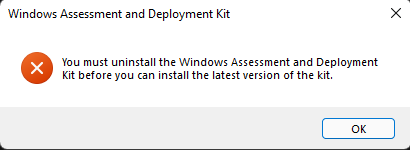 Add
Add UpgradeBehavior: uninstallPrevious to the manifest
PS M:\> winget upgrade -m .\m\Microsoft\WindowsADK\10.1.22000.1\
Found Windows Assessment and Deployment Kit [Microsoft.WindowsADK] Version 10.1.22000.1
This application is licensed to you by its owner.
Microsoft is not responsible for, nor does it grant any licenses to, third-party packages.
Downloading https://download.microsoft.com/download/1/f/d/1fd2291e-c0e9-4ae0-beae-fbbe0fe41a5a/adk/adksetup.exe
  ██████████████████████████████  2.08 MB / 2.08 MB
Successfully verified installer hash
Starting package uninstall...
Successfully uninstalled
Starting package install...
Installer failed with exit code: 2147944022
Installer log is available at: C:\Users\User\AppData\Local\Packages\Microsoft.DesktopAppInstaller_8wekyb3d8bbwe\LocalState\DiagOutputDir\WinGet-Microsoft.WindowsADK.10.1.22000.1-2021-12-23-23-01-09.384.log
WinGet-2021-12-23-23-00-39.247.log WinGet-Microsoft.WindowsADK.10.1.22000.1-2021-12-23-23-01-09.384.log WinGet-Microsoft.WindowsADK.10.1.22000.1-2021-12-23-23-01-09.384_000_package_ToolkitDocumentation_x86_en_us.log WinGet-Microsoft.WindowsADK.10.1.22000.1-2021-12-23-23-01-09.384_000_package_ToolkitDocumentation_x86_en_us_rollback.log WinGet-Microsoft.WindowsADK.10.1.22000.1-2021-12-23-23-01-09.384_001_package_WindowsDeploymentToolsEnvironment_x86_en_us.log WinGet-Microsoft.WindowsADK.10.1.22000.1-2021-12-23-23-01-09.384_001_package_WindowsDeploymentToolsEnvironment_x86_en_us_rollback.log

any updates? Mine's also said Installer failed with exit code: 2008 while upgrading Windows Assessment and Deployment Kit [Microsoft WindowsADK]

I'm receiving this error as well when attempting to upgrade the WindowsSDK.
(2/2) Found Windows Software Development Kit [Microsoft.WindowsSDK] Version 10.0.22621.1
This application is licensed to you by its owner.
Microsoft is not responsible for, nor does it grant any licenses to, third-party packages.
Successfully verified installer hash
Starting package install...
Installer failed with exit code: 2008

❯ winget --info
Windows Package Manager v1.3.2091
Copyright (c) Microsoft Corporation. All rights reserved.

Windows: Windows.Desktop v10.0.22000.856
System Architecture: X64
Package: Microsoft.DesktopAppInstaller v1.18.2091.0
Error in log file:
[2D3C:5990][2022-08-10T08:16:57]i000: Setting string variable 'VS2022INSTALL' to value 'C:\Program Files (x86)\Microsoft Visual Studio\2022\BuildTools\Common7\IDE'
[2D3C:5990][2022-08-10T08:16:57]i000: ERROR: MSI replacement servicing is not supported
[2D3C:5990][2022-08-10T08:16:57]i000: View is requesting shutdown
[2D3C:5990][2022-08-10T08:16:57]i199: Detect complete, result: 0x0
[2D3C:5990][2022-08-10T08:16:57]i500: Shutting down, exit code: 0x7d8
....
....
[2D3C:5990][2022-08-10T08:16:57]i410: Variable: SystemFolder = C:\WINDOWS\SysWOW64\
[2D3C:5990][2022-08-10T08:16:57]i410: Variable: UCRTEXISTS = 1
[2D3C:5990][2022-08-10T08:16:57]i410: Variable: UCRTVERSION = 10.0.22000.1
[2D3C:5990][2022-08-10T08:16:57]i410: Variable: VersionNT64 = 10.0.0.0
[2D3C:5990][2022-08-10T08:16:57]i410: Variable: VS2022INSTALL = C:\Program Files (x86)\Microsoft Visual Studio\2022\BuildTools\Common7\IDE
[2D3C:5990][2022-08-10T08:16:57]i410: Variable: WixBundleAction = 5
[2D3C:5990][2022-08-10T08:16:57]i410: Variable: WixBundleElevated = 1
[2D3C:5990][2022-08-10T08:16:57]i410: Variable: WixBundleInstalled = 1
[2D3C:5990][2022-08-10T08:16:57]i410: Variable: WixBundleLastUsedSource = C:\ProgramData\Microsoft\VisualStudio\Packages\Win11SDK_10.0.22621,version=10.0.22621.0,productarch=neutral\
[2D3C:5990][2022-08-10T08:16:57]i410: Variable: WixBundleLog = C:\Users\user\AppData\Local\Temp\windowssdk\Windows_Software_Development_Kit___Windows_10.0.22621.1_20220810081657.log
[2D3C:5990][2022-08-10T08:16:57]i410: Variable: WixBundleManufacturer = Microsoft Corporation
[2D3C:5990][2022-08-10T08:16:57]i410: Variable: WixBundleName = Windows Software Development Kit - Windows 10.0.22621.1
[2D3C:5990][2022-08-10T08:16:57]i410: Variable: WixBundleOriginalSource = C:\WINDOWS\Temp\{E8F15567-E078-42AF-A100-B3823D6B2D09}\.cr\winsdksetup.exe
[2D3C:5990][2022-08-10T08:16:57]i410: Variable: WixBundleOriginalSourceFolder = C:\ProgramData\Microsoft\VisualStudio\Packages\Win11SDK_10.0.22621,version=10.0.22621.0,productarch=neutral\
[2D3C:5990][2022-08-10T08:16:57]i410: Variable: WixBundleProviderKey = {fcb5e4cc-2739-4812-97fd-f3b7c5d151ae}
[2D3C:5990][2022-08-10T08:16:57]i410: Variable: WixBundleSourceProcessFolder = C:\Users\user\AppData\Local\Temp\WinGet\Microsoft.WindowsSDK.10.0.22621.1\
[2D3C:5990][2022-08-10T08:16:57]i410: Variable: WixBundleSourceProcessPath = C:\Users\user\AppData\Local\Temp\WinGet\Microsoft.WindowsSDK.10.0.22621.1\winsdksetup.exe
[2D3C:5990][2022-08-10T08:16:57]i410: Variable: WixBundleTag =
[2D3C:5990][2022-08-10T08:16:57]i410: Variable: WixBundleUILevel = 2
[2D3C:5990][2022-08-10T08:16:57]i410: Variable: WixBundleVersion = 10.1.22621.1
Unable to even uninstall the package via winget:
❯ winget uninstall --id Microsoft.WindowsSDK
No installed package found matching input criteria.

❯ winget upgrade
Name                                                    Id                   Version          Available    Source
-----------------------------------------------------------------------------------------------------------------
Windows Software Development Kit - Windows 10.0.20348.1 Microsoft.WindowsSDK < 10.0.22000.832 10.0.22621.1 winget

@denelon have you notified someone at Microsoft about this or do you have a client fix in mind for this?
For anyone encountering this issue leave a thumps up on the original post.
I created a PR with the changes OP suggested: #69265
Tested installing the manifests locally. Worked immediately for WindowsADK on my end, but I did not have it installed beforehand. So I installed the older verison first, then ran winget upgrade -m <path_to_new_version>. It was successful in uninstalling first, then reinstalling with the new version.
With WindowsSDK I had to end up going into Control Panel > Programs and Features and manually uninstalling the previous versions before winget install and winget upgrade would work.

I'm reaching out to see if I can find the team who owns WindowsADK to understand what "error 2008" means so we can potentially map to an expected return code or look at what the behavior should be.

I had this problem today.
I made sure all my Windows SDKs were uninstalled from Settings->Apps and from within the VS installer.
And would get the following if I downloaded the SDK and ran the installer

Which was weird because Windows SDK 10.0.22621.755 didn't show up in VS, winget or Settings -> Apps
- search the registry for 10.0.22621.755
- find "C:\ProgramData\Package Cache{bbdcfd1a-000e-4b9d-af4f-07049d1e9a47}\winsdksetup.exe" /modify
- run an admin prompt and go to that folder
- run winsdksetup.exe /modify to remove
- winget install Microsoft.WindowsSDK -s winget
- Install is successfull
- Launch VS and open my solution
- Get an error in the VS UI that UWP stuff is missing - but it prompts to download
- Download and install (close VS, let visual studio installer do the thing)
-
- Launch VS and open my solution - it builds and runs

I had this problem today.
I made sure all my Windows SDKs were uninstalled from Settings->Apps and from within the VS installer.
And would get the following if I downloaded the SDK and ran the installer
Which was weird because Windows SDK 10.0.22621.755 didn't show up in VS, winget or Settings -> Apps
- search the registry for 10.0.22621.755
- find "C:\ProgramData\Package Cache{bbdcfd1a-000e-4b9d-af4f-07049d1e9a47}\winsdksetup.exe" /modify
- run an admin prompt and go to that folder
- run winsdksetup.exe /modify to remove
- winget install Microsoft.WindowsSDK -s winget
- Install is successfull
- Launch VS and open my solution
- Get an error in the VS UI that UWP stuff is missing - but it prompts to download
- Download and install (close VS, let visual studio installer do the thing)
- Launch VS and open my solution - it builds and runs
This issue seems to still be occurring in Winget ... & VS - they're not recognizing the newer release (well, actually, winget is not recognizing a lot of different packages that are actually up to date) ... but, at the same time, ...both will recognize the newer release...(?) Winget wants you to uninstall Microsoft.WindowsSDK 10.0.22621.755, yet Winget shows 10.0.22621.2 as the most up to date & available release, & whatever you do, it spits out the error '2008' ... Strangely enough, VS wants you to uninstall 10.0.22621.755 too...? Okay....
winget uninstall Microsoft.WindowsSDK --version 10.0.22621.755
It will uninstall successfully. Then click & download from the MS dev page link (OR! The ~direct installer link winget will also provide you) to install Microsoft.WindowsSDK once again, &, if you have a keen eye, then you will notice you are installing the same v10.0.22621.755 that was just uninstalled! ... The one benefit is that it won't appear in the list generated by winget upgrade --include-unknown from then on.

This ADKSetup and SDKsetup is a pretty big trouble because it can’t upgrade until you uninstall previous version. Exclude for WDKSetup

This issue has been resolved now that uninstallPrevious has been added to the package manifest: https://github.com/microsoft/winget-pkgs/pull/86259
I also verified on a clean machine that installing an older version and upgrading now succeeds and no longer returns a 2008 exit code.
