

 microsoft
Add Attributes to the TestDefinition in the trx file.
Original developer community feedback copied here
I’d like suggest adding the attributes of a TestMethod to the TestDefinition in the test result file.
There is several attributes in the Microsoft.VisualStudio.TestTools.UnitTesting namespace that would make sense to add.
Here is an example of what it could loook like for Microsoft.VisualStudio.TestTools.UnitTesting.TestPropertyAttribute Microsoft.VisualStudio.TestTools.UnitTesting.DescriptionAttribute Microsoft.VisualStudio.TestTools.UnitTesting.OwnerAttribute
[TestMethod]
[TestProperty("Key1", "Value1")]
[TestProperty("Key2", "Value2")]
[Description("Test Description Data")]
[Owner("Owner Name")]
public void TestCaseName()
{

}
<TestDefinitions>
<UnitTest name="TestCaseName" storage="unittests.dll" priority="4" id="40b0cd91-e3c2-d2c7-c9de-8d3b3d7e3bd1">
  <Description>Test Description Data</Description>
  <Execution id="49d87ce0-a1b6-4497-a848-9df61cd0d438" />
  <Owner>Owner Name</Owner>
  <Properties>
    <Property>
      <Key>Key1</Key>
      <Value>Value1</Value>
    </Property>
    <Property>
      <Key>Key2</Key>
      <Value>Value2</Value>
    </Property>
  </Properties>
  <TestMethod codeBase="UnitTests.dll" adapterTypeName="executor://mstestadapter/v2" className="UnitTests.Tests" name="TestWithProperties" />
</UnitTest>
</TestDefinitions>

It would be great to add grouping option by "traits" (akin to VS Test Explorer Traits grouping) to trx output, with xml nodes nesting in trx/html output ofc
The "traits" in VS Test Explorer are based on [TestCategoryAttribute] and [CategoryAttribute] applied to classes marked with [TestAttribute] and [TestFixtureAttribute].
There are 4 categories defined in our tests at present: "FileAttachments", "QuickFilter", "redacted" and "AddRows"
To better explain my suggestion, here is a view from VS Test Explorer of our tests runs:
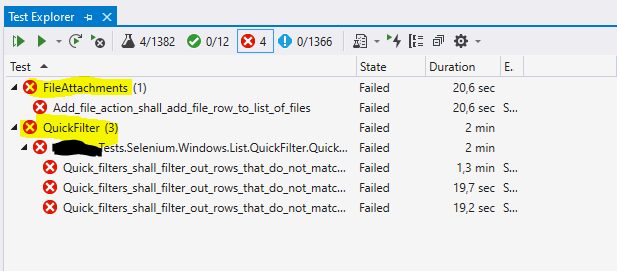
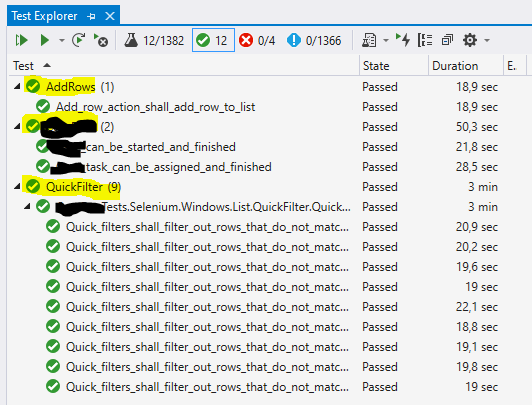
And here is expected output from trx file (rendered in AzureDevOps test run view)
(there is one level of nesting visible already, resulting from separate test runs for two sets of parameters P1, P2, P3 values)
 I would like the "traits" to be displayed as another nest level within a test run.
And why not go one step further and add all grouping options available in VS Test Explorer in vstest trx/html output?

Hello @Haplois @pavelhorak: How is the status of this feature? Our team changed to Azure Devops and we are really missing this feature, since we used the Description ([Description("Test Description Data")]) properties for matching Unit Tests with our documented testplans. Is there an alternative to extract the test description from a VSTest unit test run in a build?

I actually have been adding descriptions to my tests in a pretty extensive Selenium regression testing framework for my companies web app. But now I'm trying to extract those descriptions to throw into a database along with the test results.
I'm having the same issue with not being able to figure out how to exact the description from each test.
