

 microsoft
User configurable menus
We now allows extension writer to contribute menu items. The next logical step is to allow user to configure their menus - this is analog to the keybindings-story. One idea is to have a menus.json file which defines your menus:
{
  "editor/context": [
  {
    "command": "my command",
    "when": "editorHasSelection"
  },
  {
   // more..
  }
  ],
 "explorer/context": [
   // more ...
  ]
}

This extension adds two new context menus to the Explorer Viewlet:
- Open New Workbench Here: Opens a new instance of VS Code scoped to the selected folder OR to the folder containing the selected file.
- Reopen Workbench Here: Reopens VS Code scoped to the selected folder. This feature only works on folders, it has no effect when a file is selected. now i want to add two new context menus to the Open New Workbench Here how do i do

@jrieken This extension adds two new context menus to the Explorer Viewlet:
Open New Workbench Here: Opens a new instance of VS Code scoped to the selected folder OR to the folder containing the selected file. Reopen Workbench Here: Reopens VS Code scoped to the selected folder. This feature only works on folders, it has no effect when a file is selected. now i want to add two new context menus to the Open New Workbench Here how do i do
I was just about to add a request to add this feature. It would be very useful to be able to extend the file tab menu, or add an additional menu bar. Any idea when this will be done? Thanks.

This feature would be really good.
Most plugin authors don't use the context menu at all. They expect you to memorize their keyboard shortcuts, or bring up the command palette, search for a command, navigate to it, and press Enter.
It's way better if you put the power in the hands of the user and let them create their own context menu entries for when plugin devs come up short. That way, you don't need to remember anything, you right-click and select the command you want.
This especially helps for infrequently used plugins where you can't remember the plugin name or the command name.


I really don't understand how this isn't like priority 1 in vs code. There are like 5 other open requests that seem to suggest the same thing. Debug toolbar placement is just down right infuriating, and placing buttons/other action items down in the status bar is just.... not good.

While trying to include the officially supported „Go to Implementation” in the context menu (in #54317) this came up as a way this should be solved instead.
@jrieken Would you be willing to provide more mentoring instructions for the feature? I’d like to tackle this, but I mostly made miniscule PRs against vscode and I’m not that familiar with the codebase. Thanks!

Well, there are two kind of PRs. One is that "I kinda know how it should be done but I don't have the time to do it" and others are "I have no clue how to do it". User configurable menus is one of the latter and 'yes' I can coach a PR here but it requires planning on my side. It doesn't make sense for you to start on this while I am super booked with other things because I won't be able to provide useful advise then.
I'd like to suggest that Go To Implementation be returned to the context menu. The argument in #27403 (silenced) about it being useful only in a handful of places in a file is not true for C# projects which utilize dependency injection, which is very common for ASP .NET Core and similar.
I am happy to learn that this option is available in the Go menu, but had it been in the context menu, I would have discovered it months ago. Instead I just assumed it was an OmniSharp limitation.


I would also agree with @TomasHubelbauer and @Xanewok that "Go to implementation" should be in the context menu or better yet provide the end user (of VS Code) the capability to update keybindings to whatever they want.
For e.g. if you take Typescript and you ctrl-click on a function for a class that implements an interface, VS Code will take you to the definition of that interface. This is useless in almost all cases. I would rather present a choice to the user where he wants to go or have a option to choose the behavior by default.

I never knew a "Go To implementation" existed because I'd always used the context menu. Today I when I was reading through the release notes I found out there's such a thing. I found it strange that such a useful thing is not there in the context menu. It'd be great to have it there as I use context menu a lot while code browsing!

@thakkarparth007 @dhanvikapila Press the :+1: button, that's how we prioritise work. Adding more comments in the spirt of "I need this so bad" just makes us unsubscribe from issues. The issue is understood, it has (till now) 24 upvotes and this is the list of feature requests it "competes" against: https://github.com/Microsoft/vscode/issues?q=is%3Aopen+is%3Aissue+label%3Afeature-request+sort%3Areactions-%2B1-desc
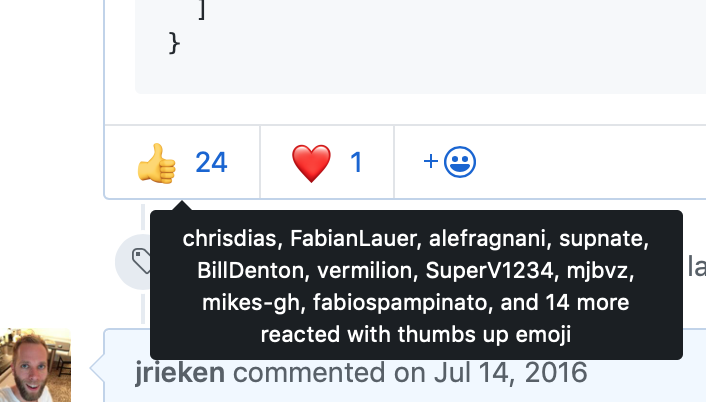
About the prioritization of this feature, I think that microsoft's position is quite clear, in the form of @claudiaregio's (the PM for the very ~~un~~popular extension) reply about unwanted menu options contributed by the jupyter extension:
users do not have to use or click on any options/features made available to them if they do not wish to use them
I would like to know if this is also the vscode's team oficial position, @jrieken?
It's like saying:
If you don't want candy crush, just don't click in the candy crush icon.
Because the amount of contributions, even duplicated contributions, is getting quite large, at least for me.

@phgmacedo, to help provide more clarity, I do not represent the VS Code core team, I work on the Python team. The issue you filed on our extension, cannot be solved by the extension at this time unless the Python + Jupyter extensions decouple, and we already had a lengthy conversation as to why that is not being done at this moment.
Glad you filed an issue here! It could be resolved by VS Code core if they choose to complete it.

I'm not trying to be a negative nancy, but I've long been a proponent for getting this added to vscode, and paricipating in these discussions for 4-5 years, its pretty clear its never gonna happen. Someone SOMEWHERE on the vscode team has made a decision toolbars aren't going to be a thing in vscode, and we've seen what (IMO) is borderline conspiracy levels of closed issues, and ignoring issue after issue of people requesting this functionality. People volunteering to provide PR's for it, people proposing it as an optional opt-in bit of functionality.
I'd get used to command palette and do your best to try and remember 100k commands. Or maybe use extensions that put a handful of select icons in your status bar, because I really don't see this functionality changes for the foreseeable future.
VSCode cannot count on extensions to behave reasonably. In the python/jupyter extensions, there is a very old issue from @isidorn that was completely ignored, and for "normal" (non microsoft) users, all kinds of feedback about the extension's menu is quickly and summarily shut down. If the user is more vocal, they get tagged as "spam" or "disruptive", but with msft employees they get more privilege, and instead only get edited like @brettcannon did here:

FWIW as a possible alternative solution (or perhaps also inspiration) for something like this, check VSpaceCode, which gives you configurable and discoverable/hierarchical keyboard menus:
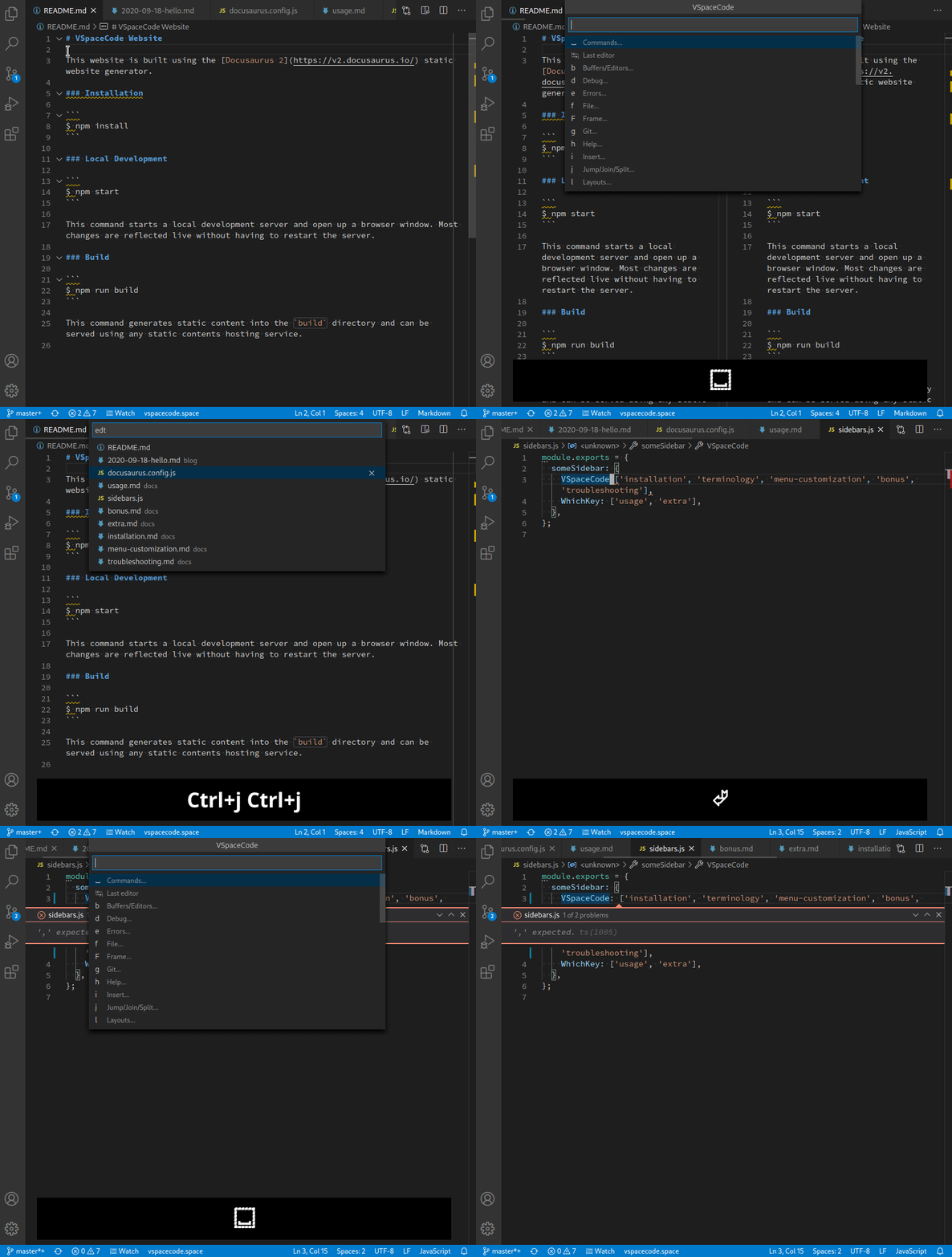
(I'm not affiliated with the project, just a very happy user of it)

@The-Compiler I'd say that appears to be probably one of the better suggestions/workarounds I've seen. I still think there is plenty of justification to have a toolbar... but that ship has sailed...
You can hide items based on position with this extension customize-ui
settings.js

"customizeUI.stylesheet": {
    "div.context-view.monaco-menu-container.bottom.left > div.monaco-scrollable-element > div.monaco-menu > div > ul > li:nth-child(1)": "display: none !important;", // Open to the Side
    "div.context-view.monaco-menu-container.bottom.left > div.monaco-scrollable-element > div.monaco-menu > div > ul > li:nth-child(2)": "display: none !important;", // Open Containing Folder
...
}
Unfortunately there is no way to hide parent passed on children attribute in CSS, or else hiding the li in this selector would be perfect
div.context-view.monaco-menu-container.bottom.left > div.monaco-scrollable-element > div.monaco-menu > div > ul > span[@aria-label="Open to the Side"]

@jrieken any progress? I like to use extension with command plate. Many extension register usless context menu.

This feature is essential to me. I don't want to have to memorise dozens of key bindings. Being able to customize key bindings isn't enough; I work with too many languages, types of documents, etc. to remember key bindings for even common tasks.

Only been 6yr... Can we get any traction on this one? Surely Microsoft has figured efficient ways to add hooks so something like this could be opt in for those who feel it necessary
Jetbrains fleet is already looking very good... But looks like fleet is doing away with toolbars as well. I wish companies would stop doing things to ui nobody wants or needs. Toolbars work. People are used to them.
Also the moving the menu to the titlebar so we have limited area to drag windows around. Just stop.


FYI and yes it isn't the full deal yet but since a few milestones you can hide menu items from toolbar. That helps to main a clean and custom look. See https://code.visualstudio.com/updates/v1_72#_hide-actions-from-tool-bars for the announcement.

FYI and yes it isn't the full deal yet but since a few milestones you can hide menu items from toolbar. That helps to main a clean and custom look. See https://code.visualstudio.com/updates/v1_72#_hide-actions-from-tool-bars for the announcement.
hi @jrieken, In addition to the actions in the editor that can be hidden, the right-click menu on the file tree or other places can hide this matter. Is there any progress?
