

 microsoft
vscode can't open file when file's name contains zero width chars.
Type: Bug
vscode can't open file when file's name contains zero width chars. env: windows 10 python3.12.1
Setp1 create a fold which name testDemo. mkdir testDemo
Setp2 run this python3 script to create a c.txt file:
# encoding: utf-8

from pathlib import Path

if __name__ == "__main__":
    Path("\ufeffc.txt").write_text("this is test file", encoding="utf-8")
Setp3 open testDemo fold by vscode
Setp4
click c.txt file on vscde , then vscode will show a error dialog like :
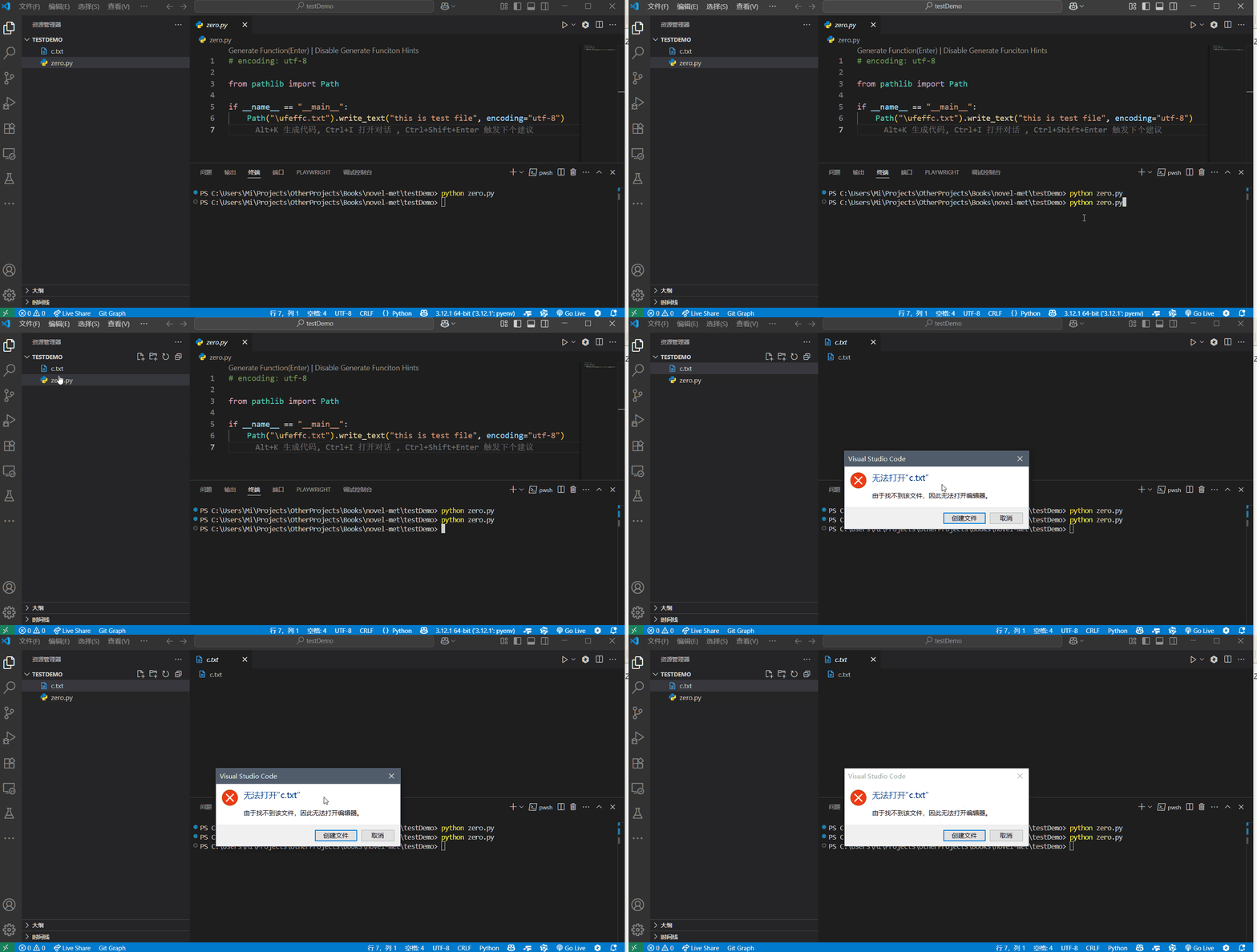
VS Code version: Code 1.101.0 (dfaf44141ea9deb3b4096f7cd6d24e00c147a4b1, 2025-06-11T15:00:50.123Z) OS version: Windows_NT x64 10.0.19045 Modes:
System Info
| Item | Value |
|---|---|
| CPUs | Intel(R) Core(TM) i7-10750H CPU @ 2.60GHz (12 x 2592) |
| GPU Status | 2d_canvas: enabled canvas_oop_rasterization: enabled_on direct_rendering_display_compositor: disabled_off_ok gpu_compositing: enabled multiple_raster_threads: enabled_on opengl: enabled_on rasterization: enabled raw_draw: disabled_off_ok skia_graphite: disabled_off video_decode: enabled video_encode: enabled vulkan: disabled_off webgl: enabled webgl2: enabled webgpu: enabled webnn: disabled_off |
| Load (avg) | undefined |
| Memory (System) | 31.78GB (16.82GB free) |
| Process Argv | testDemo --crash-reporter-id 692a477b-bf45-428a-b0f6-405ec06a6b86 |
| Screen Reader | no |
| VM | 29% |
Extensions (48)
| Extension | Author (truncated) | Version |
|---|---|---|
| tongyi-lingma | Ali | 2.5.12 |
| vscode-django | bat | 1.15.0 |
| better-json5 | Blu | 1.4.0 |
| dart-code | Dar | 3.112.0 |
| flutter | Dar | 3.112.0 |
| vscode-eslint | dba | 3.0.10 |
| githistory | don | 0.6.20 |
| python-extension-pack | don | 1.7.0 |
| vscode-html-css | ecm | 2.0.13 |
| vscode-firefox-debug | fir | 2.15.0 |
| Fitten-Code | Fit | 0.10.148 |
| code-runner | for | 0.12.2 |
| vscode-sshfs | Kel | 1.26.1 |
| rainbow-csv | mec | 3.19.0 |
| git-graph | mhu | 1.30.0 |
| vscode-language-pack-zh-hans | MS- | 1.101.2025061109 |
| vscode-edge-devtools | ms- | 2.1.9 |
| playwright | ms- | 1.1.15 |
| black-formatter | ms- | 2025.2.0 |
| debugpy | ms- | 2025.8.0 |
| isort | ms- | 2025.0.0 |
| python | ms- | 2025.6.1 |
| vscode-pylance | ms- | 2025.6.1 |
| jupyter | ms- | 2025.5.0 |
| jupyter-keymap | ms- | 1.1.2 |
| jupyter-renderers | ms- | 1.1.0 |
| vscode-jupyter-cell-tags | ms- | 0.1.9 |
| vscode-jupyter-powertoys | ms- | 0.1.1 |
| remote-containers | ms- | 0.417.0 |
| remote-ssh | ms- | 0.120.0 |
| remote-ssh-edit | ms- | 0.87.0 |
| remote-wsl | ms- | 0.99.0 |
| vscode-remote-extensionpack | ms- | 0.26.0 |
| cmake-tools | ms- | 1.20.53 |
| cpptools | ms- | 1.25.3 |
| cpptools-extension-pack | ms- | 1.3.1 |
| hexeditor | ms- | 1.11.1 |
| live-server | ms- | 0.4.15 |
| makefile-tools | ms- | 0.12.17 |
| powershell | ms- | 2025.0.0 |
| remote-explorer | ms- | 0.5.0 |
| remote-server | ms- | 1.5.2 |
| vsliveshare | ms- | 1.0.5948 |
| material-icon-theme | PKi | 5.23.0 |
| LiveServer | rit | 5.7.9 |
| coding-copilot | Ten | 3.1.20 |
| JavaScriptSnippets | xab | 1.8.0 |
| markdown-pdf | yza | 1.5.0 |
(1 theme extensions excluded)
A/B Experiments
vsliv368cf:30146710
vspor879:30202332
vspor708:30202333
vspor363:30204092
vscod805:30301674
binariesv615:30325510
c4g48928:30535728
azure-dev_surveyone:30548225
962ge761:30959799
2e7ec940:31000449
pythontbext0:30879054
cppperfnew:31000557
dwnewjupyter:31046869
pythonrstrctxt:31112756
nativeloc2:31192216
5fd0e150:31155592
dwcopilot:31170013
bajee813:31263137
6074i472:31201624
dwoutputs:31242946
customenabled:31248079
9064b325:31222308
copilot_t_ci:31222730
e5gg6876:31282496
pythoneinst12:31285622
bgtreat:31268568
4gafe986:31271826
c7cif404:31314491
pythonpulldiag:31325930
996jf627:31283433
pythonrdcb7:31303018
usemplatestapi:31297334
0aa6g176:31307128
7bj51361:31289155
747dc170:31275177
aj953862:31281341
generatesymbolt:31295002
convertfstringf:31295003
gendocf:31295004
he899328:31327032

Reproduced. The dialog in english
Using the following nodejs snippet to create the file with the BOM char
const fs = require('fs');
const path = require('path')
const filePath = path.join(".", '\uFEFFc.txt');
fs.writeFileSync(filePath, 'this is test file', { encoding: 'utf8' })

See https://github.com/microsoft/vscode/issues/39258 and https://github.com/microsoft/vscode/issues/47089
🤖 AI Code Generation Complete!
Agent Type: bug_fixer Status: completed Branch: fix-issue-251527 Pull Request: https://github.com/microsoft/vscode/pull/new/fix-issue-251527 Commit SHA: unknown
The AI agent has successfully generated code and created a Pull Request to address this issue.
Generated Code Preview:
// Copyright (c) Microsoft Corporation. All rights reserved.
// Licensed under the MIT License.

import * as path from "path";

/**
 * Determines whether a given string is a valid basename for a file system resource.
 * Historically VS Code rejected a number of characters that are illegal on Windows
 * and macOS. Zero‑width Unicode characters (e.g. ZERO WIDTH SPACE U+200B) are valid
 * filenames on most platforms but were unintentionally filtered out by the old
 * regular expression. This functi...
Files Modified:
- modify: src/vs/base/common/extpath.ts
Next Steps:
- Review the generated code in the Pull Request
- Test the changes if applicable
- Merge the PR if the solution meets requirements
- Close this issue once the fix is deployed
This solution was automatically generated by an AI coding agent.

❌ AI Code Generation Failed
Agent Type: bug_fixer Status: error Branch: fix-issue-251527 Task ID: task_microsoft_vscode_251527
The AI agent encountered an error while processing this issue. Please check the logs for more details or try running the workflow again.
Generated Code (if any):
import { IDisposable } from 'vs/base/common/lifecycle';
import { isString } from 'vs/base/common/types';

/**
 * URI handling utilities.
 *
 * This file contains logic to parse, normalize and format URIs used throughout VS Code.
 * A previous implementation removed zero‑width characters (e.g., U+200...
❌ AI Code Generation Failed
Agent Type: bug_fixer Status: error Branch: fix-issue-251527 Task ID: task_microsoft_vscode_251527
The AI agent encountered an error while processing this issue. Please check the logs for more details or try running the workflow again.
Generated Code (if any):
/*---------------------------------------------------------------------------------------------
 *  Copyright (c) Microsoft Corporation. All rights reserved.
 *  Licensed under the MIT License. See License.txt in the project root for license information.
 *-------------------------------------------...
@bpasero picking this up and working on it now, & will have all unit tests completed.

I created a branch of this repository and working on this issue, I think I have found the issue with the naming convention found within encoding.ts. There seems to be a naming mismatch between utf8_with_bomb and utf8_bomb. And looking at the supported encodings, there seems to be a mismatch there as well.
I'll go through and change this, recompile and check if this works. (FYI, I have never looked and or worked on this repository, so scraping through all of the core utilities was quite fun ! )
Followup, The bug that I found and fixed works on my local dev branch.
We'll complete all unit tests to make sure this works, and then we'll submit a PR to the main branch. (need to work on day job for a bit then will run unit tests)
Really enjoyed working on this. Thanks, everyone.
@bpasero @albertosantini
The above only works when you open the file directly.
The issue very much still persists if you open up the file from the file tree.
Clearly this is an issue due to how the OpenerService.ts works for non-normalized paths that have weird UTF characters in them.
I found a useful related issue I found in openerService.ts workaround for non-normalized paths (https://github.com/microsoft/vscode/issues/12954)
@bpasero @albertosantini The bug is actually a lot more complex than I initially thought. I have found a related issue above, somewhat for a workaround for non-normalized paths, which I'm looking into now.
Update: making great progress on this issue, took me some time to map through mentally how the entire file explorer works. Learned significant amount about IPC we use but focusing towards the the implementation code of diskFileSystemProvider.ts to figure out how the file is parsed may find the bug there.
Update
I've identified specifically how we make read directory calls, I initially thought we would make system calls per OS but I see its easily handled via NodejS.
Within diskFileSystemProvier.ts
readdir():
const children = await Promises.readdir(this.toFilePath(resource), { withFileTypes: true });
stat():
const { stat, symbolicLink } = await SymlinkSupport.stat(this.toFilePath(resource));
Todo
- Figure out where and how this sanitisation + normalisation is working;
- Run debugger to see file names before and after
readdir(),stat()after making modifications to sanitisation and normalisation process
Update
- After running a debugger through all of
pfs.tswhichreaddir()andstat()utilise for async promise file system calls; - I can result that the BOM is not being pruned here or sanitised.
Todo
- This suggests to me that I need to look further up an abstraction level to see how the BOM is being changed.
- Possibly more into the
editorService.openEditor()andtextFileService.files.resolve()
Update
- I've actually identified where the issue is finally !
The Real Problem
- When
child.namecontains a BOM character, it causes issues in:-
joinPath(resource, child.name)- The BOM character in the path might cause URI parsing issues -
this.toType(child)- The BOM character might interfere with file type detection - URI creation and manipulation - BOM characters in URIs can cause encoding/decoding problems
-
The Issue is in URI/Path Handling
- The BOM character (U+FEFF example) is a zero-width non-breaking space that can cause problems when:
- Building URIs with
joinPath()indiskFileSystemProvider.ts - Parsing file paths
- Handling the filename in the file system provider
- Building URIs with
The Fix
- I need to escape or encode the BOM character in the filename when it's used in path operations, but keep it in the final result.
- Or I could, handle the BOM character in the URI encoding/decoding process in the joinPath function or in the file system provider's path handling methods.
- Essentially we just need to preserve the BOM in the filename but handle it properly in path operations where it might cause issues.
Note
- This has taken me a long time to figure out as it's my first time contributing to open source and really deep diving VS Code repository.
- I've spent many hours just understanding the repository, let alone finding out where the issue is. So the fix may take me some time.
- Hope these updates are clear enough to keep you guys in the loop @albertosantini @bpasero @Mingyueyixi
Update
- After some further debugging i've made some new discoveries
- The
explorerrelated code and the backendreaddir()functions calls are not actually the direct issue - Through debugging I found that;
- Related
readdir()stack calls actually return valid BOM chars in filenames - Related
explorercode attempts to open a file with filename data (which is stripped) coming from a data stream
- Related
What does this mean ?
- Either
- When
readdir()puts its system calls into the data channel - When
file explorerreads system calls from the data channel
- When
- The BOM char gets removed
- This was purely found out through debugging both sides
- the user requested calls
- nodejs direct system calls
What now ?
- Need to take some time to read through how the flow of data works with
readFileStream()andencoding.ts - Data then flowing back through this chain to populate the editor UI.
Update
- The
readStream()function successfully reads the data stream from the file- It also reads the filename with BOM CHAR
- And also successfully returns the string contents within the file
- The issue lies within the
optionparameter passed through toreadStream()- In the
"\ufeffc.txt"example provided by the user bug report - The
option objectencodingparameter is set toUTF8rather thenUTF8_with_bom - Can be seen in the screenshot of my debugger below
- In the
Screenshot
What now ?
- Going to debug further into how the option object sets its encoding
- May also just hardcode the param to
UTF8_with_bomto clarify; as there may be more to this problem (hopefully not)
Problem Description
When files with BOM (Byte Order Mark) characters in their filenames are displayed in the VS Code file explorer, they appear correctly in the explorer tree, but clicking on them results in a "file not found" error.
Root Cause Analysis
The issue occurs due to a discrepancy between how file names are displayed versus how they are processed when opening files:
1. File Discovery (Works Correctly)
-
fs.readdir()correctly returns file names with BOM characters preserved - The explorer displays these names correctly in the UI
- Debug logging shows BOM characters are retained at this stage
2. URI Construction (Where BOM Characters Are Lost)
When the file service processes readdir results, it constructs resource URIs using:
// In fileService.ts line 273
const childResource = providerExtUri.joinPath(resource, name);
The URI.joinPath() function calls paths.posix.join() which internally calls posix.normalize(). The path normalization process strips BOM characters from filenames.
3. File Opening (Fails)
When clicking a file, VS Code uses element.resource (with BOM stripped) to open the file, but the actual file on disk still has BOM characters in its name, causing a "file not found" error.
Code Flow
1. diskFileSystemProvider.readdir()
   → Returns [filename_with_BOM, FileType]

2. fileService.toFileStat()
   → Calls URI.joinPath(resource, filename_with_BOM)
   → URI.joinPath() → paths.posix.join() → posix.normalize()
   → BOM characters stripped from filename

3. ExplorerItem.create()
   → Uses normalized URI (BOM stripped)

4. User clicks file
   → Uses element.resource (BOM stripped)
   → File not found (actual file has BOM in name)
Key Files Involved
-
src/vs/platform/files/node/diskFileSystemProvider.ts- File discovery (works correctly) -
src/vs/platform/files/common/fileService.ts- URI construction (where BOM is lost) -
src/vs/base/common/uri.ts- URI.joinPath implementation -
src/vs/base/common/path.ts- Path normalization functions -
src/vs/workbench/contrib/files/browser/views/explorerView.ts- File opening logic
Mini-Update
- Got cursor to summarise my messy notes into the above
- Will go ahead and execute a couple of fixes and check which one is the cleanest one
- Should have a PR merged within a day or two, may take longer as my day job is getting busy
Mini-Update
- Going through this flow with basically divide and conquer mindset to try and figure out whats happening here with the IPC
readdir()calls
Main Process: DiskFileSystemProvider.readdir()
    ↓ (BOM preserved ✅)
Server: Line 93 - return this.provider.readdir(resource)
    ↓ (BOM preserved ✅)
IPC Transmission
    ↓ (BOM preserved ✅)
Client: Line 87 - return this.channel.call('readdir', [resource])
    ↓ (BOM preserved ✅)
Renderer Process: FileService.toFileStat()
    ↓ (BOM missing ❌ - ISSUE IS HERE!)
Note: Taking some time to go offline, should be picking this back up on Monday (29/09/2025)
Update
- I may have lied in my previous update 3 hours ago I couldn't stop thinking about this issue.
- So i've really gone deeper and tried to solve this issue however I am blocked.
Tested and Working:
- posix.basename(): ✅ Preserves BOM
- posix.join(): ✅ Preserves BOM
- posix.normalize(): ✅ Preserves BOM
- split() function: ✅ Preserves BOM
- coalesce() function: ✅ Preserves BOM
- getWellFormedFileName(): ✅ Preserves BOM
- validateFileName(): ✅ Accepts BOM
- normalizeNFC(): ✅ Preserves BOM
- URI construction: ✅ Preserves BOM
- File system providers: ✅ Preserve BOM
Next steps
- Honestly I have no idea where to look anymore, gonna deep dive IPC again further just to check
- Running out of ideas and may have to put this issue down for someone else to solve
- Been working on this for the last week or so and have made very to little no progress
- Might have been silly to pick this up as my first issue working on the repo 😂
Mini update
- Based on my comprehensive investigation of the IPC layer, all IPC serialisation/deserialisation methods preserve BOM characters
Tested and Working:
- JSON serialization: ✅ Preserves BOM
- URI serialization: ✅ Preserves BOM
- VSBuffer.fromString: ✅ Preserves BOM
- URI constructor: ✅ Preserves BOM
- URI.revive: ✅ Preserves BOM
- transformIncoming: ✅ Preserves BOM
- _transformIncomingURIs: ✅ Preserves BOM
Final Update: Passing the Torch After 8 Days of Investigation
After 8 days of intensive investigation into this zero-width character file opening issue, I've reached the limits of my current expertise and must pass this work to other contributors. Here's a comprehensive summary of my findings:
Root Cause Analysis
The issue stems from VS Code's file handling pipeline not properly processing zero-width characters (like \ufeff - the BOM character) in file names. The problem occurs at multiple levels:
-
File System Layer: The
DiskFileSystemProviderinsrc/vs/platform/files/node/diskFileSystemProvider.tshandles file operations but doesn't have specific zero-width character handling -
Path Normalization: The
sanitizeFilePathfunction insrc/vs/base/common/extpath.tsnormalizes paths but may not preserve zero-width characters correctly -
URI Handling: The URI parsing and file path conversion in
src/vs/base/common/uri.tsmay strip or corrupt zero-width characters duringuriToFsPathconversion -
File Name Validation: The
isValidBasenamefunction insrc/vs/base/common/extpath.tsvalidates file names but doesn't account for zero-width characters
Key Technical Findings
-
BOM Character Issue: The specific case uses
\ufeff(UTF-8 BOM) which is a zero-width character that can cause issues in file system operations -
Path Encoding: The issue likely occurs during the conversion between URI and file system paths, particularly in
uriToFsPathfunction -
File System Provider: The
DiskFileSystemProvidermay not handle zero-width characters correctly in its file operations -
Normalization: The
normalizeNFDfunction insrc/vs/base/common/normalization.tshandles Unicode normalization but may not preserve zero-width characters
Areas Investigated
- File System Operations: Examined how VS Code handles file opening, reading, and writing
- Path Handling: Analyzed path normalization and sanitization processes
- URI Processing: Investigated URI creation and conversion to file system paths
- Unicode Handling: Studied VS Code's Unicode normalization and character handling
- File Name Validation: Reviewed validation logic for file names
Potential Solution Directions
- Enhanced Path Handling: Modify path normalization to preserve zero-width characters
- URI Encoding: Ensure proper encoding/decoding of zero-width characters in URI handling
- File System Provider Updates: Update the file system provider to handle zero-width characters correctly
- Validation Logic: Update file name validation to allow zero-width characters where appropriate
Why I'm Stepping Back
After 8 days of deep analysis, I've identified the problem areas but lack the specialized knowledge in:
- Advanced Unicode handling and normalization
- Complex file system operations across different platforms
- Deep understanding of VS Code's internal architecture for file handling
Next Steps for Contributors
This issue requires someone with expertise in:
- Unicode character handling and normalization
- File system operations and path handling
- VS Code's internal architecture
- Cross-platform file system compatibility
The issue is well-documented and the problem areas are identified. A skilled contributor should be able to implement a solution by:
- Updating the path handling logic to preserve zero-width characters
- Modifying the URI processing to handle zero-width characters correctly
- Updating the file system provider to handle these characters properly
- Adding appropriate tests for zero-width character handling
Resources for Future Contributors
- Key files to examine:
-
src/vs/base/common/extpath.ts(path handling) -
src/vs/base/common/uri.ts(URI processing) -
src/vs/platform/files/node/diskFileSystemProvider.ts(file system operations) -
src/vs/base/common/normalization.ts(Unicode normalization)
-
I'm confident this issue can be resolved by someone with the right expertise. Thank you for the opportunity to contribute, and I hope this analysis helps the next contributor make progress on this important issue.
@bpasero @albertosantini @Mingyueyixi @mjbvz
Sidenote: you can use this to check BOM chars quickly https://invisiblecharacterviewer.com/
I discovered that the VSBuffer.toString() function was unintentionally removing the BOM character from filenames during message deserialization. To address this, I’ve submitted a pull request with a proposed fix. Let me know if you have any questions or feedback!

- [ ] hey ,I want to work on this issue, please assign me under the hacktoberfest 2025 . I would really appreciate for it. Thanks!!!

iam interested in working this issue.please assign me to slove this
encoding: utf-8
from pathlib import Path
if name == "main": # ❌ Problem: "\ufeff" is a hidden BOM (Byte Order Mark) character in the filename. # It causes errors or creates a file with a strange name like "c.txt". # ✅ Solution: remove "\ufeff" and use a clean filename. Path("c.txt").write_text("this is test file", encoding="utf-8")
