
vscode
 vscode copied to clipboard
 microsoft
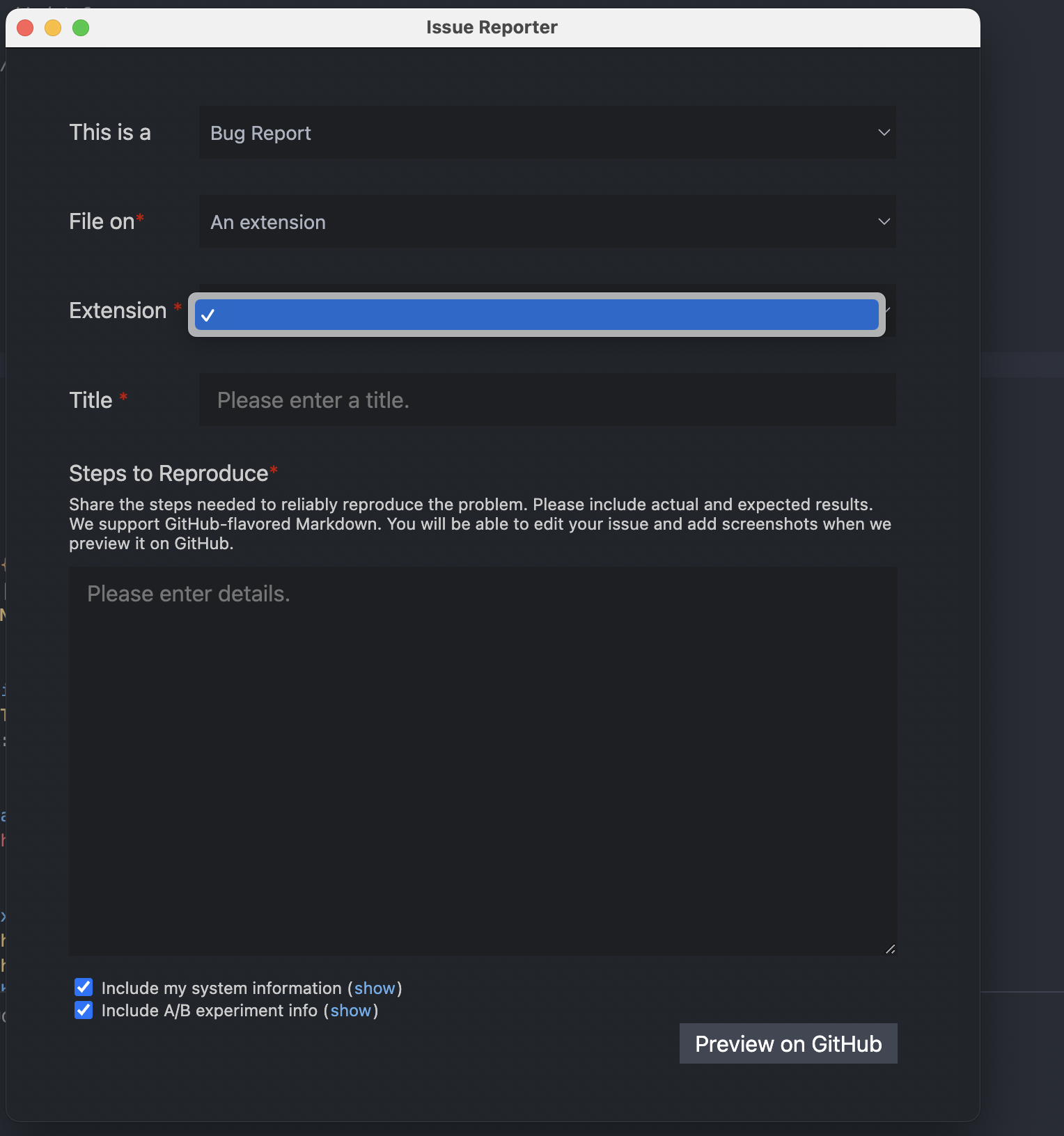
Extensions list is empty on a disconnected window bug report screen
Issue Type: Bug
My ssh connection keeps dying, I went to file a report, but can't chose the correct extension because the extensions list in the bug report screen is completely empty on a disconnected window.
I'm not sure if this belongs here or remote-ssh possibly
VS Code version: Code 1.69.2 (Universal) (3b889b090b5ad5793f524b5d1d39fda662b96a2a, 2022-07-18T16:12:57.074Z) OS version: Darwin arm64 21.5.0 Restricted Mode: No Connection to 'SSH: dev' could not be established Canceled

Thanks for creating this issue! It looks like you may be using an old version of VS Code, the latest stable release is 1.70.0. Please try upgrading to the latest version and checking whether this issue remains.
Happy Coding!


This is caused because this line throws: https://github.com/microsoft/vscode/blob/2a0a37294867e8321dc531980ab2a445b5d90d2a/src/vs/workbench/services/issue/electron-sandbox/issueService.ts#L45
Here: https://github.com/microsoft/vscode/blob/2a0a37294867e8321dc531980ab2a445b5d90d2a/src/vs/base/parts/ipc/common/ipc.ts#L559
which gets called here: https://github.com/microsoft/vscode/blob/2a0a37294867e8321dc531980ab2a445b5d90d2a/src/vs/platform/extensionManagement/common/extensionManagementIpc.ts#L164
@sandy081 is there an API I should use instead? Or could this API handle when a connection is closed?
This is for the Extension drop down in the Issue Reporter which reports nothing when a connection is closed... Repro with OSS:
- Run OSS
- Open a Remote Window
- New TestResolver Window
- after that loads run:
>Remote-TestResolver: Kill Remote Server... - Wait for it to be fully "disconnected"
- Open issue reporter
If you drop a breakpoint on the first line I mention you can see the error thrown

Use this API instead - https://github.com/microsoft/vscode/blob/d61f0a0fba717715487de799b82661029996fbcd/src/vs/workbench/contrib/extensions/common/extensions.ts#L98

@sandy081 should I only use that when the other one fails or will this get me all extensions local and remote?
You can replace the current one with this call. It will give you all extensions (local and remote if there are).
@sandy081 I can't use that one because it's under contrib. Is there another one I should use? Or can that one be pulled into vs/platform?
I am afraid if there is a similar one in workbench/services or platform that supports this functionality. The closer one is IWorkbenchExtensionManagementService that returns all extensions from all servers, but you have to dedup them.
@sandy081 could I ask that:
this.extensionManagementService.getInstalled();
Be made a bit more robust best effort?
In other words, not throw if there's a Remote Connection issue and have it only return client side extensions if there's no working connection?
Are you depending on that throwing of Errors today?
I will add an arg for you to not bail out when one of the server fails to load extensions