

 microsoft
Editor hint in new file can't be reached by tabbing
Version: 1.60.0-insider Commit: e7d7e9a9348e6a8cc8c03f877d39cb72e5dfb1ff Date: 2021-09-01T10:39:32.559Z Electron: 13.1.8 Chrome: 91.0.4472.164 Node.js: 14.16.0 V8: 9.1.269.39-electron.0 OS: Darwin x64 18.7.0
Steps to Reproduce:
Open VS Code and create a new untitled file. Tab over to try to click on the "Select a language" action and the hint disappears. Can we make this action keyboard focus-able?
cc @isidorn

Originally I did not make those links clickable because all those actins can be accessed via the command palette, however I do agree that they should be focusable.
Ideally the first tab would focus onto the Select a language and the next on the don't show again.
Or even better the first tab would focus on the whole thing - which would read the whole message, and left right or subsequent tabs would navigate to the links.
@TylerLeonhardt what do you think? Also assigning to you since you now own the untitled hint.
Assigning to September as I think this is minor and we can easily fix.

Hey , since it is a good first issue, can I work on this ? , if no, will delete comment, sorry for any inconvenience caused @isidorn


@TylerLeonhardt may I ask, I would alter cursor style to pointer but is that already done from what I can see here?
I'm not sure what you mean. This issue is about being able to hit the tab key while in VS Code to highlight the links that show up in the editor so that someone who uses a screen reader can use this feature.
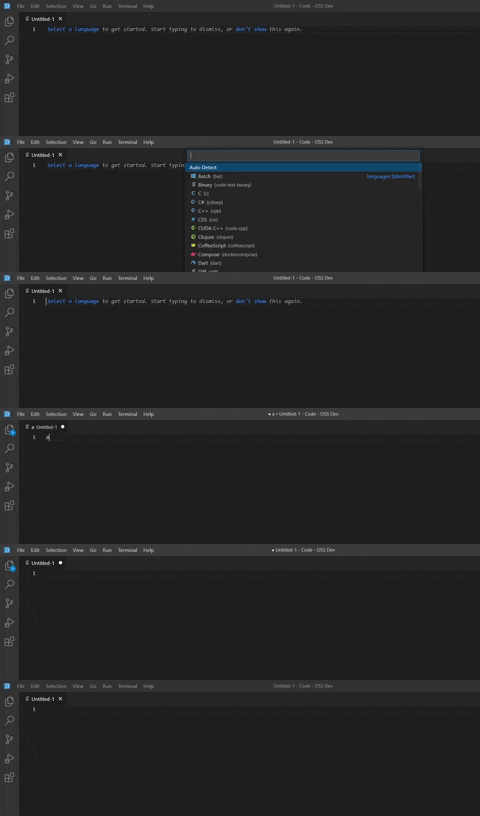 Hello, I tried working on this issue, and as you can see, I can now tab to focus the two links.
But when I activate the link by keyboard (by pressing space or enter), it will write the pressed key.
I implemented the link activation with a listener on the HTML node:
Hello, I tried working on this issue, and as you can see, I can now tab to focus the two links.
But when I activate the link by keyboard (by pressing space or enter), it will write the pressed key.
I implemented the link activation with a listener on the HTML node:
const languageOnKeyPress = async (e: KeyboardEvent) => {
	if (e.code === 'Space' || e.code === 'Enter') {
		e.stopPropagation();
		// Need to focus editor before so current editor becomes active and the command is properly executed
		this.editor.focus();
		await this.commandService.executeCommand(ChangeModeAction.ID, { from: 'hint' });
	} else {
		this.editor.removeContentWidget(this);
	}
	this.editor.focus();
};
How can I prevent the editor to write when I activate the link?
And I don't really know how to test this feature. Should I instantiate a UntitledTextEditorHintContentWidget and trigger the events? If so, how?
Thank you


@isidorn I tried to reproduce this issue, I found that even when workbench.editor.empty.hint is set to text in the below-mentioned VS Code Version, The hint was not visible.
I tried to dig in, for the reason and found that in #213165 we have updated from const shouldRenderDefaultHint = model?.uri.scheme === Schemas.untitled && languageId === PLAINTEXT_LANGUAGE_ID && !inlineChatProviders.length; to const shouldRenderDefaultHint = model?.uri.scheme === Schemas.untitled && languageId === PLAINTEXT_LANGUAGE_ID && hasEditorAgents; and hasEditorAgents is false for the below-mentioned version. (Ref: https://github.com/microsoft/vscode/pull/213165/files#diff-f8e886d59b8516de7fea9105924026f872bf576f42bc20cff450073df79337f7L149).
Is it an expected flow? Would love to fix this if this is not expected.
Version: 1.90.0
Commit: 89de5a8d4d6205e5b11647eb6a74844ca23d2573
Date: 2024-06-04T19:34:48.028Z
Electron: 29.4.0
ElectronBuildId: 9593362
Chromium: 122.0.6261.156
Node.js: 20.9.0
V8: 12.2.281.27-electron.0
OS: Darwin arm64 23.5.0

Assigning first to @joyceerhl. Feel free to assign back to me if you would like me to investigate.
@manav014 the issue you describe is fixed in Insiders https://github.com/microsoft/vscode/issues/214679

Hey @joyceerhl Thanks for confirming. I can take this forward, would be great if you could assign this to me.
Thanks for assigning this @joyceerhl !
I tried to work on this.
I've been working on this, and I'm planning to introduce an onKeyDown event. This event will trigger whenever a user presses any key within the editor. If the user presses the Tab key, then user can move across 3 hint operations(select a language, fill with template and don't show ).
However, I haven't found a specific class name that identifies the anchor tags for language selection, template filling, and hiding. To assign a tabIndex and focus these elements on KeyDown, I'd need a class name. Should I introduce a new class name for these anchor tags?
Alternatively, if this approach seems infeasible, do you have any other ideas on how to achieve this solution?
@joyceerhl I have created a PR that will fix this issue. Would be great if you can review the PR.
