

 microsoft
Remote-SSH & WSL: Support trash
 Issue Type: Feature Request
On my vscode remote-ssh (Ubuntu), I can only delete file permanently, which caused many troubles. Could vscode remote-ssh add features to remove file to trash?
On my local env, I can delete files to trash.
VS Code version: Code 1.39.2 (6ab598523be7a800d7f3eb4d92d7ab9a66069390, 2019-10-15T15:33:00.827Z) OS version: Darwin x64 18.7.0 Remote OS version: Linux x64 4.4.0-165-generic

(Experimental duplicate detection) Thanks for submitting this issue. Please also check if it is already covered by an existing one, like:
![vscodebot[bot] avatar](https://avatars.githubusercontent.com/in/2406?v=4 "Published by a pub.dev verified publisher")
Sorry, I don't think it's covered by that issue. Instead, I don't have the option to delete file NOT permanently.
I think this is the responsibility of whichever extension you are using. Assuming it's the Microsoft one I suggest you open an issue at https://github.com/microsoft/vscode-remote-release
If you do that please link to it from here, then close this one.

Is there a generic location where the trash is on OS? To implement this the remote file system provider would have to move the file into there.

I have also noticed this on my Ubuntu remote, I can only "Delete permanently" in remote but if I open local vscode on the same machine, then it will move files to the trash. So I assume we have some way to find the trash?

@bpasero For my Ubuntu 16.04, the trash is located at /home/$USER/.local/share/Trash. But "Delete permanently" is equivalent to command rm instead of gvfs-trash which is to move to trash.
I was going to request the same feature. I'm on a Windows machine and it really scares me when I want to delete files since there's only a "Delete Permanently" option which doesn't send files to Recycle Bin. Remote WSL is so cool that I sometimes almost forget I'm working remotely in my WSL and since the option "Enable Trash" is enabled in my VSCode I think it's a bit confusing/contradictory that Remote WSL doesn't obey one rule of the settings of VSCode.


(Experimental duplicate detection) Thanks for submitting this issue. Please also check if it is already covered by an existing one, like:
This feature request is now a candidate for our backlog. The community has 60 days to upvote the issue. If it receives 20 upvotes we will move it to our backlog. If not, we will close it. To learn more about how we handle feature requests, please see our documentation.
Happy Coding!

:slightly_smiling_face: This feature request received a sufficient number of community upvotes and we moved it to our backlog. To learn more about how we handle feature requests, please see our documentation.
Happy Coding!


Yep, this feature would be absolutely appreciated :) I almost deleted an entire week's worth of log files...

I look forward to the implementation of this feature. remote-wsl provides much options and advantages for the development using vscode.


I deleted test folder (despite I was right clicking on other file but test folder was selected somehow) , I couldn't retrieve them back so had to rework through them again. This feature is really needed

I just accidentally deleted the src directory of a project because the UI was frozen with, apparently, the wrong item selected. Luckily I had just pushed my work to Git moments before this happened.
The only option for deleting items I'm getting when connected to remotes and local Docker containers is Delete Permanently.

I just had the exact same experience. I right clicked on a single file to delete it permanently, vscode apparently decided to select an entire project folder with it, and proceded to wipe it out from my computer. 1 day of work lost in 1 second. It is unacceptable that this issue has been going on for 2 years now without being solved.

Hi Ben @bpasero, do you think it is feasible to implement this feature with the trash package mentioned by @LeuisKen? If it is ok to incorporate the package into the codebase, I would like to give it a try.
npm package like
trashmay help: https://www.npmjs.com/package/trash

I've opened a new issue on the remote tools repo: https://github.com/microsoft/vscode-remote-release/issues/5615 the bot says it needs 10 upvotes tho
Edit: I just realized this issue was already transferred from that repo, so my new issue will probably just be marked as duplicate, although technically I asked for an option to delete the confirmation so I guess it's not the same because this issue doesn't mention that

// Moves files/folders to the OS trash (recycle bin on Windows) when deleting. Disabling this will delete files/folders permanently.
"files.enableTrash": true
Couldn't we "simply" have VSCode target the remote's trash directory (e.g. $HOME/Trash)?
I'd be totally fine without editor undo integration (i.e. manual restoration only) if that's what's holding this back!
🙂 This feature request received a sufficient number of community upvotes and we moved it to our backlog. To learn more about how we handle feature requests, please see our documentation.
Happy Coding!
What is the current status of this? Like it has been more than a year.

For anyone who hasn't been able to recover stuff with the strategy of finding the folder where your file was contained and CTRL + Z, try finding your ~/.vscode-server/data/User/History file, track down the directory that was changed around the same time (hint: use ls -lla or another tool). Then, find the latest file that was changed, in my case it a was a .py file with the name eODp.py. This allowed me to recover the file successfully after cat'ing it.

Does anyone know where we are with this feature request? Both from feature consistency and file recoverability standpoint, it is just incredible how this critical bit of requirement is repeatedly overlooked. This issue has been open for more than 3 years. Microsoft must prioritise this request and enable file deletion within VSCode (running in WSL2) to either a configurable directory or windows bin.

For anyone who hasn't been able to recover stuff with the strategy of finding the folder where your file was contained and
CTRL + Z, try finding your~/.vscode-server/data/User/Historyfile, track down the directory that was changed around the same time (hint: use ls -lla or another tool). Then, find the latest file that was changed, in my case it a was a .py file with the nameeODp.py. This allowed me to recover the file successfully aftercat'ing it.
This worked perfectly fine for me. I could track down the directory that was changed on a specific date and recover my deleted file. Thank you @bmw99x!

I now see a undo option for files. I can confirm that I was able to recover the delete file using undo command.

However, this doesn't work for folders:
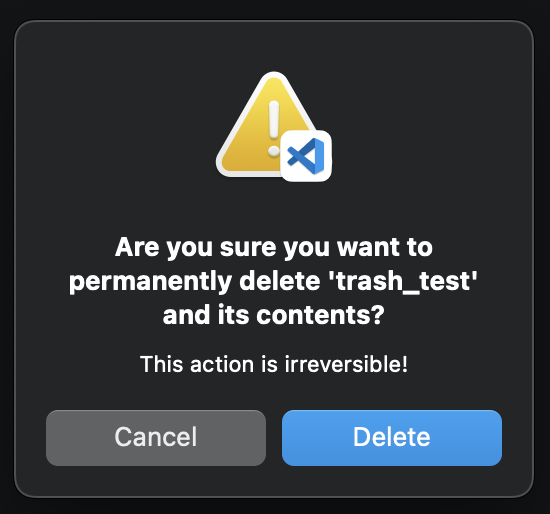
Version: 1.75.1 (Universal) Commit: 441438abd1ac652551dbe4d408dfcec8a499b8bf Date: 2023-02-08T21:34:59.000Z Electron: 19.1.9 Chromium: 102.0.5005.194 Node.js: 16.14.2 V8: 10.2.154.23-electron.0 OS: Darwin arm64 21.6.0 Sandboxed: Yes