

 microsoft
Add support for vertical tabs
Add a big boost in developer productivity by adding support for vertical tabs for files. This is a basic feature in most browsers and is requested by many users.
Tabs are one of the most used features in VSCode in my opinion and improving them has a direct and strong impact in productivity. It would allow for many more tabs to be opened at the same time, without having to scroll them all the time, and could open up possibilities like grouping or archiving in the future.
Duplicates of this issue (that were closed for some reason) have 57 upvotes combined:
25 upvotes: https://github.com/microsoft/vscode/issues/75749 28 upvotes: https://github.com/microsoft/vscode/issues/85527 4 upvotes: https://github.com/microsoft/vscode/issues/65193
The following extension has almost 10,000 installs, but it requires a hack to work (I couldn't do it):
https://marketplace.visualstudio.com/items?itemName=pzuraq.vertical-tab-bar

While I'm working on this with my own, here's my idea how it should be implemented.

If verticalTabs option is introduced, there're 6 combinations editor should consider.
- Tabs (true) Breadcrumbs (true) Vertical Tabs (true)
┌─────────────────────────┐
│Title + Breadcrumbs      │
├──────┬──────────────────┤
│Tabs  │Editor space      │
│      │                  │
│      │                  │
│      │                  │
│      │                  │
│      │                  │
└──────┴──────────────────┘
- Tabs (true) Breadcrumbs (true) Vertical Tabs (false)
┌─────────────────────────┐
│Tabs                     │
├─────────────────────────┤
│Title + Breadcrumbs      │
├─────────────────────────┤
│Editor space             │
│                         │
│                         │
│                         │
│                         │
│                         │
└─────────────────────────┘
- Tabs (true) Breadcrumbs (false) Vertical Tabs (true)
┌─────────────────────────┐
│Title                    │
├──────┬──────────────────┤
│Tabs  │Editor space      │
│      │                  │
│      │                  │
│      │                  │
│      │                  │
│      │                  │
└──────┴──────────────────┘
- Tabs (true) Breadcrumbs (false) Vertical Tabs (false)
┌─────────────────────────┐
│Tabs                     │
├─────────────────────────┤
│Title                    │
├─────────────────────────┤
│Editor space             │
│                         │
│                         │
│                         │
│                         │
│                         │
└─────────────────────────┘
- Tabs (false) Breadcrumbs (true) Vertical Tabs (false)
┌─────────────────────────┐
│Title + Breadcrumbs      │
├─────────────────────────┤
│Editor space             │
│                         │
│                         │
│                         │
│                         │
│                         │
└─────────────────────────┘
- Tabs (false) Breadcrumbs (false) Vertical Tabs (false)
┌─────────────────────────┐
│Title                    │
├─────────────────────────┤
│Editor space             │
│                         │
│                         │
│                         │
│                         │
│                         │
└─────────────────────────┘
Discuss should be made how layout will be laid on these combinations. Plus, referring to the source code, since Title (with breadcrumbs) and Tabs are tightly glued together, we need to detach them gently.

I think that looks great.
Two more ideas:
-
To have the option to have the vertical tabs as a panel like the File Explorer and the Outline panels. That way we can have the files and the opened tabs in the same column and save a lot of space. The File Explorer and the tabs both represent a similar type of information if you think about it: the File Explorer shows files in general as they are in the hard drive and the tabs which files are opened, arranged by users' preference.
-
When splitting the editor, to be able to configure vertical tabs or horizontal tabs in each section separately.
- To have the option to have the vertical tabs as a panel like the File Explorer and the Outline panels. That way we can have the files and the opened tabs in the same column and save a lot of space. The File Explorer and the tabs both represent a similar type of information if you think about it: the File Explorer shows files in general as they are in the hard drive and the tabs which files are opened, arranged by users' preference.
I think VSCode already has it although it's a global one, not a per-editor-group.

I don't have that option here. How do you activate it? I have Folders, Outline, Timeline, NPM Scripts in the Explorer panel.
Simply right click on any list header will show context menu for toggling it.

@santiagopuentep maybe you have previously moved Open Editors onto the Output Panel. Does it appear as a tab there? Or in the context menu of any tab there?

@gjsjohnmurray I searched everywhere but it's nowhere to be found. Two of my colleagues do have it so it'll remain a mystery I suppose. Thanks for the help anyway.
@orange4glace From what I can see the Open Editors panel work almost exactly like vertical tabs.
The only problem I see is that it's not visible when other panels are opened (like search). So maybe improving panels to to be able to place them on a new column (for example a column with all the panels and one with the Opened Editors panel) or to the other side of the screen (to have some to the right and some to the left) I think could be a great way to solve vertical tabs + adding new possibilities for the other panels too.
@orange4glace Also, moving the close button to the right and removing the full path would make them look exactly like tabs and would remove a lot of noise to the panel.
Found it. "explorer.openEditors.visible": 1 solved the problem.
You may want to set that larger than 1. Default value is 9.
Helptext for the section doesn't state that a value of zero disables the panel entirely. It probably ought to.

I would love for VSCode to have official support for vertical tabs. I found the now discontinued VS extension "custom document well" to be a really big productivity boost so I made a clone of it. The extension API in VSCode didn't permit me to do most of the things I wanted so it's sadly not a normal extension.
I don't want to be doing self promotion so no link. But some ideas.
I handled the issue of a split document well by splitting the vertical tabs. It also supports grouping and coloring per group.

Since that screen shot was taken I've also added pinning, which keeps the pinned tab at the top.

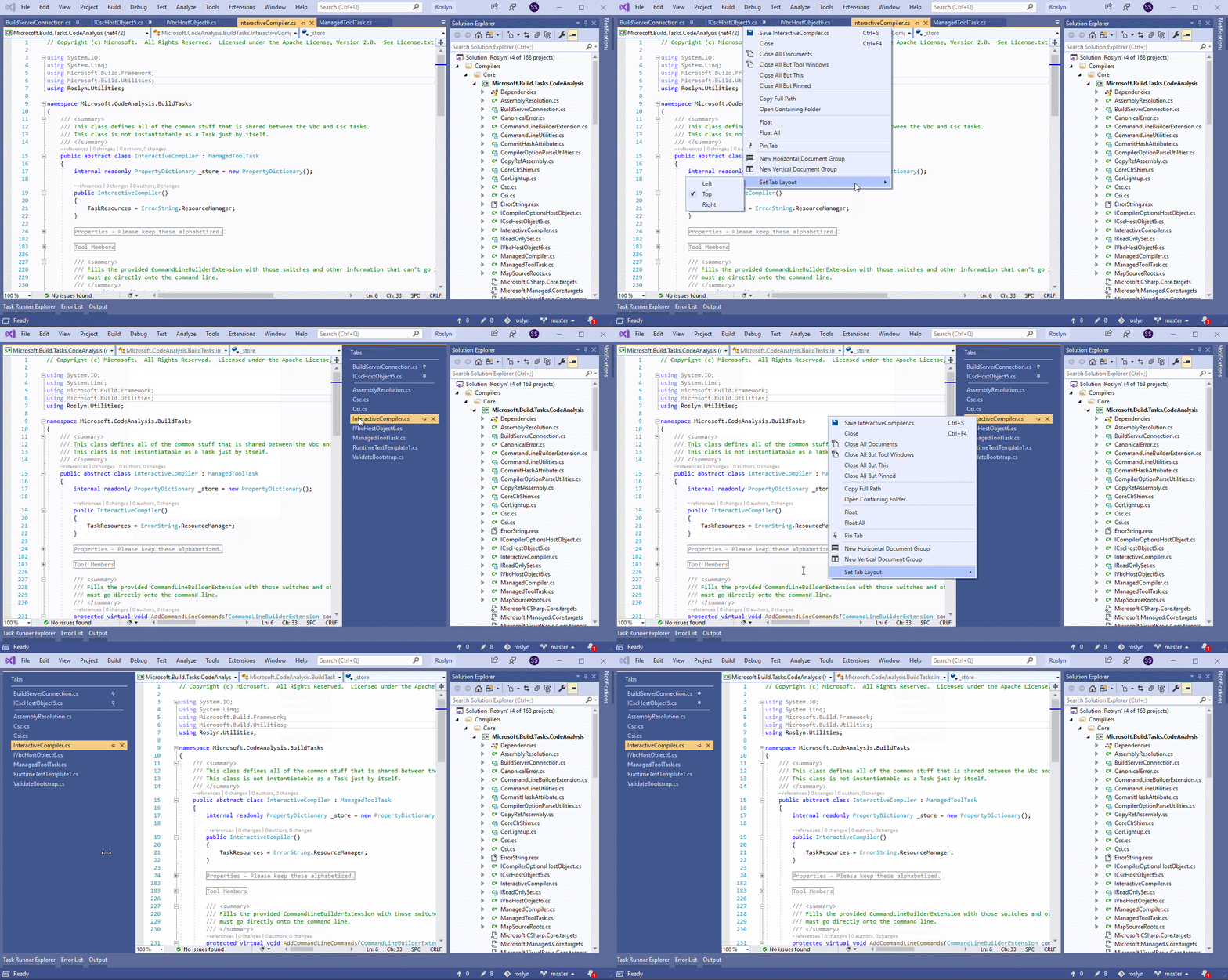
Visual Studio now has vertical tabs. Make it happen! Specifically tabs on the right.

Visual Studio now has vertical tabs. Make it happen! Specifically tabs on the right.
How can it be enabled?

How can it be enabled?
https://docs.microsoft.com/en-us/visualstudio/releases/2019/release-notes-v16.4#vertdoctabs
enable workbench.files.action.focusOpenEditorsView
it will constantly stay visible in top left corner and will not scroll with project files which is good
for fast switching trough opened files: command + option + left/right

@orange4glace
Wow!! amazing ! Can you write an article to guide me and let me experience it ?

I want vertical tabs for open editors to be implemented the ways edge does for browser tabs
https://user-images.githubusercontent.com/32778608/126530941-6f93e69a-f995-46d8-84fc-968e8d2f07b2.mp4

The best implementation of vertical tabs I saw is in WebStorm (IntelliJ IDEA):

This is the only reason I still using WebStorm instead of VS Code 💁♂️

Yep, IDEA IDEs get this perfectly right - especially in terms of being configurable, for left or right positions and alignment, and the option to keep tabs sorted or grouped, or manually sortable with drag-and-drop.
The "Open Files" panel doesn't cut it, because it doesn't stay on-screen - leaving no obvious way to switch between tabs when you have another panel open. (unless you also leave the tabs enabled - which, if you have to reach for two different UIs to navigate between tabs at different times, that really doesn't work either.)
And the vertical-tab-bar extension is just a CSS styling of "OpenFiles", with all the same problems.
The bot said it was added almost a year ago, but I don't think we got any confirmation from a human?
Can the devs please post an update? Where/is this on the roadmap?

Yep, IDEA IDEs get this perfectly right - especially in terms of being configurable, for left or right positions and alignment, and the option to keep tabs sorted or grouped, or manually sortable with drag-and-drop.
The "Open Files" panel doesn't cut it, because it doesn't stay on-screen - leaving no obvious way to switch between tabs when you have another panel open. (unless you also leave the tabs enabled - which, if you have to reach for two different UIs to navigate between tabs at different times, that really doesn't work either.)
And the vertical-tab-bar extension is just a CSS styling of "OpenFiles", with all the same problems.
The bot said it was added almost a year ago, but I don't think we got any confirmation from a human?
Can the devs please post an update? Where/is this on the roadmap?
Haha , the bot mean that this task is going into the vscode team's work, but we don't know when the vscode team will be finished.
I hope vscode team can take reference from the awesome work done by ms edge team. The vertical tabs, tab groups, and collections in ms edge is really nice. I switched to edge and stayed with edge for that reason


Please advise which code editor has convenient vertical tabs?
JetBrains IDEs are cool in that perspective. E.g. WebStorm.

Open Editors can now be pinned on the side since 1.64 (January 2022).

Is the issue closed or is there any important missing feature in Open Editors right now ?

@pilatte the open editor's position wasn't the feature request. Folks are requesting the ability to place the tabs vertically in a column on either side of the editor.
A question for the VS Code devs - What's the technical hurdle for implementing this feature?

You can have the list of opened tabs on the left if you have the side bar on the right, you just can't have both on the same side.
@the0neWhoKnocks I agree that Opened Editors is a list of opened tabs and not a proper vertical tab bar.
Yep, IDEA IDEs get this perfectly right - especially in terms of being configurable, for left or right positions and alignment, and the option to keep tabs sorted or grouped, or manually sortable with drag-and-drop.
The "Open Files" panel doesn't cut it, because it doesn't stay on-screen - leaving no obvious way to switch between tabs when you have another panel open. (unless you also leave the tabs enabled - which, if you have to reach for two different UIs to navigate between tabs at different times, that really doesn't work either.)
And the vertical-tab-bar extension is just a CSS styling of "OpenFiles", with all the same problems.
The bot said it was added almost a year ago, but I don't think we got any confirmation from a human?
Can the devs please post an update? Where/is this on the roadmap?
To add to this comment, there is a clearer, more User friendly visual language implemented with tabs:
- A Tab is a UI that is linked to an area currently being viewed.
- The current tab stands out more than it's siblings (Browsers slightly grey out siblings, Editors add an indicator like a highlight line), and the font generally stands out more.
- Users can easily position/order a Tab based on their preference/need.
- Since the tabs are linked to the Editor, there's a visual grouping especially when you've split the views.
- Having a close button gives a User an exit, when they're not familiar with keyboard shortcuts.