

 microsoft
UriError path cannot begin with two slash characters???
Describe the bug When trying to open the "Show dependencies" I get a small error dialog which says:
Command "maven.project.showDependencies" fails. [UriError]:
If a URI does not contain an authority component, then the
path cannot begin with two slash characters ("//")
To Reproduce Steps to reproduce the behavior:
- Go to Explorer
- Open Maven
- Right mouse click on maven project
- Left mouse click on "Show dependencies"
- See error
Expected behavior I'd like to see the dependency tree in a tab.
Environments (please complete the following information as much as possible):
- OS: openSUSE Leap 15.3
- VS Code version: 1.67.2
- Extension version: 0.35.1
Additional context
Default settings of extension.
mvn 3.8.5 in PATH
In the extension host log:
[2022-05-28 19:38:42.741] [exthost] [warning] [redhat.java] Accessing a resource scoped configuration without providing a resource is not expected. To get the effective value for '[java]', provide the URI of a resource or 'null' for any resource.
In the window log:
[2022-05-28 19:42:25.616] [renderer1] [error] [UriError]: If a URI does not contain an authority component, then the path cannot begin with two slash characters ("//"): Error: [UriError]: If a URI does not contain an authority component, then the path cannot begin with two slash characters ("//")
    at E (vscode-file://vscode-app/usr/share/code/resources/app/out/vs/workbench/workbench.desktop.main.js:70:19479)
    at new a (vscode-file://vscode-app/usr/share/code/resources/app/out/vs/workbench/workbench.desktop.main.js:70:20120)
    at new m (vscode-file://vscode-app/usr/share/code/resources/app/out/vs/workbench/workbench.desktop.main.js:70:21768)
    at m.with (vscode-file://vscode-app/usr/share/code/resources/app/out/vs/workbench/workbench.desktop.main.js:70:20814)
    at S (vscode-file://vscode-app/usr/share/code/resources/app/out/vs/workbench/workbench.desktop.main.js:82:1031)
    at f.doGetUriLabel (vscode-file://vscode-app/usr/share/code/resources/app/out/vs/workbench/workbench.desktop.main.js:2114:11720)
    at f.getUriBasenameLabel (vscode-file://vscode-app/usr/share/code/resources/app/out/vs/workbench/workbench.desktop.main.js:2114:12495)
    at qr.getName (vscode-file://vscode-app/usr/share/code/resources/app/out/vs/workbench/workbench.desktop.main.js:799:28496)
    at qr.getName (vscode-file://vscode-app/usr/share/code/resources/app/out/vs/workbench/workbench.desktop.main.js:2133:48985)
    at vscode-file://vscode-app/usr/share/code/resources/app/out/vs/workbench/workbench.desktop.main.js:2814:19984
    at Array.map (<anonymous>)
    at Jt.computeTabLabels (vscode-file://vscode-app/usr/share/code/resources/app/out/vs/workbench/workbench.desktop.main.js:2814:19954)
    at Jt.handleOpenedEditors (vscode-file://vscode-app/usr/share/code/resources/app/out/vs/workbench/workbench.desktop.main.js:2814:11425)
    at Jt.openEditor (vscode-file://vscode-app/usr/share/code/resources/app/out/vs/workbench/workbench.desktop.main.js:2814:11173)
    at Pi.doShowEditor (vscode-file://vscode-app/usr/share/code/resources/app/out/vs/workbench/workbench.desktop.main.js:2906:17288)
    at Pi.doOpenEditor (vscode-file://vscode-app/usr/share/code/resources/app/out/vs/workbench/workbench.desktop.main.js:2906:16714)
    at Pi.doCloseActiveEditor (vscode-file://vscode-app/usr/share/code/resources/app/out/vs/workbench/workbench.desktop.main.js:2906:20213)
    at Pi.doCloseEditors (vscode-file://vscode-app/usr/share/code/resources/app/out/vs/workbench/workbench.desktop.main.js:2906:22605)
    at Pi.closeEditors (vscode-file://vscode-app/usr/share/code/resources/app/out/vs/workbench/workbench.desktop.main.js:2906:22110)
    at async vscode-file://vscode-app/usr/share/code/resources/app/out/vs/workbench/workbench.desktop.main.js:2701:29598
    at async Promise.all (index 0)
[2022-05-28 19:42:25.695] [renderer1] [error] [UriError]: If a URI does not contain an authority component, then the path cannot begin with two slash characters ("//"): Error: [UriError]: If a URI does not contain an authority component, then the path cannot begin with two slash characters ("//")
    at E (vscode-file://vscode-app/usr/share/code/resources/app/out/vs/workbench/workbench.desktop.main.js:70:19479)
    at new a (vscode-file://vscode-app/usr/share/code/resources/app/out/vs/workbench/workbench.desktop.main.js:70:20120)
    at new m (vscode-file://vscode-app/usr/share/code/resources/app/out/vs/workbench/workbench.desktop.main.js:70:21768)
    at m.with (vscode-file://vscode-app/usr/share/code/resources/app/out/vs/workbench/workbench.desktop.main.js:70:20814)
    at S (vscode-file://vscode-app/usr/share/code/resources/app/out/vs/workbench/workbench.desktop.main.js:82:1031)
    at f.doGetUriLabel (vscode-file://vscode-app/usr/share/code/resources/app/out/vs/workbench/workbench.desktop.main.js:2114:11720)
    at f.getUriBasenameLabel (vscode-file://vscode-app/usr/share/code/resources/app/out/vs/workbench/workbench.desktop.main.js:2114:12495)
    at qr.getName (vscode-file://vscode-app/usr/share/code/resources/app/out/vs/workbench/workbench.desktop.main.js:799:28496)
    at qr.getName (vscode-file://vscode-app/usr/share/code/resources/app/out/vs/workbench/workbench.desktop.main.js:2133:48985)
    at X.getAriaLabel (vscode-file://vscode-app/usr/share/code/resources/app/out/vs/workbench/workbench.desktop.main.js:3043:18227)
    at K.renderElement (vscode-file://vscode-app/usr/share/code/resources/app/out/vs/workbench/workbench.desktop.main.js:157:2212)
    at z.renderElement (vscode-file://vscode-app/usr/share/code/resources/app/out/vs/workbench/workbench.desktop.main.js:157:1825)
    at g.insertItemInDOM (vscode-file://vscode-app/usr/share/code/resources/app/out/vs/workbench/workbench.desktop.main.js:132:19188)
    at g.render (vscode-file://vscode-app/usr/share/code/resources/app/out/vs/workbench/workbench.desktop.main.js:132:18118)
    at g.onScroll (vscode-file://vscode-app/usr/share/code/resources/app/out/vs/workbench/workbench.desktop.main.js:132:24330)
    at m.invoke (vscode-file://vscode-app/usr/share/code/resources/app/out/vs/workbench/workbench.desktop.main.js:67:145)
    at r.deliver (vscode-file://vscode-app/usr/share/code/resources/app/out/vs/workbench/workbench.desktop.main.js:67:2265)
    at o.fire (vscode-file://vscode-app/usr/share/code/resources/app/out/vs/workbench/workbench.desktop.main.js:67:1843)
    at vscode-file://vscode-app/usr/share/code/resources/app/out/vs/workbench/workbench.desktop.main.js:128:16207
    at m.invoke (vscode-file://vscode-app/usr/share/code/resources/app/out/vs/workbench/workbench.desktop.main.js:67:145)
    at r.deliver (vscode-file://vscode-app/usr/share/code/resources/app/out/vs/workbench/workbench.desktop.main.js:67:2265)
    at o.fire (vscode-file://vscode-app/usr/share/code/resources/app/out/vs/workbench/workbench.desktop.main.js:67:1843)
    at k._setState (vscode-file://vscode-app/usr/share/code/resources/app/out/vs/workbench/workbench.desktop.main.js:67:23277)
    at k.setScrollDimensions (vscode-file://vscode-app/usr/share/code/resources/app/out/vs/workbench/workbench.desktop.main.js:67:21286)
    at d.setScrollDimensions (vscode-file://vscode-app/usr/share/code/resources/app/out/vs/workbench/workbench.desktop.main.js:128:18531)
    at g.layout (vscode-file://vscode-app/usr/share/code/resources/app/out/vs/workbench/workbench.desktop.main.js:132:17527)
    at N.layout (vscode-file://vscode-app/usr/share/code/resources/app/out/vs/workbench/workbench.desktop.main.js:157:9549)
    at ar.layoutBody (vscode-file://vscode-app/usr/share/code/resources/app/out/vs/workbench/workbench.desktop.main.js:3043:9369)
    at ar.layout (vscode-file://vscode-app/usr/share/code/resources/app/out/vs/workbench/workbench.desktop.main.js:219:18381)
    at o.layout (vscode-file://vscode-app/usr/share/code/resources/app/out/vs/workbench/workbench.desktop.main.js:157:20495)
    at u.layoutViews (vscode-file://vscode-app/usr/share/code/resources/app/out/vs/workbench/workbench.desktop.main.js:157:33719)
    at u.relayout (vscode-file://vscode-app/usr/share/code/resources/app/out/vs/workbench/workbench.desktop.main.js:157:31784)
    at u.onViewChange (vscode-file://vscode-app/usr/share/code/resources/app/out/vs/workbench/workbench.desktop.main.js:157:28630)
    at vscode-file://vscode-app/usr/share/code/resources/app/out/vs/workbench/workbench.desktop.main.js:157:29871
    at m.invoke (vscode-file://vscode-app/usr/share/code/resources/app/out/vs/workbench/workbench.desktop.main.js:67:145)
    at r.deliver (vscode-file://vscode-app/usr/share/code/resources/app/out/vs/workbench/workbench.desktop.main.js:67:2265)
    at o.fire (vscode-file://vscode-app/usr/share/code/resources/app/out/vs/workbench/workbench.desktop.main.js:67:1843)
    at ar.set minimumBodySize [as minimumBodySize] (vscode-file://vscode-app/usr/share/code/resources/app/out/vs/workbench/workbench.desktop.main.js:219:15350)
    at ar.updateSize (vscode-file://vscode-app/usr/share/code/resources/app/out/vs/workbench/workbench.desktop.main.js:3043:11974)
    at x.runner (vscode-file://vscode-app/usr/share/code/resources/app/out/vs/workbench/workbench.desktop.main.js:3043:3916)
    at x.doRun (vscode-file://vscode-app/usr/share/code/resources/app/out/vs/workbench/workbench.desktop.main.js:71:18006)
    at x.onTimeout (vscode-file://vscode-app/usr/share/code/resources/app/out/vs/workbench/workbench.desktop.main.js:71:17972)
[2022-05-28 19:42:25.715] [renderer1] [error] [UriError]: If a URI does not contain an authority component, then the path cannot begin with two slash characters ("//"): Error: [UriError]: If a URI does not contain an authority component, then the path cannot begin with two slash characters ("//")
    at E (vscode-file://vscode-app/usr/share/code/resources/app/out/vs/workbench/workbench.desktop.main.js:70:19479)
    at new a (vscode-file://vscode-app/usr/share/code/resources/app/out/vs/workbench/workbench.desktop.main.js:70:20120)
    at new m (vscode-file://vscode-app/usr/share/code/resources/app/out/vs/workbench/workbench.desktop.main.js:70:21768)
    at m.with (vscode-file://vscode-app/usr/share/code/resources/app/out/vs/workbench/workbench.desktop.main.js:70:20814)
    at S (vscode-file://vscode-app/usr/share/code/resources/app/out/vs/workbench/workbench.desktop.main.js:82:1031)
    at f.doGetUriLabel (vscode-file://vscode-app/usr/share/code/resources/app/out/vs/workbench/workbench.desktop.main.js:2114:11720)
    at f.getUriBasenameLabel (vscode-file://vscode-app/usr/share/code/resources/app/out/vs/workbench/workbench.desktop.main.js:2114:12495)
    at qr.getName (vscode-file://vscode-app/usr/share/code/resources/app/out/vs/workbench/workbench.desktop.main.js:799:28496)
    at qr.getName (vscode-file://vscode-app/usr/share/code/resources/app/out/vs/workbench/workbench.desktop.main.js:2133:48985)
    at X.getAriaLabel (vscode-file://vscode-app/usr/share/code/resources/app/out/vs/workbench/workbench.desktop.main.js:3043:18227)
    at K.renderElement (vscode-file://vscode-app/usr/share/code/resources/app/out/vs/workbench/workbench.desktop.main.js:157:2212)
    at z.renderElement (vscode-file://vscode-app/usr/share/code/resources/app/out/vs/workbench/workbench.desktop.main.js:157:1825)
    at g.insertItemInDOM (vscode-file://vscode-app/usr/share/code/resources/app/out/vs/workbench/workbench.desktop.main.js:132:19188)
    at g.render (vscode-file://vscode-app/usr/share/code/resources/app/out/vs/workbench/workbench.desktop.main.js:132:18118)
    at g.onScroll (vscode-file://vscode-app/usr/share/code/resources/app/out/vs/workbench/workbench.desktop.main.js:132:24330)
    at m.invoke (vscode-file://vscode-app/usr/share/code/resources/app/out/vs/workbench/workbench.desktop.main.js:67:145)
    at r.deliver (vscode-file://vscode-app/usr/share/code/resources/app/out/vs/workbench/workbench.desktop.main.js:67:2265)
    at o.fire (vscode-file://vscode-app/usr/share/code/resources/app/out/vs/workbench/workbench.desktop.main.js:67:1843)
    at vscode-file://vscode-app/usr/share/code/resources/app/out/vs/workbench/workbench.desktop.main.js:128:16207
    at m.invoke (vscode-file://vscode-app/usr/share/code/resources/app/out/vs/workbench/workbench.desktop.main.js:67:145)
    at r.deliver (vscode-file://vscode-app/usr/share/code/resources/app/out/vs/workbench/workbench.desktop.main.js:67:2265)
    at o.fire (vscode-file://vscode-app/usr/share/code/resources/app/out/vs/workbench/workbench.desktop.main.js:67:1843)
    at k._setState (vscode-file://vscode-app/usr/share/code/resources/app/out/vs/workbench/workbench.desktop.main.js:67:23277)
    at k.setScrollDimensions (vscode-file://vscode-app/usr/share/code/resources/app/out/vs/workbench/workbench.desktop.main.js:67:21286)
    at d.setScrollDimensions (vscode-file://vscode-app/usr/share/code/resources/app/out/vs/workbench/workbench.desktop.main.js:128:18531)
    at g.layout (vscode-file://vscode-app/usr/share/code/resources/app/out/vs/workbench/workbench.desktop.main.js:132:17527)
    at N.layout (vscode-file://vscode-app/usr/share/code/resources/app/out/vs/workbench/workbench.desktop.main.js:157:9549)
    at ar.layoutBody (vscode-file://vscode-app/usr/share/code/resources/app/out/vs/workbench/workbench.desktop.main.js:3043:9369)
    at ar.layout (vscode-file://vscode-app/usr/share/code/resources/app/out/vs/workbench/workbench.desktop.main.js:219:18381)
    at o.layout (vscode-file://vscode-app/usr/share/code/resources/app/out/vs/workbench/workbench.desktop.main.js:157:20495)
    at u.layoutViews (vscode-file://vscode-app/usr/share/code/resources/app/out/vs/workbench/workbench.desktop.main.js:157:33719)
    at u.relayout (vscode-file://vscode-app/usr/share/code/resources/app/out/vs/workbench/workbench.desktop.main.js:157:31784)
    at u.onViewChange (vscode-file://vscode-app/usr/share/code/resources/app/out/vs/workbench/workbench.desktop.main.js:157:28630)
    at vscode-file://vscode-app/usr/share/code/resources/app/out/vs/workbench/workbench.desktop.main.js:157:29871
    at m.invoke (vscode-file://vscode-app/usr/share/code/resources/app/out/vs/workbench/workbench.desktop.main.js:67:145)
    at r.deliver (vscode-file://vscode-app/usr/share/code/resources/app/out/vs/workbench/workbench.desktop.main.js:67:2265)
    at o.fire (vscode-file://vscode-app/usr/share/code/resources/app/out/vs/workbench/workbench.desktop.main.js:67:1843)
    at ar.set maximumBodySize [as maximumBodySize] (vscode-file://vscode-app/usr/share/code/resources/app/out/vs/workbench/workbench.desktop.main.js:219:15479)
    at ar.updateSize (vscode-file://vscode-app/usr/share/code/resources/app/out/vs/workbench/workbench.desktop.main.js:3043:12050)
    at x.runner (vscode-file://vscode-app/usr/share/code/resources/app/out/vs/workbench/workbench.desktop.main.js:3043:3916)
    at x.doRun (vscode-file://vscode-app/usr/share/code/resources/app/out/vs/workbench/workbench.desktop.main.js:71:18006)
    at x.onTimeout (vscode-file://vscode-app/usr/share/code/resources/app/out/vs/workbench/workbench.desktop.main.js:71:17972)

In the extension host log:
extension host log you pasted is irrelavant to this extension. I've created a issue in https://github.com/redhat-developer/vscode-java/issues
In the window log:
The error is thrown by vscode, that given URI of the dependencies is malformed... I cannot reproduce it myself. Can you provide a sample project? BTW, you can also check "Maven for Java" output window, see if command calculating dependencies is successfully executed.

In the extension host log:
extension host log you pasted is irrelavant to this extension. I've created a issue in https://github.com/redhat-developer/vscode-java/issues
It is the only non-info and only java related there.
In the window log:
The error is thrown by vscode, that given URI of the dependencies is malformed... I cannot reproduce it myself. Can you provide a sample project? BTW, you can also check "Maven for Java" output window, see if command calculating dependencies is successfully executed.
Yes, it is in the output available, the mvn command is executed, but the editor tab is next to a red error icon in the middle empty. I try to upload a sample project after morning coffee ;-)
One more question, did you open your project on VS Code desktop version or remotely connect to a server/docker container?
To the last question: It is local. Remote dev I have not used before together with Java development, but with Rust and NodeJS.
I've attached a zipped project dir. Workspace is in .vscode/issue-817.code-workspace. I hope I've found all absolute paths and changed them correctly.
Then I've seen that it seems the UI is crashing.
If I open a new empty text file and call the Show Dependencies or active pom.xml the content is shown in this empty text file tab. But the tab headers are looking strange (missing) and in Open Editors there are only empty selections without any icons and not selectable/changeable.
Maybe you can follow this on the screenshot

If there is no empty text editor open it looks like this:
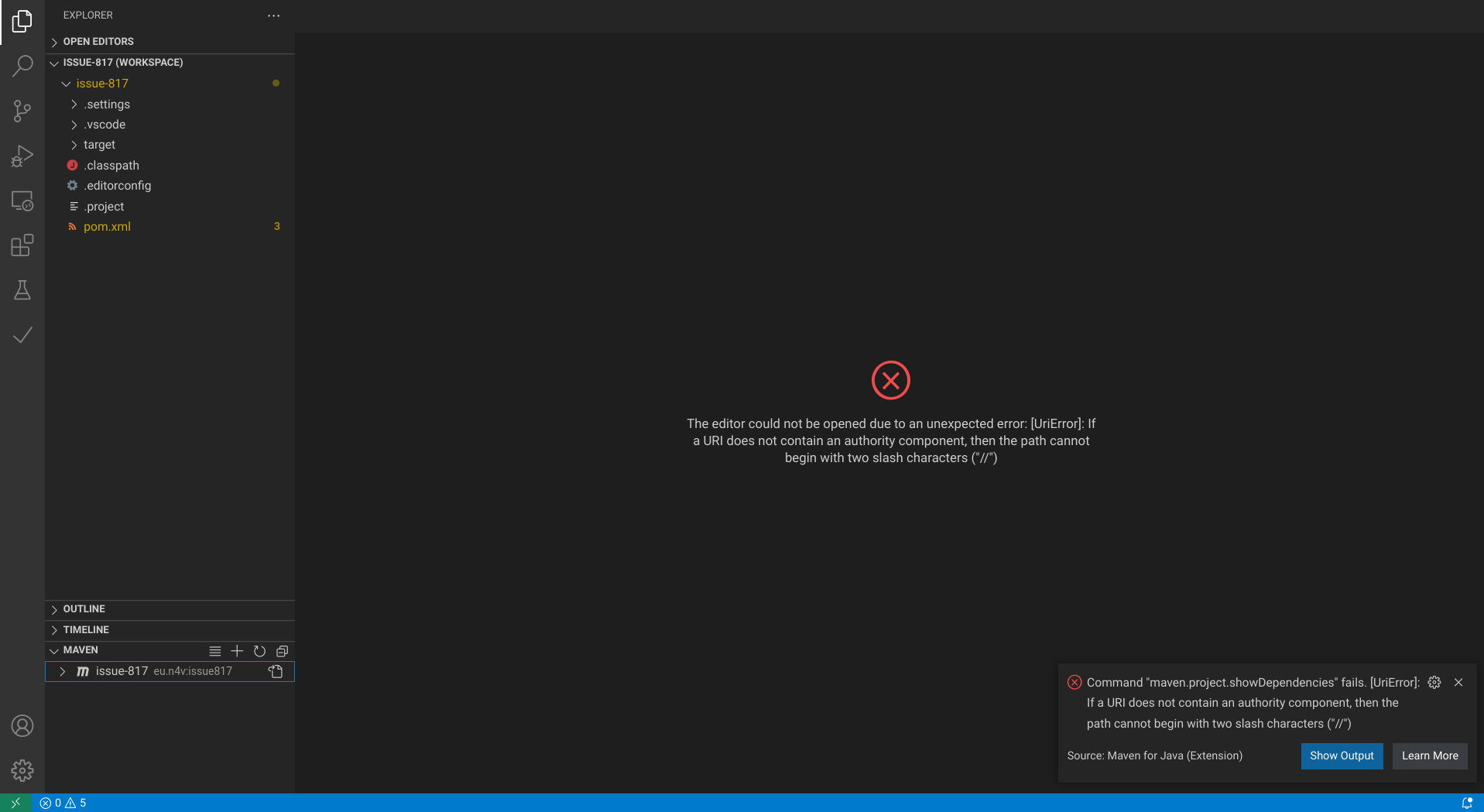
Sorry for the late response, but I failed to reproduce it with the sample project you provided. It's strange...
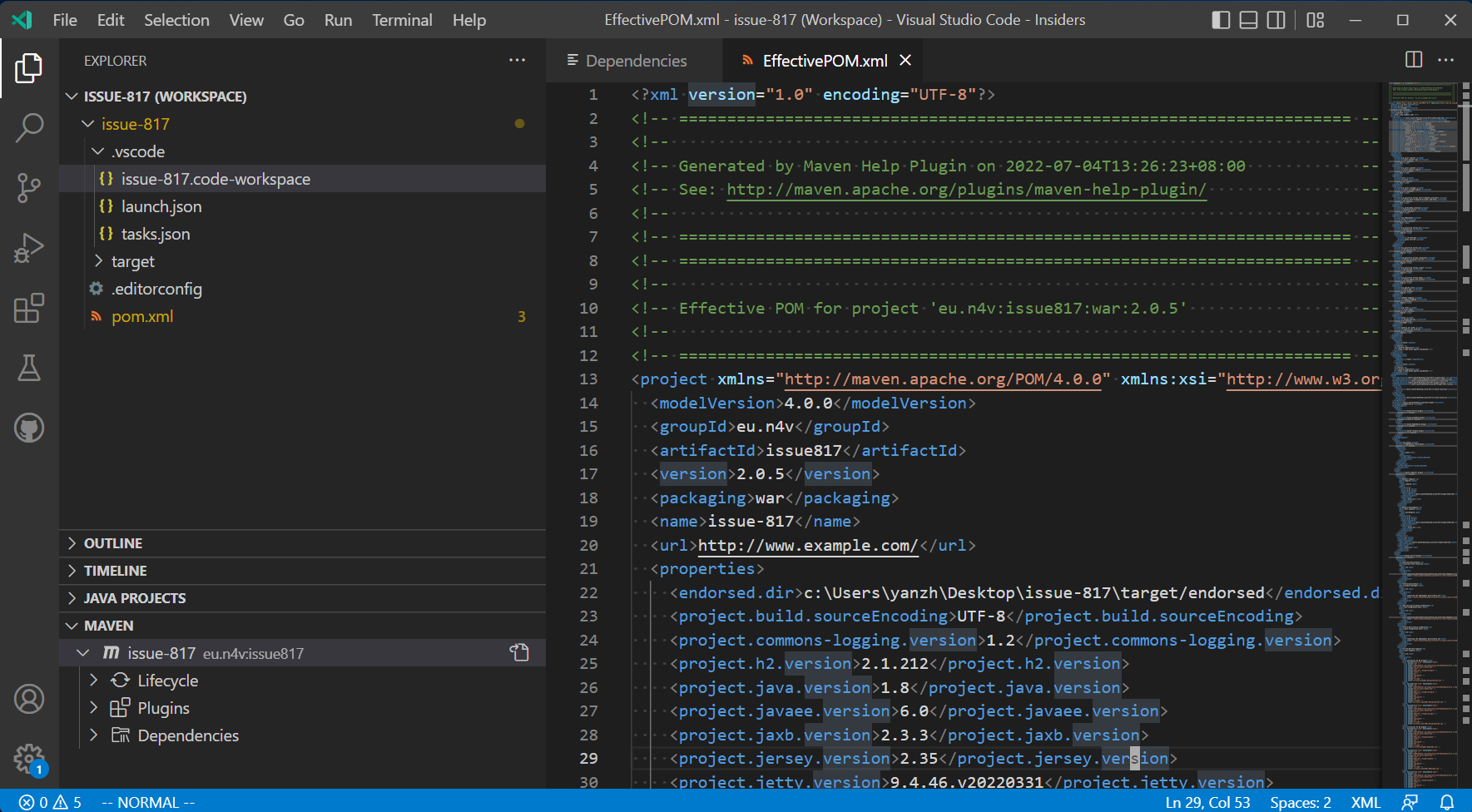
If it is any help I get the same on MacOS. I've had it for a while and worked around it by using the terminal, but it did work in the past MacOS Monterey v12.5.1 VSCode v17.1.0 Extension v0.38.0

I've experienced the same problem today. To reproduce, do the following:
- % mvn archetype:generate -DgroupId=com.mycompany.app -DartifactId=my-app -DarchetypeArtifactId=maven-archetype-quickstart -DarchetypeVersion=1.4 -DinteractiveMode=false
- code my-app
- right click my-app in the maven project view 4.a select "Show Dependencies" in the context menu
found: pop-up announces "Command "maven.project.showDependencies" fails. [UriError]: If a URI does not contain an authority component, then the path cannot begin with two slash characters ("//")"
4.b Select "Show Effective POM" in context menu
found: pop-up announces "Command "maven.project.effectivePom" fails. [UriError]: If a URI does not contain an authority component, then the path cannot begin with two slash characters ("//")"
Extra Info it is also broken in the pre-release version (v0.38.2022090603)
VSCode: Version: 1.71.2 (Universal) Commit: 74b1f979648cc44d385a2286793c226e611f59e7
OSX Darwin goldfish.local 21.6.0 Darwin Kernel Version 21.6.0: Wed Aug 10 14:25:27 PDT 2022; root:xnu-8020.141.5~2/RELEASE_X86_64 x86_64
Extension v0.38.0

@chris-miner I was not able to reproduce it with my PC (windows though), I guess it's something related to machine/os/env...etc.
I'll test it on Linux/macOS see if I can reproduce it. Otherwise I think I can ship a new release which will produce more detailed logs when this error occurs.
I tested with WSL on Windows, it works but the the title looks strange.
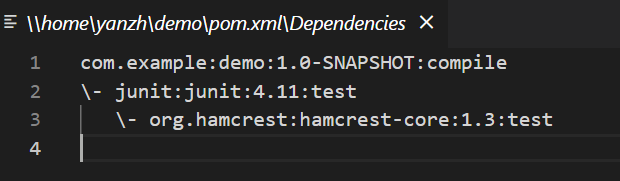
I think I found the culprit. In Unix-like systems, absolute path starts with /. When assembling the customized Uri, an extra slash is prepended, leading to wrong path. And that might cause problems if you host machine is using Unix-like OS.
https://github.com/microsoft/vscode-maven/blob/0774e4c3894270df945631850033e492c8300d04/src/utils/uiUtils.ts#L122
UPDATE I can stably reproduce it on macOS
We will ship the fix in this week.
@chris-miner @liamor @kolbma
Can you help to verify the pre-release version 0.38.2022092607, see if it works for your case? Thanks.
I can verify that using version v0.38.2022092607 works in my case. I created a new quick-start project and was able to see both dependencies and the effective pom for the project. Thanks!
We will ship the fix in this week.
@chris-miner @liamor @kolbma Can you help to verify the pre-release version
0.38.2022092607, see if it works for your case? Thanks.
I don't find time to test it earlier, but I'm now on version v0.39.0 and it works for me now.
Thanks.