

 microsoft
Include #%% in executed code within Interactive window. (was: New notebook-style usability issues)
Issue Type: Feature Request
Hello.
After upgrading to VSCode 1.59.1 I have issues with the new notebook format. I mostly use .py files and interactive iPython panel. Latest update broke my workflow.
- There is no indication on the collapsed cell whether it's executing or not. I have to unwrap it just to see it's running.
- It's impossible to delete a cell with one click. I have to select it or expand it first. There is no 'X' to get rid of an erroneus code instantly.
- Collapsing the cell is not trivial too. If it's a long one I have to scroll all the way down to double-click it's number. Which itself (double-clicking the number) was not an easy thing to figure out.
- Cell header is not propagating from '#%%' comment. I now have to modify all my files to have a comment right below "#%%' line so that I know what cell is running.
Is there any chance this will be fixed in future releases?
Extension version: 2021.8.1147840270 VS Code version: Code 1.59.1 (3866c3553be8b268c8a7f8c0482c0c0177aa8bfa, 2021-08-19T11:53:52.479Z) OS version: Darwin x64 20.6.0 Restricted Mode: No

- and 2. are both fixed in Insiders and the upcoming Stable release. For 1., a blue progress bar will display on top of the executing cell even when it's collapsed. For 2., the cell toolbar will be rendered when the cell is collapsed. You can configure
"notebook.cellToolbarVisibility": "hover"so that you don't need to click on a cell for the toolbar to appear. Here's what that looks like together: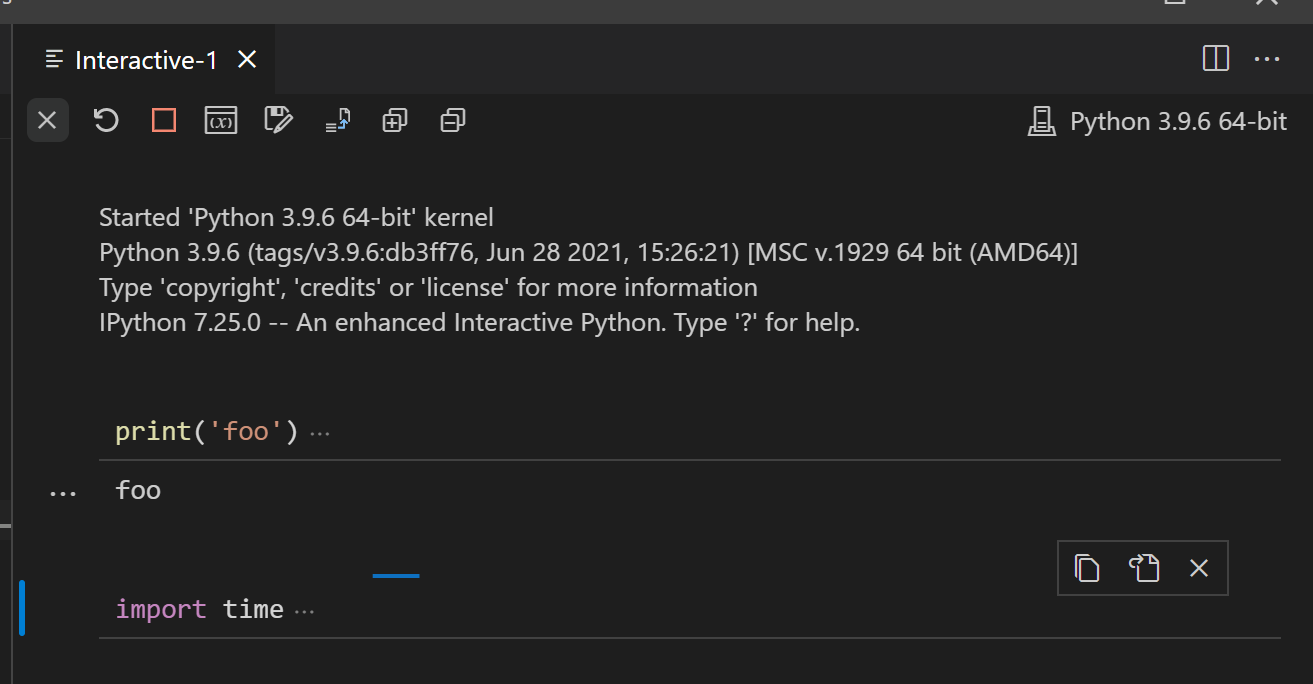
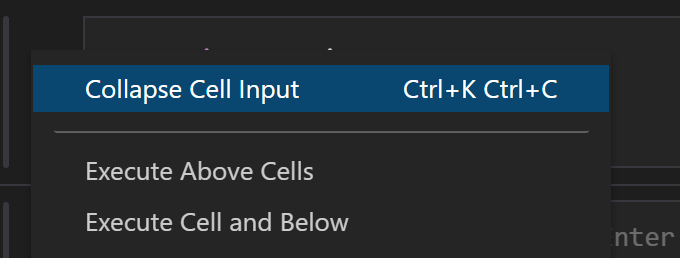
Re: 3., you can double click anywhere on the cell container to collapse it; doesn't have to be on the execution count. You can also use Ctrl+K Ctrl+C, or right click on the cell and select Collapse Cell Input:
Cell header is not propagating from '#%%' comment. I now have to modify all my files to have a comment right below "#%%' line so that I know what cell is running.
We removed propagating the cell header in response to user feedback https://github.com/microsoft/vscode-jupyter/issues/6623 A setting might make sense here though.

Can we make "notebook.cellToolbarVisibility": "hover" the default? I think that makes more sense.

notebook.cellToobarVisibility is currently click by default because notebook users have given us feedback that the cell toolbar showing up on scroll added a lot of clutter to the notebook interface. Perhaps we can consider introducing a new setting interactive.cellToolbarVisibility, or modifying the existing setting to be keyed on viewtype, and making the default value for interactive window hover
Most of the issues are covered by other issues or have been resolved. Bullet #4 is still interesting though and is driving keeping this open.

Thanks for replies and clarification.
I have concerns about "notebook.cellToolbarVisibility": "hover". I bet it would work only when VSCode window has active focus. So it would still take two clicks to delete the cell.
What was better in previous version is that collapse and delete cell buttons were both on the same side. Now I have to scroll from bottom left to top right.
Sorry, what i meant to suggest is what @joyceerhl called "interactive.cellToolbarVisibility". I don't use the notebook editor myself, just the IW.
@svintuss The "notebook.cellToolbarVisibility": "hover" setting does not require the interactive window to have focus, so you can delete cells with a single click.
collapse and delete cell buttons were both on the same side
You can also configure "notebook.cellToolbarLocation": "left" to render the cell toolbar on the left of the cell. Please let us know if that helps.
closing as most of this looks completed, please open a new issue for any remaining concerns
