

 microsoft
Cannot use `Jupyter:` and `Notebook:` commands for interactive window when `.py` file has focus (jupytext mode)
Issue Type: Bug
- Open some
.pyfile - Output something into
Interactive-1window - Open command pallete (
Ctrl + Shift + P) from.pyfile - Apply
Jupyter: Clear All
Cells in Interactive-1 window are not cleared.
Also I can't use Notebook: Restart Kernel from .py file. I can't even find this command.
(These commands work fine if i select Interactive-1 window)
Extension version: 2021.8.1195043623 VS Code version: Code 1.59.0 (379476f0e13988d90fab105c5c19e7abc8b1dea8, 2021-08-04T23:13:20.182Z) OS version: Linux x64 5.8.0-63-generic snap Restricted Mode: No
System Info
| Item | Value |
|---|---|
| CPUs | AMD Ryzen 5 4600H with Radeon Graphics (12 x 1722) |
| GPU Status | 2d_canvas: unavailable_software gpu_compositing: disabled_software multiple_raster_threads: enabled_on oop_rasterization: disabled_off opengl: disabled_off rasterization: disabled_software skia_renderer: enabled_on video_decode: disabled_software vulkan: disabled_off webgl: unavailable_software webgl2: unavailable_software |
| Load (avg) | 1, 1, 1 |
| Memory (System) | 15.08GB (0.50GB free) |
| Process Argv | --no-sandbox --force-user-env --unity-launch --crash-reporter-id 417bce1b-d3f2-43a2-bf1b-e2eb11a9b3f6 |
| Screen Reader | no |
| VM | 0% |
| DESKTOP_SESSION | ubuntu |
| XDG_CURRENT_DESKTOP | Unity |
| XDG_SESSION_DESKTOP | ubuntu |
| XDG_SESSION_TYPE | x11 |
A/B Experiments
vsliv368cf:30146710
vsreu685:30147344
python383cf:30185419
vspyt653:30270858
pythonvspyt602:30300191
vspor879:30202332
vspor708:30202333
vspor363:30204092
pythonvspyt639:30300192
pythontb:30283811
pythonvspyt551cf:30345471
pythonptprofiler:30281270
vshan820:30294714
vstes263cf:30335440
pythondataviewer:30285071
pythonvsuse255:30340121
vscod805:30301674
pythonvspyt200:30340761
vscextlang:30333561
binariesv615:30325510
vsccppwt:30329788
pythonvssor306:30344512
bridge0708:30335490
vstre464cf:30346473

In the meantime while we're investigating, you can rollback to the old implementation with this setting:
"jupyter.enableNativeInteractiveWindow": false

@greazer
Thanks for reply. It doesn't work in old implementation too.
If I run Jupyter: Clear All in old implementation i got this error.
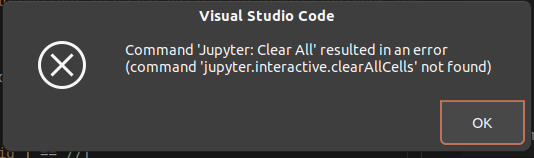
Thanks for the feedback--this is happening because these commands require the interactive window to have focus. We can change the enablement clauses for many of these commands to also work when a #%% Python file is active.

@yopparai Did this work for you in the past? I believe this is not a regression, since commands like 'Jupyter: Delete All Interactive Cells' and 'Jupyter: Restart Kernel' also do not work in the webview interactive window when the #%% Python file has focus.
@joyceerhl
Did this work for you in the past?
Yes. It worked 2 years ago for example (I don't know exactly the version in which the regression occurred).
- Download this version of vscode https://code.visualstudio.com/updates/v1_38
- Download "Python" extension
And you can use these commands from focused #%% .py file:
Python: Restart IPython KernelPython: Delete All Python Interactive Cells
I rolled back to both 1.56 and 1.57 (before any of the native interactive window work started) and can confirm that Restart Kernel and Delete All Interactive Cells did not work there. So this regression must have happened some time ago.
@joyceerhl Yes. This is a long-term regression I think. It appears between 1.38 and 1.56 versions. Should I name the exact version to fix this problem?
Based on https://github.com/microsoft/vscode-jupyter/issues/4182 it looks like this is not a regression
@joyceerhl, thanks for reply! I wrote here how it works perfectly for 1.38 vscode version. For me it looks like a regression. Am I correct in assuming (from #4182) that this feature was intentionally disabled? If so, the issue can be closed.
This is fixed in the latest Insiders build and will become available in the upcoming Stable. Kernel restart, interrupt, and interactive clear all can now be invoked when the .py file has focus, via https://github.com/microsoft/vscode-jupyter/commit/8042246baec3828d23abe260065bbb7c35590a17
and interactive clear all can now be invoked when the .py file has focus
Unable to clear all cells when *.py is in focus.
Restart & Interrupt work, but not clear all.
