

 microsoft
Interactive Window improvements and issues
Hi! I tried to integrate notebooks-related functionality in my daily workflow. Not everything was smooth and I returned to JupyterLab in the end. However, the transition was very close to becoming successful, I really liked some features! I would like to share some feedback.
High level impressions
I realized that "cells" within .py-files is the best form of a "Notebook" to me. Reasons:
- I get 100% of VSCode functionality (especially the editor)
- I have one and only one interface for code editing, regardless of what I am doing (writing C++ or drawing plots with Python in "Notebook")
- I can run ad hoc snippets in the interactive window without touching the original script
- I can seamlessly switch between running the script with the "python" command in the terminal and running it in the Interactive Mode without conversions from .py to .ipynb and vice versa
- I get clear diffs when VCS is involved
- everything else where .py is better at than .ipynb
In fact, all listed reasons can be compressed to one: "I strongly prefer .py files to .ipynb".
Cells within .py
I mean the "# %%" thing that I praised above 😄 I had the following problems with it:
- Performance decreases over time. I use VSCode to work on remote machine (not sure if it matters). After every (or so) kernel reloading the lag between my "shift+enter" and the VSCode's reaction (in the form of running the cell/selected code in the interactive window) becomes larger and larger up to 10 seconds (I needed to reload absolutely everything, VSCode included, in order to fix this). In other words, something was leaking, but I didn't understand, what exactly. Probably, the problem is there for Notebook Editor as well, but I spent less time with it, so I'm not sure.
- No cells folding. I missed this feature from JupyterLab.
- No shortcuts for operations within cells such as "go to the first line of cell", "select all the code within the cell" and so on.
- No cell-level navigation. In JupyterLab, I can navigate between cells by exiting the editor mode (by pressing Esc) and using arrows. The functionality is not somewhat crucial, but some shortcut for traveling between cells would be nice to have.
- No notebook-shortcuts (except for the "Shift+Enter"). Things like "Create a cell below" would make my life a bit easier.
In fact, only the first reason is a major blocker for me.
Notebook editor
For now, I prefer JupyterLab for working with .ipynb, however, I spent some time with Notebook Editor and here are some things I would like to mention:
- No "Go To Definition"
- No multiple cursors across cells (I mean the "Cmd+D" thing).
- No rulers
- Color theme doesn't work properly (the dark theme I use ("1337") is automatically replaced with the native dark theme).
- No brackets highlighting
- No cells folding
1, 2, 3 and 5 seem to be caused by the same fact that the editor is different from the native VSCode editor.
Common for both
- I still don't understand how I can shutdown running kernels.
- No shortcut for reloading the kernel (had to do that with the mouse 😄 ).
Software:
Visual Studio Code: 1.45.0
Python (VSCode extension): 2020.5.78807
python==3.7.7
jupyterlab==2.1.2
Microsoft Data Science for VS Code Engineering Team: @rchiodo, @IanMatthewHuff, @DavidKutu, @DonJayamanne, @greazer

/cc @jmew @claudiaregio @ronglums
Thanks for the feedback. Some of what you asked for is actually already there:
-
There are a number of cell level commands. They're accessible from the VS code command palette. Try opening the palette and typing
Python :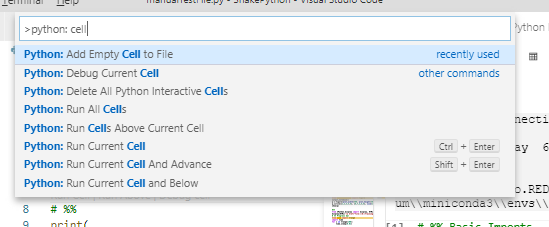
-
We don't do splitting or selecting an entire cell in a python file. Not a bad idea though. Might be hard to discover if not in a code lens though.
-
Shutting down the kernel happens when you close the interactive window.
-
Restart kernel is a command in VS code:

-
We've had other complaints of a slowdown. The slowdown might be related to this: https://github.com/microsoft/vscode-python/issues/9596#issuecomment-597181499.
Can you try putting this into your python.dataScience.runStartupCommands:
%config Completer.use_jedi = False

Oh and most of your issues with the notebook editor are on our backlog. VS code is working on supporting notebooks natively (instead of the big hack we use). This should fix things like:
- Go to definition
- Theme colors when using Remote (that's the likely cause of your theme not working)(
- Bracket highlighting
- Cell folding (maybe, not sure they've committed to this yet).
You can track our work to switch to this new API here: https://github.com/microsoft/vscode-python/issues/10496
Thanks for the detailed answer! I will remember the trick with searching desired command in the palette :)
There are a number of cell level commands
Here are the examples of commands that are missing and that I use in JupyterLab:
- Add a cell above/below the current cell (not at the end of the file; I solved the "below" version by creating a shortcut that simple inserts the "# %%" thing)
- Go to the previous/next cell (it is done simply with arrow keys in JupyterLab)
We need to go through and split into separate issues for those that we don't already know about.

@Yura52 thank you for writing this feedback! It captures many of the things I was thinking. I'm a long time Jupyter notebook user and am now trying out VS Code. Definitely some huge benefits and with the added functionality of the Python Interactive # %%. I agree with the statement "I strongly prefer .py files to .ipynb". There are so many benefits you get from a fully developed text editor that Jupyter has to hack together (code diff, undo/redo, suggestions, linting, shortcuts, navigation, etc).
I want to through my support behind the "Cells in .py" but as @Yura52 pointed out there are some limitations (in order of priority).
- Cell shortcuts. Similar to already mentioned. But specifically these commands:
- insert cell above current cell
- insert cell below current cell
- insert cell at current line (start of cursor line and insert
# %%\n) - delete current cell
- toggle cell type code and markdown (ideally toggle to markdown would do a block line comment)
- cut current cell
- copy current cell
- select all current cell
- collapse current cell (for the code folding)
- Cell Navigation. Also already mentioned but specific commands:
- focus to start of cell above current
- focus to start of cell below current
- go to cell output. Currently a button above the cell but not clear if there's a keyboard shortcut command.
- Writing markdown is cumbersome because must all be comments. Having some functionality which auto adds # on return would be helpful. Perhaps if there was also a context around when
cellType="markdown"it could have functionality specifically to that cell. - Copying charts to clipboard. I am often coping and pasting charts as I go. Having a command and/or UI button which copies to the clipboard would be great but not required.
Mentioned previously was "No notebook-shortcuts" which is a problem; however, if the above have commands for them which could be referenced in the keybindings.json then key shortcuts are basically solved.
Closing thought: it may be nice to make this functionality work withing if __name__ == '__main__'. With Python scripts it's not ideal to have them all defined on the root because then it'll execute when imported. If you could define # %% cells within the if..main.. block then it would align close with best practices for Python.

Thanks for all the great feedback! The biggest takeaway I'm getting from this is that the interactive experience could literally be a replacement for notebook development, IF it supported/emulated some of the same experiences that are possible in a notebook. In addition, @earthastronaut, your closing thought is really interesting new idea about enabling a mix of standard python script with embedded "cells". I'm generalizing your suggestion beyond just doing it for the if..main.. block, say for example if you could define a function and within that function have a concept of cells. This sounds like it could become a complicated problem, but I believe it's worth thinking about.
I'm going to turn this issue into one that is specifically designed to exist as an "idea-factory" for things we could do to make the current script cell experience more powerful and useful. From this issue, ideas that have merit for further investigation should be pulled out into separate issues.
The notebook-specific feedback here is covered by what @rchiodo said above -- those limitations will be addressed when we finally can move to the VS Code native notebook API.
Thanks @greazer for making the tickets to tackle these issues. I had some time and started coding up a solution for the cell edits and navigation. I'll have a branch and can make a PR. Thought I'd provide a heads up.
For me the biggest benefit of working with ipynb files over py files is interactivity of the kernel when coding. The autocomplete/intellisense is much smarter when using the notebook editor or the interactive window. If we could get kernel-based intellisense in the editor window, it think that would really improve my coding experience and I would have no reason to keep working in notebooks.

I'd like to make another suggestion. A cool thing about Google Colab is that they show the RAM and disk usage in the toolbar.
Toolbar
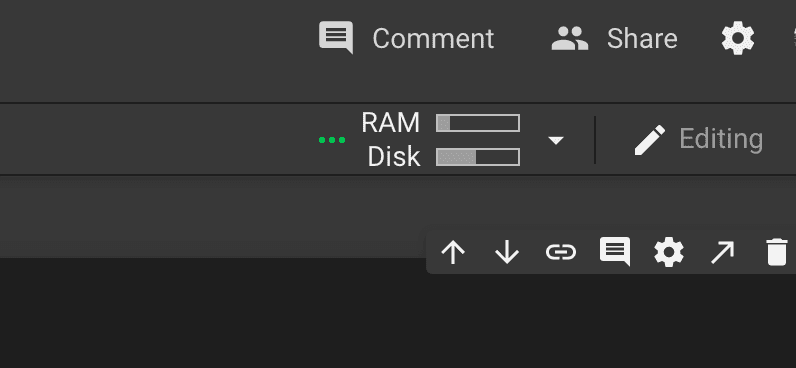
Clicking on the toolbar opens this popup with more details
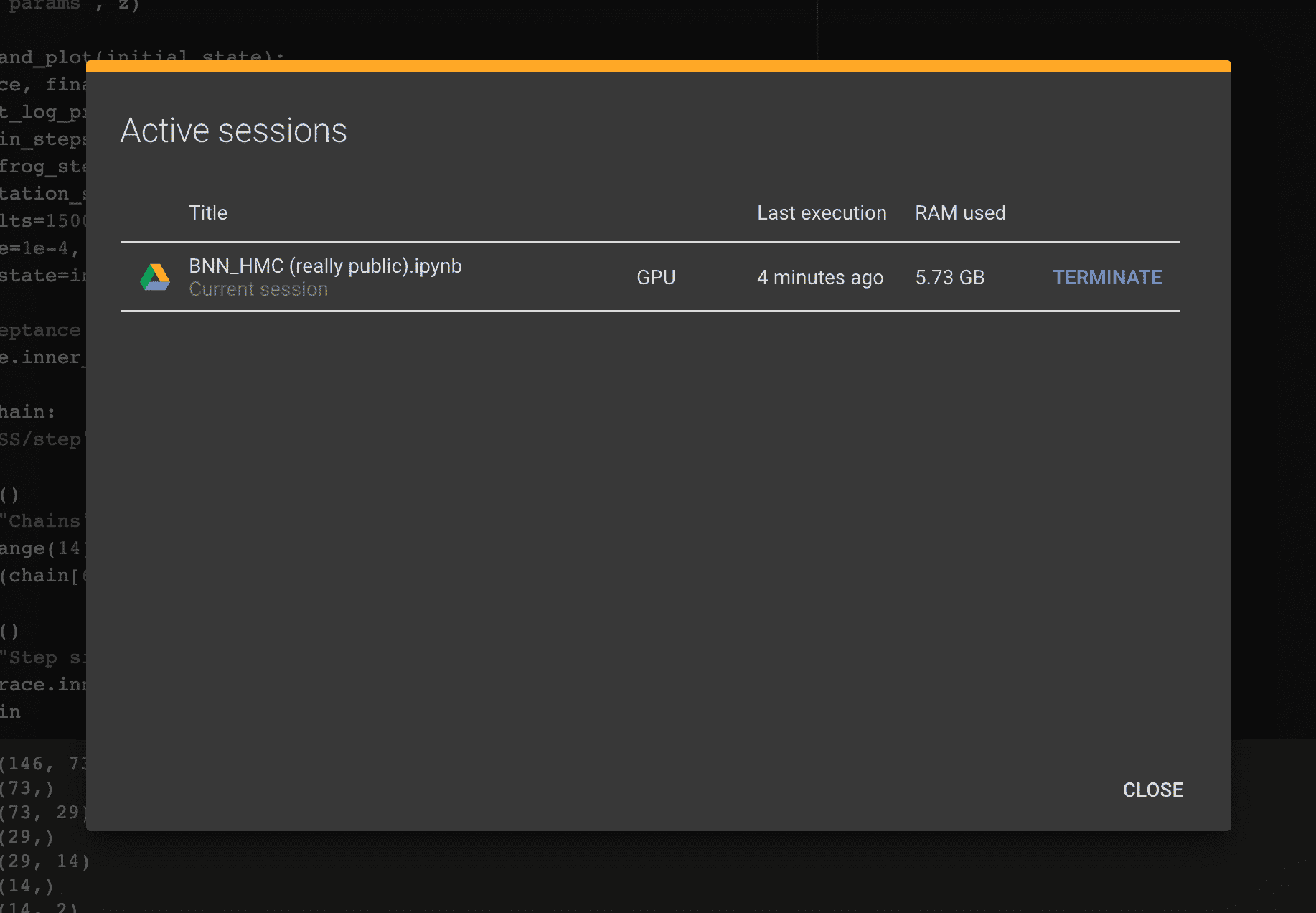
Disk usage isn't that relevant when working locally but the RAM and CPU usage coming from the interactive window would be great to know.
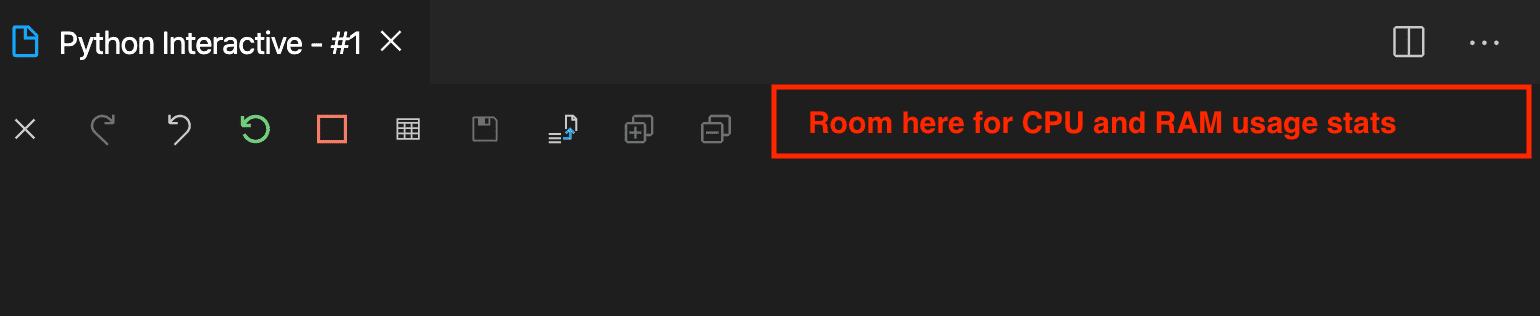

looks like the majority of the requests here have been implemented except for @janosh's request for viewing RAM and disk usage, which we can make a separate issue
