
vscode-jupyter

vscode-jupyter copied to clipboard
 microsoft
Tooltip highlighting functions with reasonable-sized dictionary defaults is slow and unstoppable over Remote SSH
Applies To
- [ ] Notebooks (.ipynb files)
- [X] Interactive Window and/or Cell Scripts (.py files with #%% markers)
What happened?
Summary
- Tooltip highlighting is slow when reasonably-sized dictionaries are passed as default variables to functions.
- The slowness is magnified by many orders of magnitude when working over Remote SSH.
- The work to compute the tooltip does not stop when moving the cursor off the function, so the interactive window will be unable to run commands until the tooltip finishes in the background.
- With a large enough dictionary (on the order of a thousand elements), this can effectively lock up your interactive session.
Steps to Reproduce
- Connect to a machine with Remote SSH, make sure Jupyter and Python extensions are installed.
- Create the following file:
# %%
n = 50
test_variable = {str(i): i for i in range(n)}

def test_func(t: dict = test_variable) -> int:
    return 0

# %%
test_variable

test_func
- Run the first cell in an interactive window.
- Hover your mouse over
test_func. - Notice that the tooltip is pretty slow, but finishes within a few seconds.
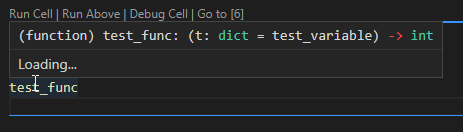
- Note that even with
n=70, resource usage from the associatednodeprocess is very high (100% intopfor me). - Note that moving the cursor off the function does not stop the tooltip computation.
- Setting
n>100can cause a serious slowdown on your machine, effectively rendering the interactive window unusable. I've not been able to find a way to stop the tooltip computation once it has started.
VS Code Version
Version: 1.71.0 (system setup) Commit: 784b0177c56c607789f9638da7b6bf3230d47a8c Date: 2022-09-01T07:36:10.600Z Electron: 19.0.12 Chromium: 102.0.5005.167 Node.js: 16.14.2 V8: 10.2.154.15-electron.0 OS: Windows_NT x64 10.0.22000 Sandboxed: No
Jupyter Extension Version
v2022.8.1002431955
Jupyter logs
info 14:3:22.398: Starting raw kernel '3.10.5 (Python 3.10.5)' for interpreter /home/dskel/.pyenv/versions/3.10.5/bin/python
info 14:3:22.410: Process Execution: > ~/.pyenv/versions/3.10.5/bin/python -c "import ipykernel; print(ipykernel.__version__); print("5dc3a68c-e34e-4080-9c3e-2a532b2ccb4d"); print(ipykernel.__file__)"
> ~/.pyenv/versions/3.10.5/bin/python -c "import ipykernel; print(ipykernel.__version__); print("5dc3a68c-e34e-4080-9c3e-2a532b2ccb4d"); print(ipykernel.__file__)"
info 14:3:22.415: Kernel launching with ports 9020,9021,9022,9023,9024. Start port is 9000
info 14:3:22.431: Process Execution: > ~/.pyenv/versions/3.10.5/bin/python -m ipykernel_launcher --ip=127.0.0.1 --stdin=9023 --control=9021 --hb=9020 --Session.signature_scheme="hmac-sha256" --Session.key=b"657a8025-f120-4378-b167-07fcc3a2d580" --shell=9022 --transport="tcp" --iopub=9024 --f=/home/dskel/.local/share/jupyter/runtime/kernel-v2-26286DBepmrjCLRFF.json
> ~/.pyenv/versions/3.10.5/bin/python -m ipykernel_launcher --ip=127.0.0.1 --stdin=9023 --control=9021 --hb=9020 --Session.signature_scheme="hmac-sha256" --Session.key=b"657a8025-f120-4378-b167-07fcc3a2d580" --shell=9022 --transport="tcp" --iopub=9024 --f=/home/dskel/.local/share/jupyter/runtime/kernel-v2-26286DBepmrjCLRFF.json
info 14:3:22.431: Process Execution: cwd: ~/Documents/Code/puzzles/subsolver
cwd: ~/Documents/Code/puzzles/subsolver
info 14:3:22.562: ipykernel version 6.15.2 for /home/dskel/.pyenv/versions/3.10.5/bin/python
info 14:3:22.562: ipykernel location ~/.pyenv/versions/3.10.5/lib/python3.10/site-packages/ipykernel/__init__.py for /home/dskel/.pyenv/versions/3.10.5/bin/python
warn 14:3:22.846: StdErr from Kernel Process /home/dskel/.pyenv/versions/3.10.5/lib/python3.10/site-packages/traitlets/traitlets.py:2392: FutureWarning: Supporting extra quotes around strings is deprecated in traitlets 5.0. You can use 'hmac-sha256' instead of '"hmac-sha256"' if you require traitlets >=5.
  warn(

warn 14:3:22.846: StdErr from Kernel Process /home/dskel/.pyenv/versions/3.10.5/lib/python3.10/site-packages/traitlets/traitlets.py:2346: FutureWarning: Supporting extra quotes around Bytes is deprecated in traitlets 5.0. Use '657a8025-f120-4378-b167-07fcc3a2d580' instead of 'b"657a8025-f120-4378-b167-07fcc3a2d580"'.
  warn(

info 14:3:22.856: Kernel Output: NOTE: When using the `ipython kernel` entry point, Ctrl-C will not work.

To exit, you will have to explicitly quit this process, by either sending
"quit" from a client, or using Ctrl-\ in UNIX-like environments.

To read more about this, see https://github.com/ipython/ipython/issues/2049


To connect another client to this kernel, use:
    --existing kernel-v2-26286DBepmrjCLRFF.json

info 14:3:23.65: Got new session ef10fc5f-1338-453e-ad73-ef344b375858
info 14:3:23.65: Started new restart session
info 14:3:23.87: Executing silently Code (idle) = import sys\nprint(sys.executable)
info 14:3:23.100: Widget Message: Received IPyWidgetMessages.IPyWidgets_onRestartKernel
info 14:3:23.113: Widget Message: Received IPyWidgets_kernelOptions in ScriptManager
info 14:3:23.113: Widget Message: Received IPyWidgetMessages.IPyWidgets_kernelOptions
info 14:3:23.195: Executing silently Code (completed) = import sys\nprint(sys.executable) with 1 output(s)
info 14:3:23.197: UpdateWorkingDirectoryAndPath in Kernel
info 14:3:23.197: Executing silently Code (idle) = import types as _VSCODE_types\nimport os\nimport hashlib as _VSCODE_hashlib\nfrom IPython import get_ip
info 14:3:23.218: Executing silently Code (completed) = import types as _VSCODE_types\nimport os\nimport hashlib as _VSCODE_hashlib\nfrom IPython import get_ip with 1 output(s)
info 14:3:23.219: Waiting for idle on (kernel): ef10fc5f-1338-453e-ad73-ef344b375858 -> idle
info 14:3:23.219: Finished waiting for idle on (kernel): ef10fc5f-1338-453e-ad73-ef344b375858 -> idle
info 14:3:23.220: Executing silently Code (idle) = __file__ = '/home/dskel/Documents/Code/puzzles/subsolver/tools.py'
info 14:3:23.225: Executing silently Code (completed) = __file__ = '/home/dskel/Documents/Code/puzzles/subsolver/tools.py' with 0 output(s)
info 14:3:27.373: Generated code for 1 = <ipython-input-1-869a3a7009c5> with 7 lines
info 14:3:27.445: Cell 13 executed with state Success
info 14:3:29.203: Generated code for 2 = <ipython-input-2-65bc27a07a85> with 4 lines
info 14:3:29.251: Cell 14 executed with state Success
### Coding Language and Runtime Version

Python v3.9.13 and Python v3.10.5

### Language Extension Version (if applicable)

v2022.14.0

### Anaconda Version (if applicable)

_No response_

### Running Jupyter locally or remotely?

Remote
