

 microsoft
Understand needed update to webRoot or sourceMapPathOverrides
The Debug Diagnostics is trying its best to help me with the below error message; but I'm still not sure how to work out the required updates.

What does it mean by; "couldn't find a corresponding source location"? I think its because it can't find the source maps?
What path is it looking for the corresponding "source location" on? How am I supposed to read the red/ green and not highlighted part of the other files with the same name message? Is the red, parts of the path it was looking for that don't match the paths of the other files with the same names?
I tried updating webRoot and sourceMapPathOverrides; but the error message didn't change.
My launch.json is as below.
 {
      "type": "chrome",
      "request": "launch",
      "name": "vuejs: chrome",
      "url": "http://localhost:8080",
      "webRoot": "${workspaceFolder}",
      "sourceMaps": true,
      "sourceMapPathOverrides": {
        "webpack:/*": "${webRoot}/*",
        "/./*": "${webRoot}/*",
        "/src/*": "${webRoot}/*",
        "/*": "*",
        "/./~/*": "${webRoot}/node_modules/*"
      }

The sourceMapPathOverrides are case-insensitive but exact. It looks like you have a webpack URI which doesn't match any of the overrides, which leads to the debugger trying to form a path with it in the second text diff and putting in a path like foo/webpack:/something.
You often should not need to update sourceMapPathOverrides at all. The defaults are good, and overriding them causes issues more often than not.

Looking at the Sources tab in Chrome Dev tools I see the below domains
I see webpack-internal in there; judging by the defaults - I guess this has been updated from what would normally be webpack?
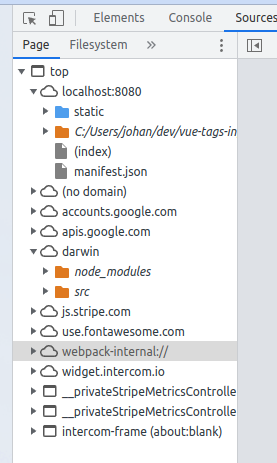
webpack-internal can be there and normally is not what you actually want to map to source files when debugging. For Vue particularly this is usually some extra files they use for loading CSS/JS, if I recall correctly.
If you're able to share the log file, I can diagnose this a bit further 🙂
In vs-code; in the loaded scripts tab I see

... checking the logs now; I see they are written to a zip file
I see the log message
Verbose logs are written to:
/root/.vscode-server/data/logs/20230303T074819/exthost7/ms-vscode.js-debug/vscode-debugadapter-5c185aae.json.gz
But that file does not exists
cd /root/.vscode-server/data/logs/20230303T074819/exthost
exthost1/ exthost2/
I am running connected to a docker container.
Hey,did you solved this problem? i've searched all the Internet and found no useful solutions. vscode never find corresponding src location Orz
