

 microsoft
Breakpoints not set when using org.mockito:mockito-inline
When using org.mockito:mockito-inline in unit tests, trying to debug the tests is harder because upon starting the debug breakpoint will have to be created after all mocks/spies are created.
In addition all live context becomes invisible.
Environment
- Operating System: MacOS
- JDK version:
openjdk version "11.0.7" 2020-04-14 OpenJDK Runtime Environment AdoptOpenJDK (build 11.0.7+10) OpenJDK 64-Bit Server VM AdoptOpenJDK (build 11.0.7+10, mixed mode) - Visual Studio Code version:
1.53.2 622cb03f7e070a9670c94bae1a45d78d7181fbd4 x64 - Java extension version: v0.12.1
- Java Debugger extension version: v0.31.0
Steps To Reproduce
- run
git clone https://github.com/sfrank-mc/vscode-java-debug-bug(or go through the code and replicate locally) - open the workspace inside the
vscode-java-debug-bugwith vscode - open file at
src/main/java/vscode/java/debug/bug/App.javaand place a breakpoint at line 8 - open file at
src/test/java/vscode/java/debug/bug/AppTest.javaanddebugthe test calledtestAppHasAGreeting - notice test will pass without breakpoint being hit.
Workaround and second issue:
- open file at
src/test/java/vscode/java/debug/bug/AppTest.javaand set a breakpoint at line 15 debugthe test calledtestAppHasAGreeting- breakpoint at line 15 is hit. don't continue.
- open file at
src/main/java/vscode/java/debug/bug/App.java - remove the breakpoint at line 8
- re-create the breakpoint at line 8
- continue running the debug session (F5)
- notice breakpoint is hit.
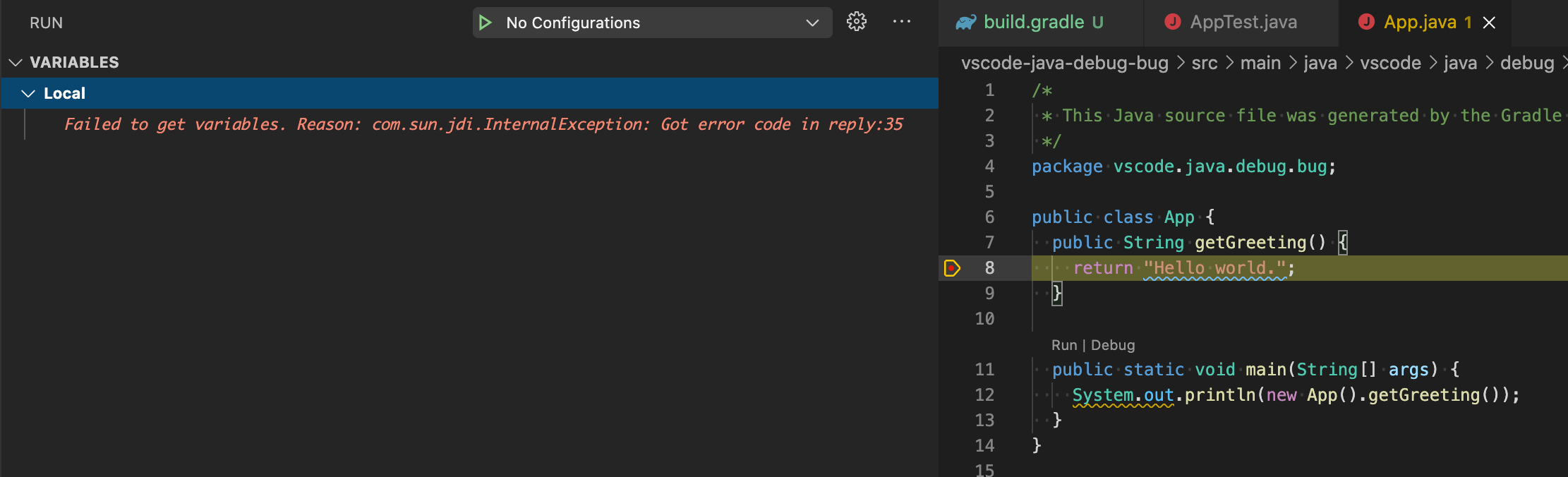
- notice there is no live context info:
Control check:
- open file at
build.gradle - comment line 30
- uncomment line 31
- perform steps 3 and 4.
- notice breakpoint is hit.
Current Result
Debug breakpoints broken in every run No debug info even if breakpoint is re-created
Expected Result
Debug breakpoints should be maintained between runs Debug info should be available

For the screenshot you shared, actually that stack frame doesn't contain any local variables. The fix for the debugger is just to ignore the exception.
But i have one question for your sample: What's the difference between the statement App classUnderTest = spy(new App()); and App app = new App();? I don't have the knowledge of the library mockito-inline you used.

Thanks for your reply @testforstephen,
Regarding the stack frame in the image - it should it think at least include this as this is an instance method - am I wrong?
This is the picture of same breakpoint when I use mockito-core instead of mockito-inline:

Regarding your question:
spy() will wrap an object interface so that it could be used for test units.
Mockito is a supporting framework that helps perform unit testing. It allows you to mock and/or spy on objects and then verify/assert certain facts that happened to them while keeping them from performing actions that may affect or be affected by the environment thus isolating the "unit" - allowing you to "unit test". Mockito-Inline is part of the framework that allows additional features including mocking/spying on static methods etc...
You can find more info here:
- https://javadoc.io/doc/org.mockito/mockito-core/latest/org/mockito/Spy.html
- https://www.baeldung.com/mockito-spy
- https://javadoc.io/static/org.mockito/mockito-core/3.8.0/org/mockito/Mockito.html#mockito-inline
Hope that helps.
Regarding the stack frame in the image - it should it think at least include this as this is an instance method - am I wrong?
It seems no this context for your sample case. The error you saw in VARIABLES view is actually from resolving this object from the stack frame. And I tried other IDEs, no variables as well.
And thank you for providing the information about the spy usage, i will take a look to see what happens at the background.
Thanks....
My bad from not being clear... I was referring to the this...
As you can see in the two picture:
- When debugging using
mockito-inlinethethisis not displayed - showing the error line you mentioned - When debugging using
mockito-corethethisis displayed correctly
As these are both from the same file and line in the code I would think they should have the same behaviour. Am I wrong?
I got your point, it should have some runtime differences between these two cases. Our debugger just reflects what the application JVM gives us and doesn't do additional processing.
Hi @sfrank-mc, I'm an AI Support assistant here to help with your issue. While the team reviews your request, I wanted to provide some possible tips and documentation that might help you in the meantime.
- Workaround: switch back to the regular mockito-core mock maker (comment out the
mockito-inlinedependency in your build and useorg.mockito:mockito-coreinstead). This restores normal debugging behavior. - Known issue in the Java Debugger with inline/instrumented code, see: • inline breakpoint will not work on some conditions (#1414) – describes breakpoints silently failing when classes are instrumented (e.g. by inline mock maker).
Other references with low confidence
- Support update the invalid breakpoint into next valid line. Discussion about invalid breakpoint handling in VS Code Debugger. No direct fix for inline/instrumented code. https://github.com/microsoft/vscode-java-debug/issues/90#issuecomment-372213181
The team will respond to your issue shortly. I hope these suggestions are helpful in the meantime. If this comment helped you, please give it a 👍. If the suggestion was not helpful or incorrect, please give it a 👎. Your feedback helps us improve!
![github-actions[bot] avatar](https://avatars.githubusercontent.com/in/15368?v=4 "Published by a pub.dev verified publisher")