vscode-java-debug

vscode-java-debug copied to clipboard
 microsoft
maven-jar-plugin use app-to-import setting make debug error
[provide a description of the issue]
Environment
- Operating System: Windows_NT x64 10.0.17763
- JDK version: java version "1.8.0_202" Java(TM) SE Runtime Environment (build 1.8.0_202-b08) Java HotSpot(TM) 64-Bit Server VM (build 25.202-b08, mixed mode)
- Visual Studio Code version: version: 1.48.1 (system setup) commit: 3dd905126b34dcd4de81fa624eb3a8cbe7485f13
- Java extension version: v0.10.0
- Java Debugger extension version: v0.10.0
Steps To Reproduce
- [step 1] I have two module in a project.They are all application.The gvt-bdp-stats-scheduler module dependent on gvt-bdp-app module. the A module's setting like this.
			<plugin>
				<groupId>org.apache.maven.plugins</groupId>
				<artifactId>maven-jar-plugin</artifactId>
				<executions>
					<execution>
						<goals>
							<goal>jar</goal>
						</goals>
						<phase>package</phase>
						<configuration>
							<!--to be imported on other projects-->
							<classifier>app-to-import</classifier>
							<includes>
								<include>**/entity/*</include>
							</includes>
						</configuration>
					</execution>
				</executions>
			</plugin>
the B module's setting like this.
        <dependency>
            <groupId>com.gvt.bdp</groupId>
            <artifactId>gvt-bdp-app</artifactId>
            <version>${revision}</version>
            <classifier>app-to-import</classifier>
        </dependency>
[attach a sample project reproducing the error] attach logs
Current Result
It's normal when I run with jar.But in debug, it cause java.lang.TypeNotPresentException: Type com.entity.OrderStatsEntity not present
Expected Result
The project work in Idea is well.
Additional Informations
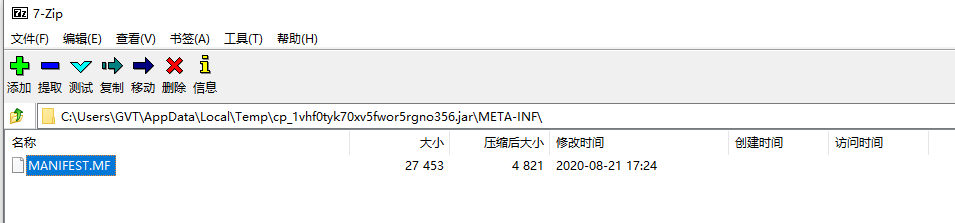
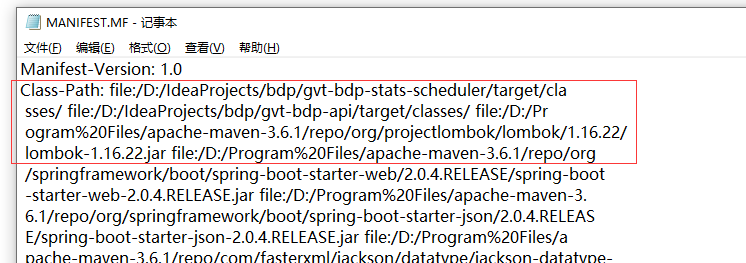
When I open the run jar file of temp, the MANIFEST.MF there is no gvt-bdp-app's class-path definition in the file when I debug gvt-bdp-stats-scheduler.