
vscode-java-debug

vscode-java-debug copied to clipboard
 microsoft
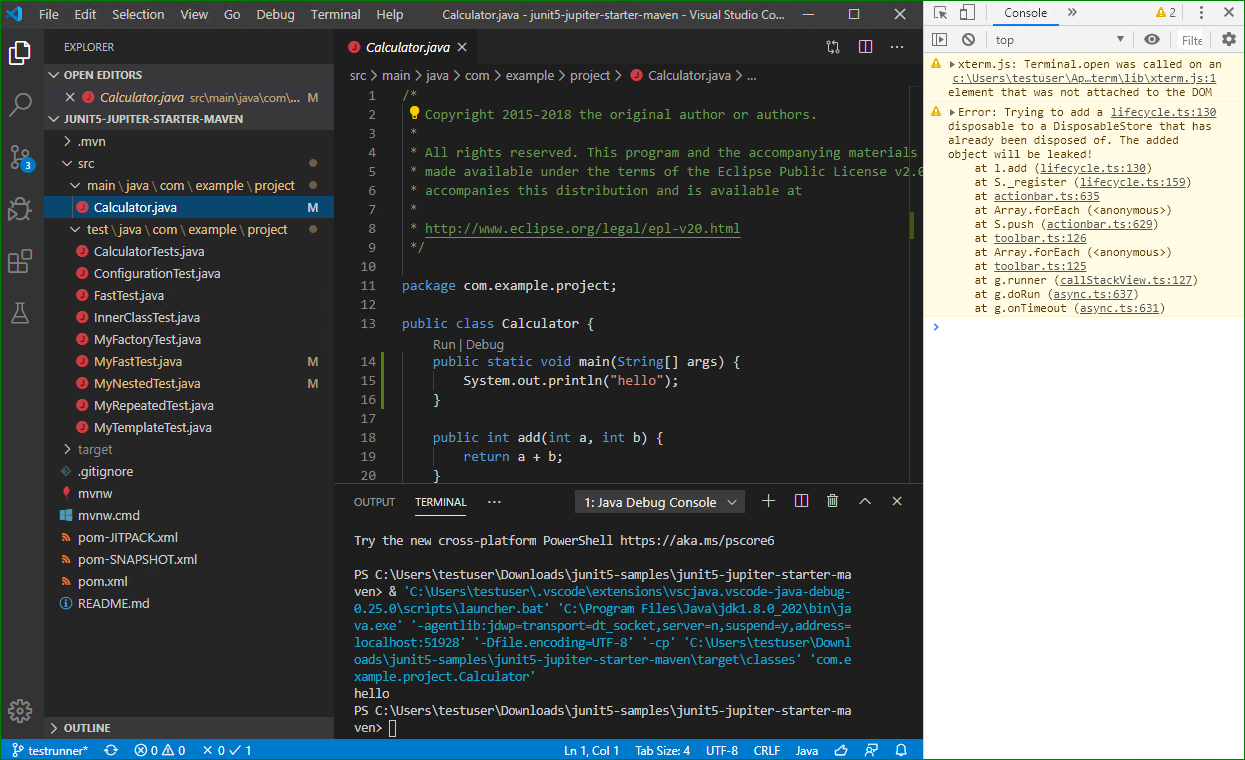
Error: Trying to add a disposable to a DisposableStore that has already been disposed of
Environment
- Operating System: Win10
- JDK version: 1.8.0_202
- Visual Studio Code version: 1.42.1
- Java extension version: 0.57.0
- Java Debugger extension version: 0.25.0
Steps To Reproduce
- Git clone https://github.com/ZhengJun003/junit5-samples/tree/testrunner
- Open junit5-jupiter-starter-maven folder
- Open Toggle Developer Tools
- Add a main method in Calculator.java file and click Debug code lens
Current Result
Start a debug session that will prompt an error at Toggle Developer Tools.

Hi @ZhengJun003, I'm an AI Support assistant here to help with your issue. While the team reviews your request, I wanted to provide some possible tips and documentation that might help you in the meantime.
This error is coming from VS Code’s UI layer when you toggle the Developer Tools, not from the Java extensions themselves. Suggestions:
- Update VS Code to the latest version. There have been various fixes around DisposableStore in recent releases.
- Update the Java extensions (Language Support for Java and Java Debugger) to their latest versions.
- Try reproducing without opening Developer Tools—clicking the "Run | Debug" code lens should launch the debugger without errors.
- If the issue persists, please file it against the VS Code core repository: https://github.com/microsoft/vscode/issues/new?title=DisposableStore%20error%20in%20UI
Labels:
- question
The team will respond to your issue shortly. I hope these suggestions are helpful in the meantime. If this comment helped you, please give it a 👍. If the suggestion was not helpful or incorrect, please give it a 👎. Your feedback helps us improve!
![github-actions[bot] avatar](https://avatars.githubusercontent.com/in/15368?v=4 "Published by a pub.dev verified publisher")