

 microsoft
CUDA File Formatting
Bug type: Language Service
Describe the bug
- OS and Version: Fedora Linux 35 (KDE Plasma) x86_64
- VS Code Version: 1.67.2
- C/C++ Extension Version: 1.10.3
- Other extensions you installed (and if the issue persists after disabling them): None
- If using SSH remote, specify OS of remote machine: N/A
- A clear and concise description of what the bug is, including information about the workspace (i.e. is the workspace a single project or multiple projects, size of the project, etc).
Clang format works for .c and .h files (as far as I have tested). For each of those, I added the following items in my settings.json:
"[c]": {
  "editor.defaultFormatter": "ms-vscode.cpptools"
},
"[h]": {
  "editor.defaultFormatter": "ms-vscode.cpptools"
}
However, when I add something similar for .cuh files, it does not format them. From what I have gathered online, clang-format should support CUDA files: https://github.com/dense-analysis/ale/issues/2318
Steps to reproduce
Use the following clang-format settings in your settings.json:
"C_Cpp.clang_format_fallbackStyle": "{ BasedOnStyle: Chromium, UseTab: Never, PointerAlignment: Right, ContinuationIndentWidth: 2, AlignConsecutiveMacros: true, AlignAfterOpenBracket: BlockIndent }",
Also, make sure you have the format on save option enabled too: "editor.formatOnSave": true,
After create a tmp.cuh file with the following contents (exactly):
static   const uint32_t H[8] = {
  0x6a09e667, 0xbb67ae85,   0x3c6ef372, 0xa54ff53a,
  0x510e527f, 0x9b05688c, 0x1f83d9ab, 0x5be0cd19,};
Finally, press CTRL/CMD+S to save the file.
Expected behavior
With the settings above, on save, it should format the file to look like this:
static const uint32_t H[8] = {
  0x6a09e667, 0xbb67ae85, 0x3c6ef372, 0xa54ff53a,
  0x510e527f, 0x9b05688c, 0x1f83d9ab, 0x5be0cd19,
};
You can try renaming the file to tmp.h and see that it does indeed format.

I'm not reproing the bug. What is your C_Cpp.formatting setting? When you set C_Cpp.loggingLevel to "Debug" does the "C/C++" logging show clangFormat or vcFormat being used? I do repro the issue with vcFormat (not sure if that's expected or not).

@sean-mcmanus I do not have a C_Cpp.formatting setting in my settings.json (i.e. default). However, even when I set it to clangFormat and save the file (format on auto save), it does not format it at all. Where do I see the debug logs?
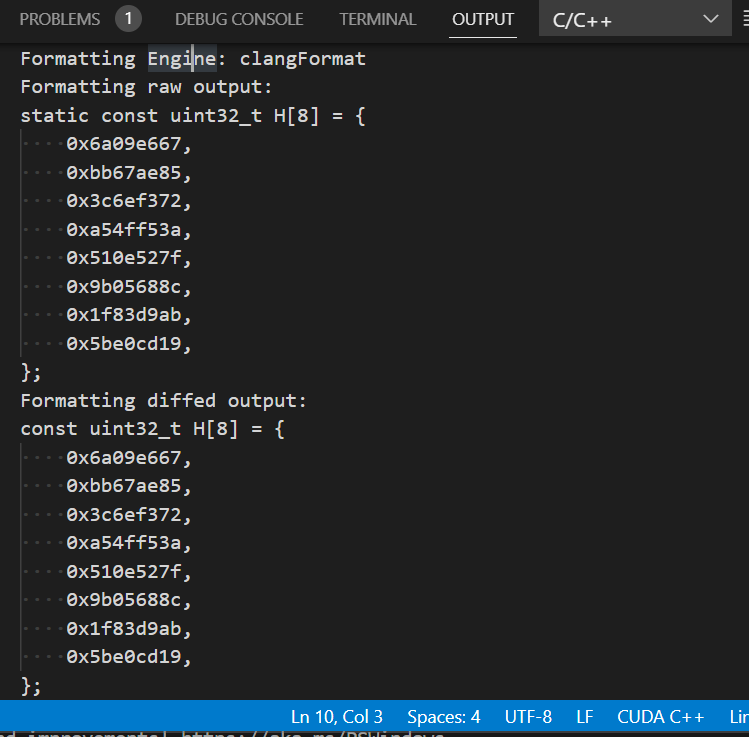
Sorry for the late reply. I can't seem to replicate. The CTRL+S shortcut doesn't seem to work for me. However, right-clicking and selecting Format Document With... → C/C++ seems to work.
I'm having this same issue. All my .h, .cpp, and .c files format fine but no matter what I do my .cu files won't format

Disabling all CUDA extensions seems to have done it.
It seems not a good solution. I wonder whether now we have a good cuda formatter.
