

 microsoft
Proposal/feature request: option to dump cmake build log file on failure
As far as I can tell, there is currently no option for verbose build logging, which makes CI debugging quite difficult. Dumping all logs in the build tree unconditionally doesn't really sense, so I end up needing to push an extra commit to dump a specific logfile path for a failing build, waiting for build cycle time, etc. Here's a concrete example:
CMake Error at scripts/cmake/vcpkg_execute_build_process.cmake:131 (message):
    Command failed: /opt/_internal/pipx/venvs/cmake/lib/python3.10/site-packages/cmake/data/bin/cmake --build . --config Debug --target install -- -v -j3
    Working Directory: /__w/1/s/external/vcpkg/buildtrees/openssl/x64-linux-dbg
    See logs for more information:
      /__w/1/s/external/vcpkg/buildtrees/openssl/install-x64-linux-dbg-out.log
I'd like to see the contents of install-x64-linux-dbg-out.log automatically, at least on a CI system.
Proposed solution
I would like to add (or at least request) a vcpkg option to automatically dump cmake build log files.
It looks reasonably straightforward to dump a build log file here: https://github.com/microsoft/vcpkg/blob/69efe9cc2df0015f0bb2d37d55acde4a75c9a25b/scripts/cmake/vcpkg_execute_build_process.cmake#L120-L140
If that would be an acceptable solution, some questions:
- what should the option be called?
- are there other cmake driver files where this should be implemented?
- does vcpkg have any existing "indented print" function? (not implemented by cmake, yet)
Describe alternatives you've considered
Not aware of any (other than unconditional or manual dumping), would be grateful for any suggestions.
Additional context
n/a

Our CI provides a detailed build log, you can directly access the detailed build log through the link in the PR. For example: https://dev.azure.com/vcpkg/c1ee48cb-0df2-4ab3-8384-b1df5a79fe53/_apis/build/builds/87665/artifacts?artifactName=file%20lists%20for%20arm-uwp&api-version=7.0&%24format=zip

Hi @jimwang118, thanks -- however, I am looking for detailed cmake and compiler sub-process logs, which are currently captured into files like install-x64-linux-dbg-out.log, and which are identified by the log message See logs for more information:.
(the zip file you linked to is empty, btw. if I look at another recent arm-uwp run, the log files do not show any more detail than what I see in my own builds -- only vcpkg top-level output)
Thank you, the link I added is the log after CI ends normally. If CI reports an error, there will be detailed log information. For example: https://dev.azure.com/vcpkg/c1ee48cb-0df2-4ab3-8384-b1df5a79fe53/_apis/build/builds/87650/artifacts?artifactName=failure%20logs%20for%20x64-linux&api-version=7.0&%24format=zip. If you are compiling locally and want to view detailed compilation logs, you can see all compilation logs in the ./vcpkg/buildtree/portname directory.
The file you linked looks like exactly what I need. If I am following correctly, the suggestion here is:
- use
vcpkg --failure-logs=<path>option (like this) - the logs will be written or moved to that target path
- then the path can be archived from CI for each run
However: how can we set --failure-logs for a toolchain mode build? Thank you.
You can see the running status in the CI result at the bottom of the PR, and then click on the details of the running error, and you can find the corresponding error log details in the link.
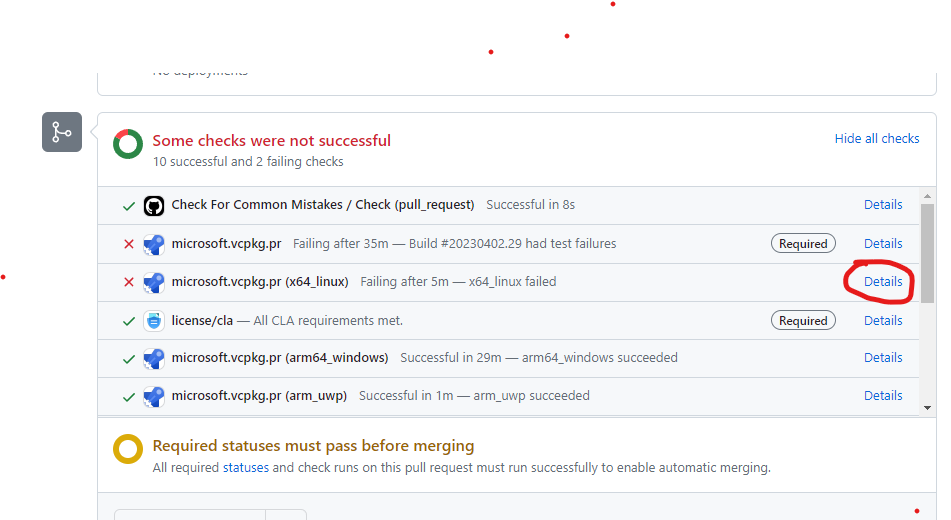


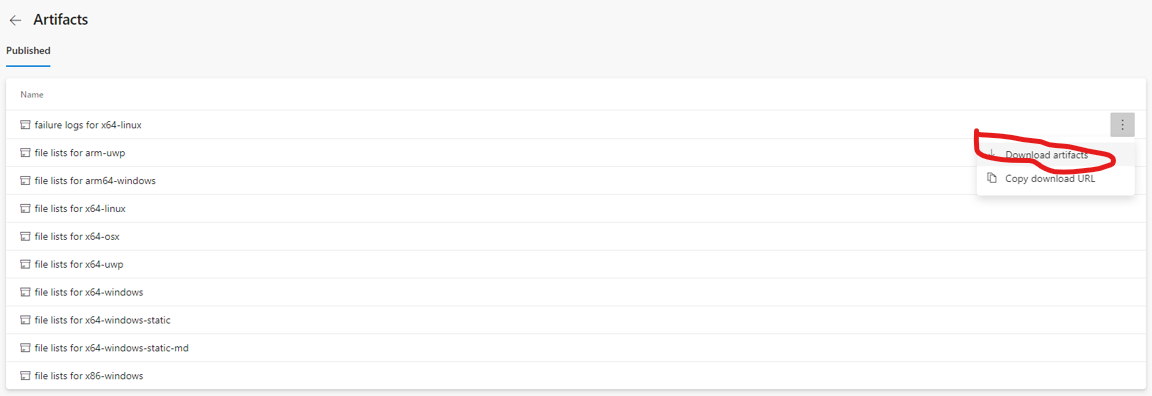
Yes, I understand that part, thank you very much.
My question is:
- we integrate with vcpkg using cmake toolchain mode
- how can I do the equivalent of
--failure-logswhen using-DCMAKE_TOOLCHAIN_FILEto activate vcpkg?
--failure-logs is only available for the ci command. This is not possible with the install command.

Perhaps the --failure-logs flag (copying the log files to some specific directory) could simply be added to the install command too? The reason I am a bit hesistant to use vcpkg ci is that it, according to --help, is an internal command and subject to change.
My current solution is to just export the entire tree of build logs, which of course is useful, but adds a few extra steps every time there is a problem. The --failure-logs program would e.g. make it easy to add a CI step that just dumps all of the relevant log files.

Just to note a gist here, I automated print of error logging in my private vcpkg fork by adding next little part after the z_vcpkg_prettify_command_line(pretty_command ${arg_COMMAND}) in the files vcpkg\scripts\cmake\vcpkg_execute_build_process.cmake and vcpkg\scripts\cmake\vcpkg_execute_required_process.cmake
        # --- Try to print error logs
        # Split the string by newline characters
        string(REGEX MATCHALL "[^\n]+" file_list ${stringified_logs})

        # Iterate over the list and print content of each file
        foreach(file IN LISTS file_list)
            string(STRIP "${file}" file_stripped)

            # Print filename
            message(STATUS "Build Failed. Content of ${file_stripped}:")

            # Read the content of the file
            file(READ ${file_stripped} file_content)

            # Print the content
            message(STATUS "${file_content}")
        endforeach()
        # ---

This is an automated message. Per our repo policy, stale issues get closed if there has been no activity in the past 180 days. The issue will be automatically closed in 14 days. If you wish to keep this issue open, please add a new comment.
![github-actions[bot] avatar](https://avatars.githubusercontent.com/in/15368?v=4 "Published by a pub.dev verified publisher")