

 microsoft
Transform not working on publish
I have added transform for log4net.config file. It shows correct in preview, it transforms fine on build, but when I publish application it doesnt do the transform, it copies original file. I use Asp.Net MVC 5. I checked csproj file, it looks fine, the same as one in the example. Anyone knows what could be a problem?

It is possible the transform is processed, but then a later build step copies the original file over and overwrites it. Can you set <CopyToOutputDirectory>Never</CopyToOutputDirectory> on log4net.config

Can you run an msbuild /v:diag and see what the ScApplyTransforms target outputs?
Also, what is the msbuild metadata on the log4net.config and its transforms?
I remembered this issue is for on publish. If you add any random whatever.config and apply a simple transform for that, does it get included in the publish?
You can perform an msbuild /t:Publish /v:diag and look for what the ScApplyWebTransforms and ScApplyWebTransforms task has output.
When I run msbuild /v:diag I can see ScApplyTransforms and I can find this
Task "SlowCheetah.TransformTask"
Task Parameter:Source=C:\Solvent\Solvent\Solvent\Xml\log4net.config
Task Parameter:Transform=Xml\log4net.DevEnv.config
Task Parameter:Destination=bin\Xml\log4net.config
Beginning transformation.
But when I run msbuild /t:Publish /v:diag I can't find ScApplyTransforms nor ScApplyWebTransforms in output. I use the same configuration for build and publish - DevEnv.
I have identified the issue.
- I don't think SC even runs on publish
- Even running on publish, SC will transform to the $(OutDir) and not $(PublishDir)
I will prepare a fix soon.
Hi, I'm getting this issue when publishing via MSDeploy.
The transforms are not applied to any *.config or appSettings.json files.
If i do a normal msbuild, the output folders do have the files with transforms applied.
Thanks

I have the same issue. My app.config is transformed during publish but appsettings.json is not. Both transform correctly at build.
I have Debug, Release and Test configurations.
Test.pubxml:
<Project ToolsVersion="4.0" xmlns="http://schemas.microsoft.com/developer/msbuild/2003">
  <PropertyGroup>
    <WebPublishMethod>FileSystem</WebPublishMethod>
    <PublishProvider>FileSystem</PublishProvider>
    <LastUsedBuildConfiguration>Test</LastUsedBuildConfiguration>
    <LastUsedPlatform>Any CPU</LastUsedPlatform>
    <SiteUrlToLaunchAfterPublish />
    <LaunchSiteAfterPublish>True</LaunchSiteAfterPublish>
    <ExcludeApp_Data>False</ExcludeApp_Data>
    <ProjectGuid>bb6fb0c7-c761-4155-86b2-aafc514483d3</ProjectGuid>
    <publishUrl>bin\Test\PublishOutput</publishUrl>
    <DeleteExistingFiles>True</DeleteExistingFiles>
    <TargetFramework>net452</TargetFramework>
    <RuntimeIdentifier>win10-x64</RuntimeIdentifier>
  </PropertyGroup>
</Project>
csproj:
<Project Sdk="Microsoft.NET.Sdk.Web">

  <PropertyGroup Label="Globals">
    <SccProjectName>SAK</SccProjectName>
    <SccProvider>SAK</SccProvider>
    <SccAuxPath>SAK</SccAuxPath>
    <SccLocalPath>SAK</SccLocalPath>
    <TypeScriptToolsVersion>2.2</TypeScriptToolsVersion>
    <Configurations>Debug;Release;Test</Configurations>
  </PropertyGroup>

  <PropertyGroup>
    <TargetFramework>net452</TargetFramework>
    <RuntimeIdentifier>win10-x64</RuntimeIdentifier>
    <PreserveCompilationContext>true</PreserveCompilationContext>
    <OutputType>Exe</OutputType>
  </PropertyGroup>

  <PropertyGroup Condition="'$(Configuration)|$(Platform)'=='Debug|AnyCPU'">
    <PlatformTarget>AnyCPU</PlatformTarget>
  </PropertyGroup>

  <PropertyGroup Condition="'$(Configuration)|$(Platform)'=='Test|AnyCPU'">
    <PlatformTarget>AnyCPU</PlatformTarget>
  </PropertyGroup>

  <ItemGroup>
    <Content Remove="appsettings.Debug.json" />
    <Content Remove="appsettings.Release.json" />
    <Content Remove="appsettings.Test.json" />
  </ItemGroup>

  <ItemGroup>
    <None Update="app.config">
      <TransformOnBuild>true</TransformOnBuild>
    </None>
    <None Update="app.Debug.config">
      <IsTransformFile>True</IsTransformFile>
    </None>
    <None Update="app.Release.config">
      <IsTransformFile>True</IsTransformFile>
    </None>
    <None Update="app.Test.config">
      <IsTransformFile>True</IsTransformFile>
    </None>

  </ItemGroup>

  <ItemGroup>
    <None Include="appsettings.Debug.json">
      <IsTransformFile>True</IsTransformFile>
    </None>
    <None Include="appsettings.Release.json">
      <IsTransformFile>True</IsTransformFile>
    </None>
    <None Include="appsettings.Test.json" />
  </ItemGroup>

  <ItemGroup>
    <Content Update="appsettings.json">
      <TransformOnBuild>true</TransformOnBuild>
    </Content>
  </ItemGroup>

</Project>

Any update on this? appsettings.json is not transforming during a publish but is transforming during the ordinary build. Or maybe there's any workaround before the fix be published?

Same issue here; deploying a WebJob and the app.config transforms are not published.

Is there a time-frame for this bug fix? It's a major issue for so many people

Come on, any news regarding this issue? We've already run into issues on production because of the transforms not being applied 👎
For web projects, I noticed that build ouputs the transformed config to the bin folder, and publish outputs the tranformed config to it's original location (root of directory). This made it difficult to use the configSource attribute for the appSettings and connectionStrings elements of web.config. As a workaround I added web.config transforms to update the configSource attributes for the differences in output paths of transformed files. Since the web.config seems to only be transformed during publish, the configSource attribute would only updated for publish as well.
Web.config
<configuration>
  ....
  <connectionStrings configSource="bin\connectionStrings.config" />
  <appSettings configSource="bin\appSettings.config" />
  ....
</configuration>
Web.Debug.config
<configuration>
  ....
  <connectionStrings configSource="connectionStrings.config" xdt:Transform="SetAttributes"/>
  <appSettings configSource="appSettings.config" xdt:Transform="SetAttributes"/>
  ....
</configuration>

I can confirm having same problem; ScApplyTransforms appears in my local build, but not in publish. What's weird is it used to be working, but yesterday I started having this problem. I haven't changed anything about my csproj or config files. I have several projects in one solution, all using Slow Cheetah, but only one of the projects is behaving this way. I tried uninstalling/reinstalling Slow Cheetah, but it did not fix my problem. Any suggestions?

I think I may have discovered a potential fix for this?
I had two projects in same solution--one where SlowCheetah was working, and another where it wasn't. I noticed that the broken project had ProjectTypeGuid of
349C5851-65DF-11DA-9384-00065B846F21 //all uppercase
whereas the working project had
349c5851-65df-11da-9384-00065b846f21 //all lowercase
I tried switching over to the lowercase version, and now my broken app is working again.
I am now facing this issue where it transforms on build and drops the applicationinsights.config into the bin directory properly transformed. However, when building the MSDeploy package, the web.config gets properly transformed but applicationinsights.config does not.
I want to add to this. The applicationinsights.config is recognized as a transform target but appears to be transformed and then dumped to the Output folder. This happens during build. During publish, the transform never takes place and the base applicationinsights.config file is copied to both the original location and the bin folder. I've verified this on our Azure Web App using the App Editor.
More research on this:
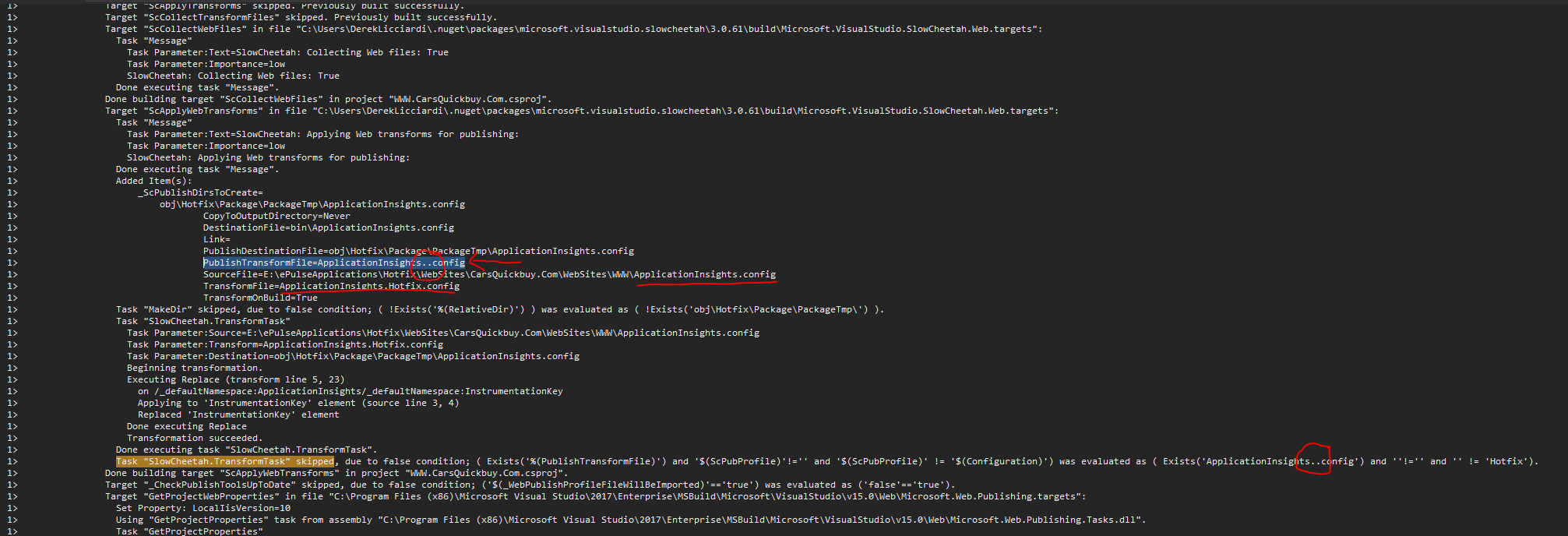
There's an extra . in the PublishTransformFile which later causes the Exists evaluation to fail.

Seems to be created from this spot in the Web.targets file.

This bug has gotten a little confusing because there are essentially two problems here. .NET Core projects have a different build pipeline and were created after SlowCheetah and such, are not fully supported yet. Also, there is already some transformation logic in place for appsettings.json, which might interfere with SlowCheetah (or vice-versa). This problem is being tracked by #7. The other problem seems to be with .NET Framework web apps, which is what I'm investigating at the moment.
@unionthugface Thanks for pointing out that issue. The uppercase is a problem, but your fix is only for the extension, which is certainly good to have, in any case. To fix the build (which seems to be the bigger problem here), the targets need to be changed. More specifically, this part. I'll get a fix for that soon and also take a closer look at your PR.
@kipusoep I think your problem is one of the above. You can try changing the ProjectTypeGuids to lower-case and see if that fixes it, as previously shown. Or, if you have a .NET Core project, then take a look and comment on #7.
@Aleksaas (or anyone else with a .NET Framework web app) can you provide more info on how you're publishing? I tried creating a new web mvc app with a some config and xml files and publishing through VS works correctly. If I try running from the command line, publish simply does not work (it sets up a bunch of stuff and simply calls the app unpublishable). Any log files or sample projects that reproduce this issue would help.
@Kressilac in your case, the build transformation is being correctly applied, using the TransformFile but there doesn't seem to be a Publish profile, so those transformations never occur. You can see the first transformation happens successfully in the log you sent, above the highlighted portion. The transformed file is being output to the _PackageTempDir. Now you'd have to find the build step where the config file is copied to the final output to see if it's taking from the temp folder or the original project folder. I've tried to reproduce this issue with a Folder publish profile but everything seems to be working normally.

@davilimap Thanks for the response. If it happens with another config file, I'll look into it. In the end or ApplicationInsights, we decided to use the App Settings feature in Azure/VSTS so that we did not need to transform ApplicationInsights.config.
@davilimap same issue as @Aleksaas has. Transformation works fine when I publish to folder but doesn't work with WebDeploy publish

@antonberezan Do you have any logs or a way to generate them for the WebDeploy publish? If you do, look for the targets specified in the docs, more specifically, ScApplyTransforms or ScApplyWebTransforms.
@davilimap I've created a sample solution https://github.com/antonberezan/slow-cheetah-webdeploy
There are two publish profiles in the sample:
- FolderPublish. Tronsformation works well.
- WebDeploy. Tronsformation dosn't work for some reason here.
NuGet Package management format is PackageReference. It seems to be related to the issue.
As I understand .csproj file must not contain any imports on SlowCheetah targets. Isn't it? When I use PackageReference SlowCheetah doesn't add any imports., but with packages.config it did.
@antonberezan The repo you linked doesn't have the physical pubxml files.
Can you try using the prerelease version of the Nuget package? (3.1.61-pre) Logs for the publish process would also help (run msbuild /t:Publish /v:diag)
I have experienced the same issue when using the NuGet PackageReference format. The key point is that the issue is only reproducible when via MsBuild command line utility. It works perfectly fine from within Visual Studio.
The scenario to reproduce:
- Create a Web project in Visual Studio
- Make sure you are using the NuGet PackageReference format
- Setup a config transformation for some file other than Web.config, e.g
App_Config\Test.config - Run MsBuild to publish the project, e.g:
msbuild WebApplication1.csproj /p:DeployOnBuild=true /p:publishUrl="D:\PublishOutput" /p:Configuration=Release /p:PublishProfile="FolderProfile"
As a result, transformations on the custom config file are not applied. However, clearly SlowCheeah is doing something with the file, as the transformed file is present in the obj folder: WebApplication1\obj\Release\App_Config\Test.config
So looks like transformation is happening, but the resulting file is not copied to the correct output location.
Workaround to fix the issue
I have found a solution in here: https://stackoverflow.com/questions/50298798/config-file-transformation-doesnt-work-on-build-server-after-migration-to-packa which also might be useful for others.
Change the order of imports in your .csproj file from:
Microsoft.CSharp.targets
Microsoft.WebApplication.targets
to
Microsoft.WebApplication.targets
Microsoft.CSharp.targets
This solves the issue, however I am not sure about consequences of such a switch. I am using this workaround on my project for a while and did not notice any issues.
Hope this information helps to find the cause and fix the issue @davilimap

I have found a solution in here: https://stackoverflow.com/questions/50298798/config-file-transformation-doesnt-work-on-build-server-after-migration-to-packa which also might be useful for others.
Change the order of imports in your .csproj file from:
Microsoft.CSharp.targets
Microsoft.WebApplication.targets
to
Microsoft.WebApplication.targets
Microsoft.CSharp.targets
Doing this for me causes the _PublishedWebsites folder in the outputpath to not even be produced.
The only thing I can figure out is to either manually copy and rename the myproject.dll.config file (which contains the correct transforms) to the publish path or to use the /p:_PackageTempDir=whatever path instead of the output path. The _PackageTempDir contains the properly transformed file and also all other files needed for deployment.
BTW, I am not using SlowCheetah. Just the built in config transform process.
UPDATE: I found a solution. You just have to have the right combination of build arguments. The issue seems to be with msbuild and not slow cheetah. https://stackoverflow.com/questions/9169341/how-to-use-msbuild-msdeploypublish-to-target-local-file-system
msbuild Solution.sln /p:Configuration=whatever /p:DeployOnBuild=True /p:DeployDefaultTarget=WebPublish /p:WebPublishMethod=FileSystem /p:publishUrl=c:\whereever

I have the same issue. When doing web publish using the command line, the NLog.config is not transformed in the publish directory but bin/NLog.config and obj/NLog.config are transformed. If you look at the obj\FolderProfile\Package\PackageTmp\NLog.config, it is not transformed.
If I do a publish through Visual Studio 2019 using right click and publish, it is transformed correctly.
The command for publishing through the command line is following: "$msBuild" /v:diag SlowCheetahWebPublishIssue.csproj /p:Configuration=FolderProfile /p:PublishProfile=FolderProfile /p:DeployOnBuild=true /t:WebPublish
Please check this to reproduce: https://github.com/tdamir/SlowCheetahWebPublishIssue
Please run the publish_command_line.ps1 to get the results I described above.


We had the same problem after switching to PackageReference syntax. This helped us.. we just manually include the files from obj\...\Config folder for publishing.
  <Target Name="IncludeTransformedConfigs">
    <!-- Because of PackageReference syntax, transformed config files are not published. Include them from obj\ folder manually.
    Issue: https://github.com/microsoft/slow-cheetah/issues/78 -->
    <ItemGroup>
      <TransformedConfigFiles Include="$(IntermediateOutputPath)\Config\*.config" />
      <FilesForPackagingFromProject Include="%(TransformedConfigFiles.Identity)">
        <DestinationRelativePath>Config\%(Filename).config</DestinationRelativePath>
      </FilesForPackagingFromProject>
    </ItemGroup>
  </Target>
  <PropertyGroup>
    <CopyAllFilesToSingleFolderForPackageDependsOn>
            IncludeTransformedConfigs;
            $(CopyAllFilesToSingleFolderForPackageDependsOn);
        </CopyAllFilesToSingleFolderForPackageDependsOn>
    <CopyAllFilesToSingleFolderForMsdeployDependsOn>
            IncludeTransformedConfigs;
            $(CopyAllFilesToSingleFolderForMsdeployDependsOn);
        </CopyAllFilesToSingleFolderForMsdeployDependsOn>
  </PropertyGroup>
