

 microsoft
App crash when registering onLayout on Views with hidden parents
Problem Description
Background
When updating views with a new layout who have hidden parents, the app crashes when you
- register the onLayout callback
- have remote debugger on.
The crash with the remote debugger on is "Windows APP: folly::toJson: JSON object value was a NaN when serializing value at "arguments"->2->2->"layout"->"height". This is because NaN isn't serializable to JSON.
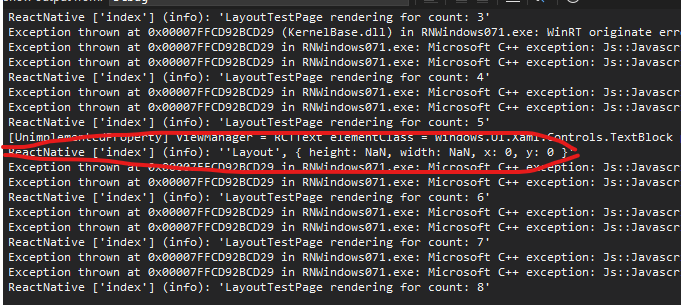
Without remote debugging on, the onLayout callback is fired with NaN width and height. This also doesn't seem correct so this problem is not just for remote debugging.
I believe this issue is similar: https://github.com/microsoft/react-native-windows/issues/8318 but since I have much more simper reproducible steps, I decided to file a different issue.
Although the example code I have is contrived, this pattern is very common in React navigation where you have a stack of screens. Once you navigate into another screen in the stack, the previous screen is hidden using display: none. If the previous screen does some kind of state update and has a layout change, it causes this crash. There seems be a similar issue filed in React Navigation repo here: https://github.com/react-navigation/react-navigation/issues/10719
My investigation
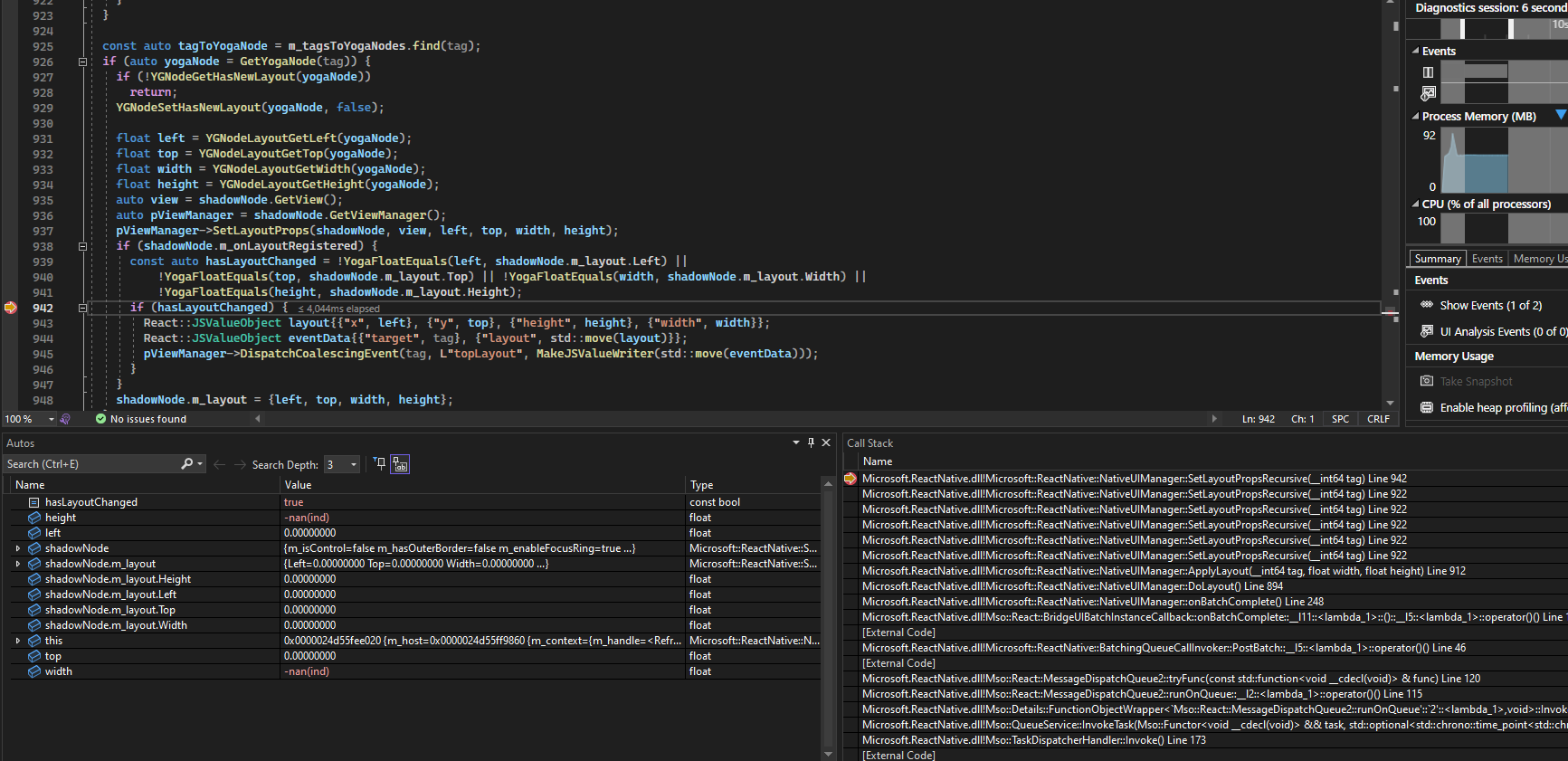
I tried debugging the code and the issue seems to arise because of NaN values returned for both width and height in the NativeUIManager here https://github.com/microsoft/react-native-windows/blob/main/vnext/Microsoft.ReactNative/Modules/NativeUIManager.cpp#L942-L943 in this code block:
 float width = YGNodeLayoutGetWidth(yogaNode);
 float height = YGNodeLayoutGetHeight(yogaNode);
The NaN values cause the hasLayoutChanged check to be true.
In release mode, the app doesn't crash however the JS onLayout callback receives NaN values. See
Potential fixes
-
YGNodeLayoutGetWidthorYGNodeLayoutGetHeightshould not return NaN - I'm not sure how feasible this is? I'm not sure why theYGNodeLayoutGetWidthorYGNodeLayoutGetHeightreturn NaN - maybe because there is no corresponding native element for this Yoga node? - Don't run
onLayoutfor NaN values - doing something like this seems to fix the issue for me
const auto isValidLayout = !isnan(width) && !isnan(height);
 if (isValidLayout && hasLayoutChanged) {
        React::JSValueObject layout{{"x", left}, {"y", top}, {"height", height}, {"width", width}};
        React::JSValueObject eventData{{"target", tag}, {"layout", std::move(layout)}};
        pViewManager->DispatchCoalescingEvent(tag, L"topLayout", MakeJSValueWriter(std::move(eventData)));
  }
- Change NaN values to 0 before calling topLayout
Steps To Reproduce
Run the following code:
import React, {useState, useEffect} from 'react';

import {Text, View} from 'react-native';

const CrashTest = () => {
  const [count, setCount] = useState(0);

  useEffect(() => {
    const id = setInterval(() => {
      setCount(c => {
        return c + 1;
      });
    }, 1000);

    return () => {
      clearInterval(id);
    };
  }, []);

  console.log(`LayoutTestPage rendering for count: ${count}`);

  return (
    <>
      <Text>
        Layout Crash Test. Check the console log - the app with crash for count
        5
      </Text>
      <View style={{display: 'none', flex: 1}}>
        {/* Removing this view causes the error to disappear*/}
        <View>
          {count % 5 === 0 ? (
            <View
              onLayout={event =>
                console.log('Layout', event.nativeEvent.layout)
              }>
              <Text>This View's on Layout causes crash</Text>
            </View>
          ) : null}
        </View>
      </View>
    </>
  );
}
export default CrashTest;
Expected Results
I don't think the onLayout callback should be run in this case. That is at least how upstream RN seems to work for iOS and Android as seen in this Expo snack here: https://snack.expo.dev/ekeguyQ98
CLI version
0.71
Environment
System:
    OS: Windows 10 10.0.19044
    CPU: (20) x64 12th Gen Intel(R) Core(TM) i7-12800H
    Memory: 15.53 GB / 31.68 GB
  Binaries:
    Node: 16.16.0 - ~\AppData\Local\Volta\tools\image\node\16.16.0\node.EXE
    Yarn: 1.22.19 - ~\AppData\Local\Volta\tools\image\yarn\1.22.19\bin\yarn.CMD
    npm: 8.11.0 - ~\AppData\Local\Volta\tools\image\node\16.16.0\npm.CMD
    Watchman: Not Found
  SDKs:
    Android SDK: Not Found
    Windows SDK:
      AllowDevelopmentWithoutDevLicense: Enabled
      AllowAllTrustedApps: Enabled
      Versions: 10.0.18362.0, 10.0.19041.0, 10.0.22000.0, 10.0.22621.0
  IDEs:
    Android Studio: AI-221.6008.13.2211.9514443
    Visual Studio: 16.11.33214.272 (Visual Studio Professional 2019), 17.4.33213.308 (Visual Studio Community 2022)
  Languages:
    Java: 11.0.18 - C:\Program Files\Microsoft\jdk-11.0.18.10-hotspot\bin\javac.EXE
  npmPackages:
    @react-native-community/cli: Not Found
    react: 18.2.0 => 18.2.0
    react-native: 0.71.0 => 0.71.0
    react-native-windows: 0.71.0 => 0.71.0
  npmGlobalPackages:
    *react-native*: Not Found

Thanks for the great detail on this bug report. Potentially could have been affected by this PR: https://github.com/microsoft/react-native-windows/pull/10712 Certainly though this shouldn't crash. Thanks for the set of suggested fixes.

@chrisglein you are welcome, glad it could help.
Ahh yes, in the PR https://github.com/microsoft/react-native-windows/pull/10712 that you linked, that could potentially fix this if we didn't dispatch the layout event for elements that are in collapsed sub trees.
However, the question I wasn't able to answer, and whether it's expected behavior, is why YGNodeLayoutGetWidth or YGNodeLayoutGetHeight return NaN (as opposed to something like 0) for such elements. Do you know?
However, the question I wasn't able to answer, and whether it's expected behavior, is why
YGNodeLayoutGetWidthorYGNodeLayoutGetHeightreturnNaN(as opposed to something like 0) for such elements. Do you know?
That I don't know. @acoates-ms @rozele do you know?
Does this reproduce in older versions of react-native-windows or only v0.71? There were a couple changes that first landed in v0.71 (#10658 and #10422) that may have introduced a regression. I can have a look tomorrow to see what the problem might be.
I know prior to #10422, I saw a similar issue when a node might have been created but not attached to any root view in a single UIManager operation, but this must be something else.

I debugged this a bit - no luck in identifying the root cause, though one interesting thing I noticed is if I switch the setCount call from the interval timer to instead fire in an onPress callback on the rendered Text, the issue still sometimes reproduces, but not always 🤯.
https://user-images.githubusercontent.com/1106239/218638891-e429fcc0-cc65-49bd-96cb-01d590e2d8e3.mp4
The faster the clicks (re-renders), the more likely the issue will reproduce.
My hunch is that this is a bug in Yoga, but I don't have definitive evidence of that yet.
Is there any update on this? I am getting this crash on the latest RNW and navigation.

I am experiencing this as well with a view component that references onLayout
import React, { useState } from 'react';
import { View, Text } from 'react-native';

export const InfoDisplayComponent = ({ containerStyle }) => {
  const [frameSize, setFrameSize] = useState(50);

  return (
    <View
      onLayout={e => {
        const { height, width } = e?.nativeEvent?.layout ?? {};
        setFrameSize(height < width ? height / 2 : width / 2);
      }}
      style={[{ width: '50%', flex: 1 }, containerStyle]}>
      <Text>Hello World</Text>
    </View>
  );
};
