

 microsoft
LSP returns strings with `\\\n` at the end of lines
Describe the bug
I'm using pyright with the neovim LSP built in client. When I look at hover documentation (or completion items documentation), I can see trailing backslash at the end of some lines (see screenshot)
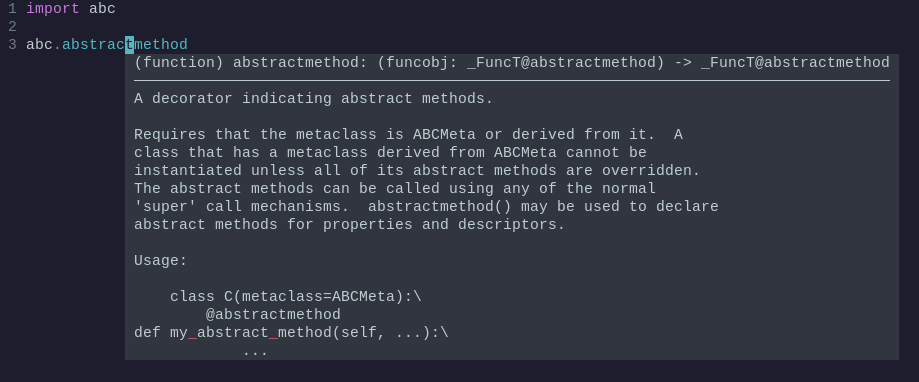
Inspecting the responses from the LSP server I can see this:
[DEBUG][2022-08-03 16:36:44] .../vim/lsp/rpc.lua:454 "rpc.receive" { id = 81, jsonrpc = "2.0", result = { contents = { kind = "markdown", value = "```python\n(function) abstractmethod: (funcobj: _FuncT@abstractmethod) -> _FuncT@abstractmethod\n```\n---\nA decorator indicating abstract methods.\n\nRequires that the metaclass is ABCMeta or derived from it. A\nclass that has a metaclass derived from ABCMeta cannot be\ninstantiated unless all of its abstract methods are overridden.\nThe abstract methods can be called using any of the normal\n'super' call mechanisms. abstractmethod() may be used to declare\nabstract methods for properties and descriptors.\n\nUsage:\n\n class C(metaclass=ABCMeta):\\\n @abstractmethod\ndef my\\_abstract\\_method(self, ...):\\\n ..." }, range = { end = { character = 18, line = 2 }, start = { character = 4, line = 2 } } }}
In that string there are instances of \\\n at the end of the line.
To Reproduce I don't know how to reproduce in other editor/configurations. In neovim with configured lspconfig is sufficient to trigger the hover function
Expected behavior
There shouldn't be a \\\n in the end of line (not sure about things like &nbps;). It should probably just be \n
Screenshots or Code
import abc

# hover on abstractmethod
abc.abstractmethod
VS Code extension or command-line pyright version 1.1.264
Additional context A workaround is mentioned in a reddit thread but the problem is not only present when doing an hover (for example it can be reproduced also on documentation associated with a completion item)

I believe those I used to tell VSCode's markdown to add line break so that the markdown will match the plaintext doctring in source better. There should be a format parameter you can change to say you want plaintext
see: https://microsoft.github.io/language-server-protocol/specifications/lsp/3.17/specification/#markupContent

~~Well, I think neovim parses the markdown, but maybe it doesn't understand \\? What does \\ translate to? It seems to just translate to literal \ anyway? Why would VSC need that?~~
Edit: actually \\ is the raw string so the actual markdown would be \, which might have a special meaning like line break.
I think neovim parses the markdown
Well not really, it just provides syntax highlighting and some degree of conceiving (eg. **bold** will be just bold) just like when you open normal markdown files. I suppose that's why it doesn't render \\ (and it's unlikely to render <br> either)
There should be a format parameter you can change to say you want plaintext
Yes that seems to work but takes highlighting completely off which is even worse.
this mentions that "two spaces" might work as well. https://stackoverflow.com/questions/26626256/how-to-insert-a-line-break-br-in-markdown
this mentions that "two spaces" might work as well
That would look better in the case markdown is not fully rendered.
Since this isn't a core type checking issue, I'm going to transfer it to the pylance-release project.

This issue has been fixed in version 2022.8.21, which we've just released. You can find the changelog here: CHANGELOG.md
I'm not sure I follow: I thought this was an issue in the pyright language server? How is it fixed there? There's nothing in the changelog about this issue.
this was the pyright PR. usually changes from pylance get squashed together to update pyright. this PR was missing detailed info though. https://github.com/microsoft/pyright/pull/3816
This will be included in the next release of pyright (1.1.267), which should be published in the next two days.