
pylance-release
 pylance-release copied to clipboard
 microsoft
pylance settings, moving root up one level for type definitions
How do I add an extra path for type definitions?
I see in vscode settings there are different options. None of them do what I am hoping. I don't want to overwrite the search path set but prepend to it.
Basically I have cd'd one level below my virtual env and that's why it's not finding the library types.
e.g.
fullstackapp*>backend**
*venv with typings lives here ** vscode is opened here
If I didn't want to move my virtual environment, is there a way to add the search path in .vscode/settings.json?
I'm using pylance 2022.5.1.
The difference is a sqlalchemy type that is returned.
When VSCode is opened at the fullstackapp level, it gives me the correct type for relationship: RelationshipProperty (or a constructor thereof) but when opened at backend level, it takes me to typeshed-fallback and describes relationship: Any
Inside .vscode/settings.json, I see different options from intellisense, including python.analysis.[typeshedPaths|autoImportCompletions|autoSearchPaths|extraPaths|indexing|stubPath|typeCheckingMode], and more for python.linting and other paths.
The app runs fine. What's the easiest way to point to the types at the top level, ideally to auto-capture the venv without specifically pointing to it but to its parent? Thanks

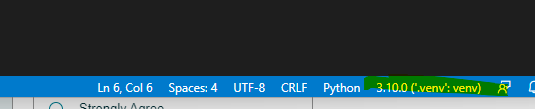
have you tried selecting an interpreter? https://code.visualstudio.com/docs/python/environments#_select-and-activate-an-environment


Closing old issue. If this is still a problem, please reopen with the information requested. thanks
