

 microsoft
Use information from .pyi files in .py files they describe
I'm sorry to start a new topic, this problem has been discussed a lot before, but I've been bothered by it for days.
As a dynamic scripting language, Python does not need to declare variables before using them, so we have a lot of code similar to the following:
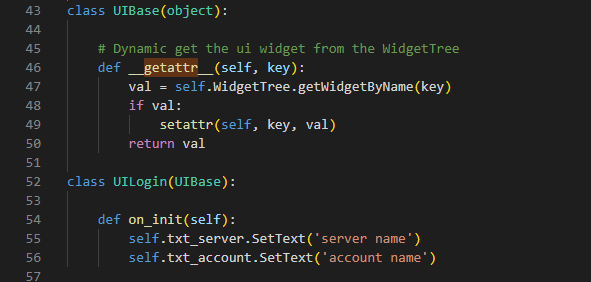
In the above example, "txt_server" is not recognized and cannot provide automatic code completion. And there may be hundreds of dynamic attributes like this.
If support get information from .pyi stub file which can be generated automatically by the tool, will very helpfull.
The advantages of writing type information in .pyi file are:
- there may be lots of dynamic variables, which are ugly to write in the source file.
- the static declaration of these variables in the source file affects the logic, but in fact, I just want the code hints, not affects the logic.
- if the type information write in source code, need submit to SVN, additional submission records will be generated. Howerver .pyi files can be temporarily generated and do not submit.
Deeply hope to support this feature, because it is very useful and commonly used.
Thank you for your work. This plug-in is very useful and helps me a lot~

This isn't how ".pyi" files work. A type stub is a stand-in for a module, not something that supplements the type info in a module. Reliably "merging" the type information in a pyi and a py file is not possible. To do what you're describing would require a mechanism other than a type stub. That isn't to say such a mechanism couldn't be designed, but it would be different from a type stub.
Let's explore the problem in more detail. Then we can explore potential solutions.
You mentioned that you thought the information "can be generated automatically by the tool". Which tool are you referring to, and what would be the "source of truth" for this information? Are the attribute names and types described in some other metadata file? If they're not described in some declarative manner, how would this information be generated?

This isn't how ".pyi" files work. A type stub is a stand-in for a module, not something that supplements the type info in a module. Reliably "merging" the type information in a pyi and a py file is not possible. To do what you're describing would require a mechanism other than a type stub. That isn't to say such a mechanism couldn't be designed, but it would be different from a type stub.
Let's explore the problem in more detail. Then we can explore potential solutions.
You mentioned that you thought the information "can be generated automatically by the tool". Which tool are you referring to, and what would be the "source of truth" for this information? Are the attribute names and types described in some other metadata file? If they're not described in some declarative manner, how would this information be generated?
Thank you for your reply.
Yes, I can obtain these types information from other resource files through my own script tool.
The core question is, how can I supplement these additional types information(Members For Class) to Pylance? It can be any way, not limited to .pyi.
Can you provide more details? What is the "source of truth" for this information, and where is it stored?
Can you provide more details? What is the "source of truth" for this information, and where is it stored?

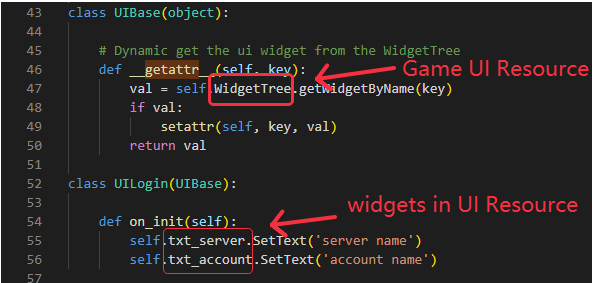
The above example is a UE4 game user interface code. The Art creates a binary game user interface resource through the UE4 editor. The program loads this resource in the python code, then obtains all the widgets in the UI resource and sets it. The problem we encounter is that when we write python code, Pylance cannot automatically prompt which widgets are in the art resources, because the widget name is not declared as a variable in class.
In order for pylance to prompt these widget name variables, I tried to parse UI resources through my own scripting tool and generate these widget names into .pyi file as class member variables, but as I said before, this does not take effect.
I can read all the widgets name in the UI resources through my own tools and output them to any file in any format, but I don't want to generate them into py code. Is there any way for pylance to get these widget name variables?
Thanks for the additional details. Makes sense.
Here's a suggestion that involves a bit of a hack. (I think any solution to this problem is going to require some creative hackery.)
You could generate a separate source file. It could be a ".pyi" or ".py". It doesn't really matter because it won't be used at runtime. This source file will declare a dummy class with a bunch of methods. Let's call this class UIBaseMixin, and we'll call the file uitypes.py. Within the source file that defines UIBase, you would include the following:
if TYPE_CHECKING:
    from uitypes import UIBaseMixin
else:
    class UIBaseMixin: ...
And when you declare UIBase, you would include this mixin class as a base class:
class UIBase(UIBaseMixin):
    ...
The declaration for the UIBaseMixin might look something like this:
# This file is generated by a script. Do not edit manually.

def UIBaseMixin:
    @property
    def txt_server(self) -> TextServer: ...

    @property
    def txt_account(self) -> TextAccount: ...
There are many variations on this approach, but I think you get the jist of it.
This solution would work with all existing language servers and type checkers, including Jedi, mypy, etc. It would require no changes to the Python typing standard and no new features in any of the static analysis tools.
Does this solution meet your needs?
Wow, that's exactly what I did before! It does trick Pylance to some extent. But in practice, I found some problems:
- There are many classes that inherit UIBase, and the UIBaseMixin.pyi file has only one.
My solution is to write a VSCode plugin, listen to the window switching event (vscode.window.onDidChangeActiveTextEditor), and generate the content in UIBaseMixin.pyi in real time according to the class in the current python document.
The above problem is barely solved, but there is a more serious problem that I have not found a solution to.
- There will be a reference relationship between multiple UIBase derived classes.
class UITest1(UIBase):
     ...

class UITest2(UIBase):
    def init(self):
              pass
# This file is generated for class UITest2

def UIBaseMixin:
    @property
    def ui_test1(self) -> UITest1: ...
In the above example, UITest1 and UITest2 both inherit from UIBase.
There is a member variable ui_test1 in UITest2, and ui_test1 is an instance of class UITest1.
When I enter self. in UITest2 init function, Pylance will automatically complete the "variable" ui_test1. But when I enter self.ui_test1., it will still prompt to complete ui_test1, so it will always prompt to complete: self.ui_test1.ui_test1...
Ideally, the inheritance chain to deceive Pylance should be:
UITest1->UITest1Mixin->UIBase
UITest2->UITest2Mixin->UIBase
Each class has its own dummy fake class to generate addition type information. I have tried using Python decorators to achieve this without success.
I have also tried to write my own code completion plugin, but found that the effect is not very good. To achieve better results, it takes a lot of effort.
Any other suggestions would be greatly appreciated. Thanks.
Correct me if I'm misunderstanding, but this sounds to me like a straightforward object-oriented modeling exercise. The goal is to reflect which methods and variables are part of each level of the object hierarchy. Differences between UITest1 and UITest2 need to be modeled in separate mix-in classes. Methods and variables that are common to all classes derived from UIBase should be included in the common UIBaseMixin.
class UIBaseMixin:
    @property
    def common_foo(self) -> Foo: ...

class UIBase(UIBaseMixin): ...

class UITest1Mixin: ...

class UITest1(UIBase, UITest1Mixin): ...

class UITest2Mixin:
    @property
    def ui_test1(self) -> UITest1: ...

class UITest2(UIBase, UITest2Mixin): ...
It certainly works, but it requires a lot of declarations of Mixin classes and modification of the inheritance chain of each UI-derived class.
As I said before, we don't want to change the code a lot, which is cumbersome and makes the code ugly.
Hope to have a more pythonic solution that doesn't require much code changes, especially repetitive code.
If you want to model this in a way that produces the right completion suggestions in all cases, it's going to require something that looks like what I've suggested. In particular, the solution needs to associate the appropriate symbols with each level of the class hierarchy. I don't see a way to streamline it more than what I've suggested above. If you want to trade off precision for complexity, you could add everything to a single base class mix-in. That will result in some completion suggestions that are incorrect (i.e. are not applicable to certain subclasses).
If you want to model this in a way that produces the right completion suggestions in all cases, it's going to require something that looks like what I've suggested. In particular, the solution needs to associate the appropriate symbols with each level of the class hierarchy. I don't see a way to streamline it more than what I've suggested above. If you want to trade off precision for complexity, you could add everything to a single base class mix-in. That will result in some completion suggestions that are incorrect (i.e. are not applicable to certain subclasses).
Eventually I went with this solution. But there is still a small question I want to ask: when the UIBaseMixin.pyi file is modified, the code highlighting in the UITest.py file opened by the editor will not be refreshed immediately, and it will be refreshed only when the code needs to be modified and saved. May I ask what event I can trigger to make pylance refresh the code highlight immediately?
Where is UIBaseMixin.pyi stored? Is it under the root of the open project (workspace)? If so, pylance should receive a file watcher notification and update immediately. If it's not under the root of the open project, then it won't receive a file system change event, which could explain what you're seeing.
To help diagnose this, you can temporarily add a pyrightconfig.json file to the root of your project and add { "verboseOutput": true } to the config. Pylance (which is built on pyright) will then output additional logging, including logs for each file system watcher event it receives. You should see something like the following logged when you write a new version of UIBaseMixin.pyi:
SourceFile: Received fs event '${event}' for path '${path}
Where is
UIBaseMixin.pyistored? Is it under the root of the open project (workspace)? If so, pylance should receive a file watcher notification and update immediately. If it's not under the root of the open project, then it won't receive a file system change event, which could explain what you're seeing.To help diagnose this, you can temporarily add a
pyrightconfig.jsonfile to the root of your project and add{ "verboseOutput": true }to the config. Pylance (which is built on pyright) will then output additional logging, including logs for each file system watcher event it receives. You should see something like the following logged when you write a new version ofUIBaseMixin.pyi:SourceFile: Received fs event '${event}' for path '${path}
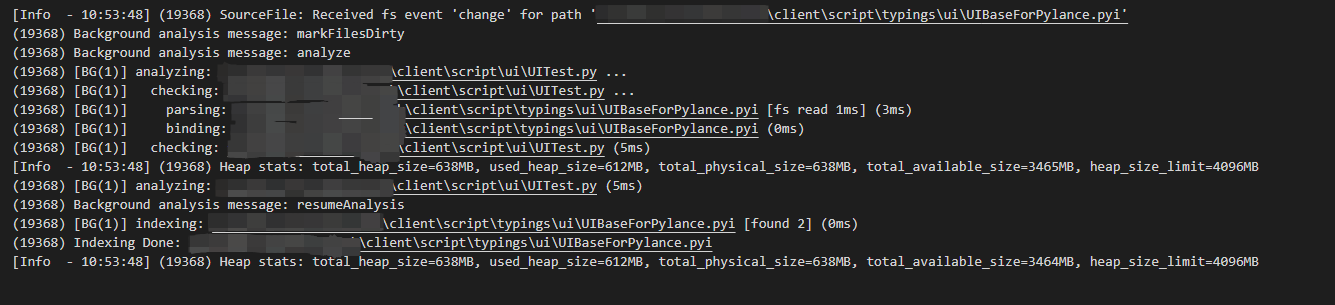

I added the declaration in UIBaseForPylance.pyi: txt_info: ue.TextBlock.
The image above is the log when this pyi file is saved, it does receive events for file changes.
Move the mouse over txt_info in the UITest.py file, it can also give type hints normally and jump to the definition.
But the txt_info text color is still white.
It sounds like the code was reanalyzed, but semantic token information was not updated. The client is responsible for requesting semantic tokens, and it doesn't know that the information has changed, so it doesn't issue a request for updated semantic tokens from the language server. I'm not sure how to address this. I presume that if you close the window and reopen it, you'll see the updated semantic tokens.
Yes, the derived class semantics token in the currently open document will not be updated when the base class changes.
Updates can be triggered by reopening the document or by modify and save the file.
Hopes there is a way to proactively trigger the update.
