
pylance-release
 pylance-release copied to clipboard
 microsoft
markdown rendering issues
Describe the bug
The auto-markdown conversion for signatureHelp and hover is useful, but appears to have some issues. For example, consider the numpy function np.unique. This is the Parameters block from its docstring:
    Parameters
    ----------
    ar : array_like
        Input array. Unless `axis` is specified, this will be flattened if it
        is not already 1-D.
    return_index : bool, optional
        If True, also return the indices of `ar` (along the specified axis,
        if provided, or in the flattened array) that result in the unique array.
    return_inverse : bool, optional
        If True, also return the indices of the unique array (for the specified
        axis, if provided) that can be used to reconstruct `ar`.
    return_counts : bool, optional
        If True, also return the number of times each unique item appears
        in `ar`.

        .. versionadded:: 1.9.0

    axis : int or None, optional
        The axis to operate on. If None, `ar` will be flattened. If an integer,
        the subarrays indexed by the given axis will be flattened and treated
        as the elements of a 1-D array with the dimension of the given axis,
        see the notes for more details.  Object arrays or structured arrays
        that contain objects are not supported if the `axis` kwarg is used. The
        default is None.

        .. versionadded:: 1.13.0
And here is how pyright renders it into markdown:
Parameters
ar : array\_like\
Input array. Unless axis is specified, this will be flattened if it
is not already 1-D.\
return\_index : bool, optional\
If True, also return the indices of ar (along the specified axis,
if provided, or in the flattened array) that result in the unique array.\
return\_inverse : bool, optional\
If True, also return the indices of the unique array (for the specified
axis, if provided) that can be used to reconstruct ar.\
return\_counts : bool, optional\
If True, also return the number of times each unique item appears
in ar.
axis : int or None, optional\
The axis to operate on. If None, ar will be flattened. If an integer,
the subarrays indexed by the given axis will be flattened and treated
as the elements of a 1-D array with the dimension of the given axis,
see the notes for more details. Object arrays or structured arrays
that contain objects are not supported if the axis kwarg is used. The
default is None.
The main issues are (sometimes, but not always) doubling or tripling backslashes (e.g. \\\n), and losing the reverse indentation layout which delineates individual parameters. The ..versionadded info is also stripped.

This isn't a core type checking issue, so I'm going to transfer it to the pylance repo.

this is what i am seeing
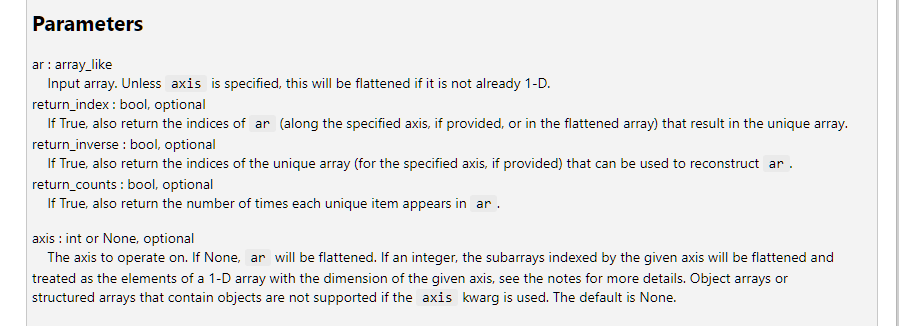
I don't see any issue on doc string rendering.
please re-open the issue with more specifics if you think we need to improve doc string rendering.

actually, I think you are talking about line wrapping. just make tooltip window larger if you don't want to see line wrapping.
I re-opened the issue and set it as enhancement. we probably want to improve line wrapping.
Thanks for your thoughts on this. The issue is with parsing the doc info in another tool (Emacs). While it may be rendered well enough in some tools, the markdown has errors, as you can see above by Github's rendering of the exact content delivered by pyright. Here's how it renders for me:

It would be great if pyright could stick to simple markdown, renderable anywhere. Even GitHub has trouble rendering the markdown pyright generates (see example above). Is there perhaps a plaintext option which returns the docs without processing?
@jdtsmith not all markdown renderer supports all different variations of markdowns. our markdown targets one that vscode LSP client uses. it looks like the markdown renderer you used are not supporting some of markdown vscode renderer supports. (we also have bugs the other way that says vscode LSP markdown renderer not supporting one that other renderers support such as LaTex markdown)
we will take a look but we will probably still target best experience over vscode's markdown renderer.
look into replacing \ with <br>
https://www.markdownguide.org/basic-syntax/#line-break-best-practices

@bschnurr it looks like is shown as it is according to the image @jdtsmith shared. so, I am not sure the markdown renderer @jdtsmith is using even supports HTML tags. it might be better to use the "two spaces - trailing whitespace" trick the doc is mentioning?
but the renderer user uses doesn't even support char escaping we put for _. (https://www.markdownguide.org/basic-syntax/#characters-you-can-escape)
so, it might be better to just ask users to use better markdown renderer.
by the way, if you don't want markdown, the LSP client you use such as Emac, you can ask the LSP client to request plaintext rather than markdown for tooltips, then we will return plain text as it is written in python source file without any conversion to markdown.
Plain text sounds workable. What is the config setting enabling that? Thanks.
@jdtsmith its up to client (Emacs), they need to request plain text hover, not markdown hover.

Unless the markdown can be simplified so as not to include special HTML entities but only pure markdown, I think just reverting to plain text is the right solution. I've put in a request (no traction yet).
Just came across this particularly bad example today (from python's re module):

I'll close this as the client's problem.