
pylance-release
 pylance-release copied to clipboard
 microsoft
Comment `# type: ignore` stopped to work
Environment data
- Pylance v2021.12.1
- Language Server version: Pylance language server 2021.12.1 (pyright fcab8004)
- OS and version: Windows 10 1809
- Python version (& distribution if applicable, e.g. Anaconda): Python 3.8.9 from python.org
Expected behaviour
- Open empty folder as project in VS Code
- Create file
notebook1.ipynbwith the following content:
a = 5
print(5)

- Create file
notebook2.ipynbwith the following content:
# cell [1]
%run "notebook1.ipynb"

# cell [2]
print(a)

Pylance will show that "a" is not defined. This is uncorrected, because we "imported" this variable via %run command.

- Create new cell at the start of
notebook2.ipynband type in it:
# type: ignore
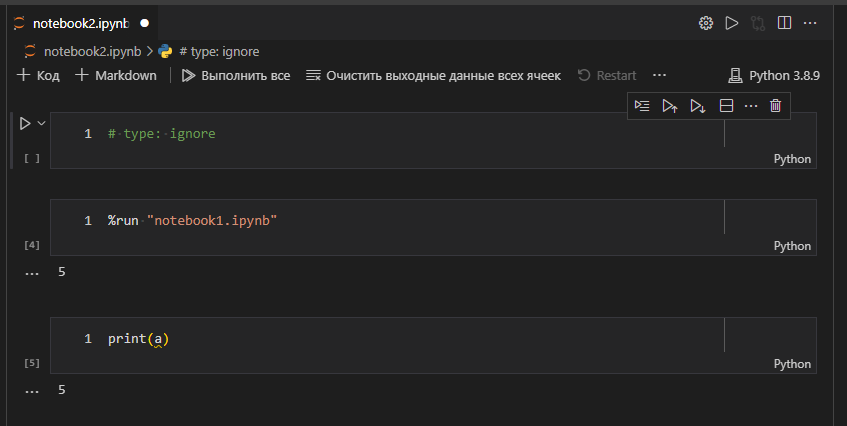
Previously, this comment worked nice and helped me a lot. But now this don't work. I had to disable Pylance, because now it just gets in the way of my work.
Actual behaviour
me: # type: ignore
pylance: <ignoring my comment>
me: <disabling pylance>
vscode:
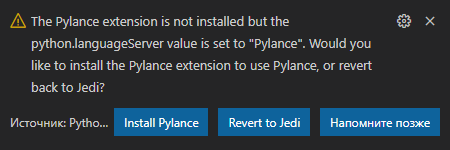
me:

Logs
click
[Info  - 21:04:46] Pylance language server 2021.12.1 (pyright fcab8004) starting
[Info  - 21:04:46] Server root directory: c:\Users\Sindzicat\.vscode\extensions\ms-python.vscode-pylance-2021.12.1\dist
[Info  - 21:04:46] No configuration file found.
[Info  - 21:04:46] No pyproject.toml file found.
[Info  - 21:04:46] Setting pythonPath for service "e": "d:\Temp\e\pyenv3.8.9-win64\python.exe"
[Warn  - 21:04:46] stubPath d:\Temp\e\typings is not a valid directory.
[Info  - 21:04:46] Assuming Python version 3.8
[Info  - 21:04:46] Assuming Python platform Windows
Search paths for d:\Temp\e
  c:\Users\Sindzicat\.vscode\extensions\ms-python.vscode-pylance-2021.12.1\dist\typeshed-fallback\stdlib
  d:\Temp\e
  d:\Temp\e\typings
  c:\Users\Sindzicat\.vscode\extensions\ms-python.vscode-pylance-2021.12.1\dist\typeshed-fallback\stubs\...
  c:\Users\Sindzicat\.vscode\extensions\ms-python.vscode-pylance-2021.12.1\dist\bundled\stubs
  [censured by user]
  c:\Users\Sindzicat\AppData\Roaming\Python\Python38\site-packages
  c:\Users\Sindzicat\AppData\Roaming\Python\Python38\site-packages\win32
  c:\Users\Sindzicat\AppData\Roaming\Python\Python38\site-packages\win32\lib
  c:\Users\Sindzicat\AppData\Roaming\Python\Python38\site-packages\pythonwin
  [censured by user]
[Info  - 21:04:46] Searching for source files
[Info  - 21:04:58] Found 20529 source files
[Info  - 21:04:58] Background analysis(1) root directory: c:\Users\Sindzicat\.vscode\extensions\ms-python.vscode-pylance-2021.12.1\dist
[Info  - 21:04:58] Background analysis(1) started
Background analysis message: setConfigOptions
Background analysis message: setImportResolver
Background analysis message: ensurePartialStubPackages
Background analysis message: setTrackedFiles
Background analysis message: markAllFilesDirty
Background analysis message: setFileOpened
Background analysis message: analyze
[BG(1)] analyzing: d:\Temp\e\notebook2.ipynb ...
[BG(1)]   parsing: d:\Temp\e\notebook2.ipynb (48ms)
[BG(1)]   parsing: c:\Users\Sindzicat\.vscode\extensions\ms-python.vscode-pylance-2021.12.1\dist\typeshed-fallback\stdlib\builtins.pyi [fs read 6ms] (388ms)
[BG(1)]   binding: c:\Users\Sindzicat\.vscode\extensions\ms-python.vscode-pylance-2021.12.1\dist\typeshed-fallback\stdlib\builtins.pyi (133ms)
[BG(1)]   binding: d:\Temp\e\notebook2.ipynb (0ms)
[BG(1)]   checking: d:\Temp\e\notebook2.ipynb (3ms)
[BG(1)] analyzing: d:\Temp\e\notebook2.ipynb (576ms)
Background analysis message: resumeAnalysis
Code Snippet / Additional information
XXX

Found a workaround. At the top of ipynb file type the following code in the first cell:
# pyright: reportUndefinedVariable=false
This helped me at least.

looks like there is a hidden code at the top of cells that cause # type features to not work. probably will be fixed by Erik's new LSP notebook support.

@sindzicat, # type: ignore works for me in notebooks after opting into the notebooks experiment that we shipped in Pylance 2022.5.3.
Note that each cell is considered a separate document now, and therefore putting a # type: ignore at the top of a cell will only ignore errors in that one particular cell.
Give it a try:
- Install the latest builds of the Python, Pylance, and Jupyter extensions.
- Set "python.pylanceLspNotebooksEnabled": true
- Reload VS Code.

We're closing this issue since it is fixed when python.pylanceLspNotebooksEnabled is set to true and as of Python extension version 2022.14.0 that is now the default.
If you are setting python.pylanceLspNotebooksEnabled to false, we would like to understand why. Please file an issue.