

 microsoft
Popup from documentation does not respect indentation in code blocks
Environment data
- VS Code version: 1.61.2
- Extension version (available under the Extensions sidebar): v2021.10.1365161279
- OS and version: MacOS 11.5
- Value of the
python.languageServersetting: Pylance
Expected behaviour
When defining a docstring in a method with a markdown code block inside the code block not only does syntax highlighting, which is working perfectly, but also respect the indentation.
Actual behaviour
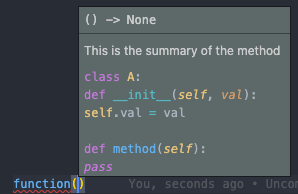
Indentation in the code block is not respected and all lines of the code are left aligned.
Steps to reproduce:
- Create a method with a docstring that includes a markdown code block
- Use the method and check the popup that appears where the docstring is rendered
Example
This is a docstring with a code block that won't respect indentation
def function():
    """This is the summary of the method

    ```python
    class A:
        def __init__(self, val):
            self.val = val

        def method(self):
        pass
    ```
    """
And this is what the pop up shows.
Notes
I see that this issue was raised in the past in microsoft/vscode-python#787 but was closed because it was supposed to be fixed but I have never seen it working properly.

What version of pylance r you using?
I'm on the latest. v2021.10.2
hmm. maybe its related to the red squiggles.
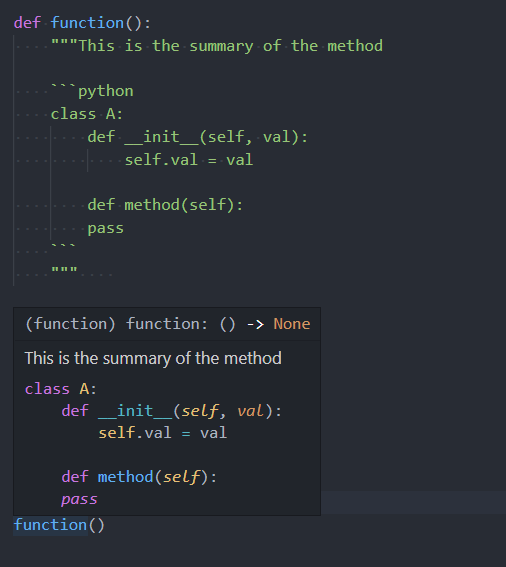
you should see "function" in the hover.
can you provide the logs from "Python Language Server" output window?

The tooltip from the issue is a signature help (where we omit "(function)" since it's a signature, so must be a function). Maybe we have some lingering docstring inconsistency?

Closing as this appears to be fixed in our latest builds.
Signature help:
Hover:
