

 microsoft
Immersive reader: Tutorial category icons appear in immersive reader text
The left border icons in tutorial instructions are inlined into immersive reader text. It's a minor thing, but maybe there's a way to filter them?
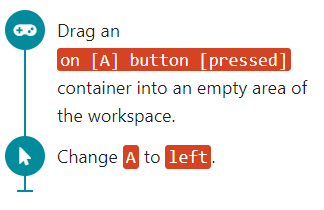
becomes
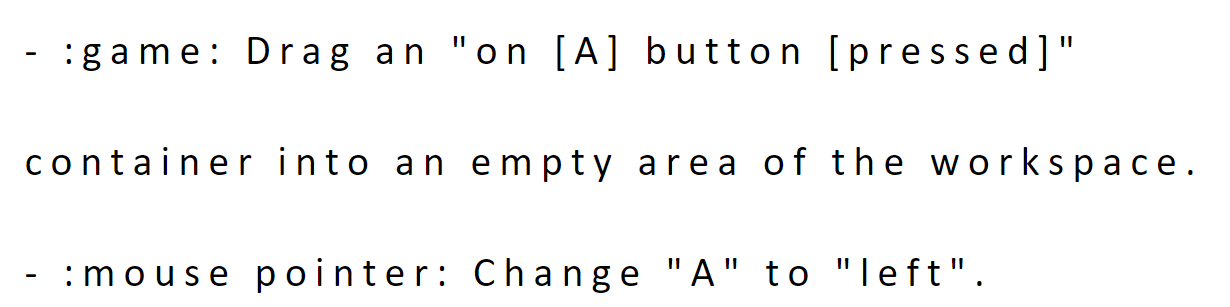


Recommendation for Triage
Issue Type: bug
Status: info-complete
Label(s): tutorial, accessibility
Duplicate Issue(s): No duplicate issue found
Likely Related: No related issue found
Suggested Priority: P3
Complexity: medium
Copilot Agent Ready: ⚠️ Needs clarification
Recommendations for Assignee
Analysis
This is an accessibility bug where tutorial category icons (the left border visual indicators in tutorial instructions) are being incorrectly included in the Immersive Reader text output. The issue affects the accessibility experience for users relying on Immersive Reader. The fix requires filtering or hiding these decorative icons when passing content to the Immersive Reader integration. This is classified as P3 because while it impacts accessibility, it's a cosmetic issue that doesn't block core functionality - the tutorial text itself is still readable.
Duplicate & Related Issues
Duplicates:
- No duplicates found via semantic search
Related Issues:
- No closely related issues found
Location Hints
Based on code search, the immersive reader implementation is in pxt-core (microsoft/pxt repository), not pxt-arcade:
webapp/src/immersivereader.tsx(in pxt repo) - Handles the Immersive Reader integration and content preparationwebapp/src/tutorial.tsx(in pxt repo) - Tutorial UI component that likely generates the content with category iconstheme/tutorial.less(in pxt repo) - Tutorial styling including the left border category icons
The fix would need to filter out decorative elements (likely CSS classes or specific HTML elements) when preparing tutorial content for the Immersive Reader. This is a cross-repository issue - while filed in pxt-arcade, the implementation lives in pxt-core and would affect all MakeCode targets that use tutorials and Immersive Reader.
Next Steps
Can assign to Copilot Coding Agent: ⚠️ Yes, after clarification
Reasoning: The issue is well-defined with clear before/after screenshots. However, this requires changes in the microsoft/pxt repository (pxt-core), not pxt-arcade. The agent would need to investigate the specific selectors/elements used for tutorial category icons and add appropriate filtering in the Immersive Reader content preparation logic. Clarification needed on whether to file this in microsoft/pxt instead, or handle as a cross-repo issue.
🏴☠️ Ahoy! This treasure was crafted by pxt-arcade Issue Triage Assistant fer issue #4328 🗺️
![github-actions[bot] avatar](https://avatars.githubusercontent.com/in/15368?v=4 "Published by a pub.dev verified publisher")