

 microsoft
[BUG] Page times out when closing on Firefox
Context
- Playwright Version: 1.32.1
- Operating System: Windows 11
- Node.js Version: v18.14.0
- Browser: Firefox
Test Repro
A repro can be found below to reproduce the issue in question. The issue is intermittent, thus the test is contained within a for loop for greater chance of the failure occurring. About 25 iterations will usually yield at least one test that comes across this issue, however should the failure in question not occur, you can increase the chances of the issue occurring by increasing the iteration count or simply rerunning the tests.
The project contains 25 identical tests, wrapped in a for loop and located in the directory: tests > repro.spec.ts. The tests are very simple, consisting of two steps:
- Navigate to https://www.google.co.uk/.
- Close the page.
Code Snippet
repro.spec.ts
import { test } from '@playwright/test';

test.describe('Repro', async () => {
    for (let i = 1; i <= 25; i++) {
        test(`Test ${i}`, async ({ page }) => {
            await page.goto('https://www.google.co.uk/');
            await page.close();
        });
    }
});
playwright.config.ts
import { defineConfig, devices } from '@playwright/test';

export default defineConfig({
  testDir: './tests',
  fullyParallel: true,
  workers: 5,
  timeout: 60 * 1000,
  reporter: 'html',

  use: {
    headless: false,
    trace: 'on',
  },

  projects: [
    {
      name: 'chromium',
      use: { ...devices['Desktop Chrome'] },
    },

    {
      name: 'firefox',
      use: { ...devices['Desktop Firefox'] },
    },

    {
      name: 'webkit',
      use: { ...devices['Desktop Safari'] },
    },
  ],
});
Describe the bug
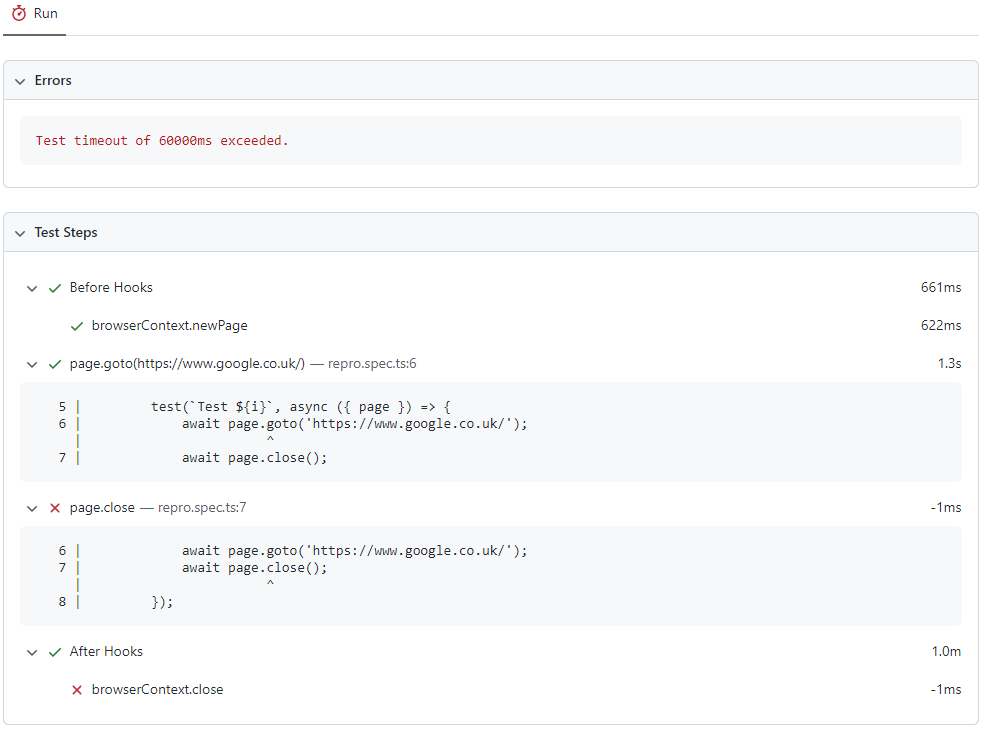
Firefox intermittently fails when attempting to close the page and browserContext. The page never closes and hangs until eventually hitting the test timeout threshold and consequently failing the test. The repro uses a test timeout of 60 seconds, however the issue occurs with a test timeout of 4 minutes too. This issue only appears to affect Firefox; I am yet to encounter the problem using Webkit and Chromium.
It should be noted that the issue occurs when running tests in parallel. In my case, the project is configured to use 5 workers. I am yet to see the issue when running the tests sequentially.
A screenshot of the report can be found below, which shows the test failing to close the page, as well as the browserContext. My lack of domain knowledge prevents me from being able to produce a trace, as no trace is generated when the test fails for this reason.
 |
|---|
| Failing Steps Report |
Thanks for any help or guidance in advance! This is my first BUG REPORT, so go easy on me should I have missed out any vital information.


Maybe unrelated but I also got an error in newPage:
Error: browserContext.newPage: Protocol error (Browser.newPage): Browser closed.
==================== Browser output: ====================
<launching> C:\Users\iusemikh\AppData\Local\ms-playwright\firefox-1391\firefox\firefox.exe -no-remote -wait-for-browser -foreground -profile C:\Users\iusemikh\AppData\Local\Temp\playwright_firefoxdev_profile-mU380e -juggler-pipe -silent
<launched> pid=7792
[pid=7792][out] console.warn: services.settings: Ignoring preference override of remote settings server
[pid=7792][out] console.warn: services.settings: Allow by setting MOZ_REMOTE_SETTINGS_DEVTOOLS=1 in the environment
[pid=7792][out] console.error: ({})
[pid=7792][out]
[pid=7792][out] Juggler listening to the pipe
[pid=7792][out] console.error: "Warning: unrecognized command line flag -wait-for-browser\n"
[pid=7792][out] console.error: (new SyntaxError("The URI is malformed.", (void 0), 133))
[pid=7792][err] JavaScript error: resource://gre/modules/XULStore.jsm, line 58: Error: Can't find profile directory.
[pid=7792][out] console.warn: SearchSettings: "get: No settings file exists, new profile?" (new NotFoundError("Could not open the file at C:\\Users\\iusemikh\\AppData\\Local\\Temp\\playwright_firefoxdev_profile-mU380e\\search.json.mozlz4", (void 0)))
[pid=7792][out] console.error: (new SyntaxError("The URI is malformed.", (void 0), 133))
[pid=7792][out] console.error: (new SyntaxError("The URI is malformed.", (void 0), 133))
[pid=7792][out] console.error: (new SyntaxError("The URI is malformed.", (void 0), 133))
[pid=7792][out] console.error: (new SyntaxError("The URI is malformed.", (void 0), 133))
[pid=7792][out] console.error: (new SyntaxError("The URI is malformed.", (void 0), 133))
[pid=7792][out] console.error: (new SyntaxError("The URI is malformed.", (void 0), 133))
[pid=7792][out] console.error: (new SyntaxError("The URI is malformed.", (void 0), 133))
[pid=7792][out] console.error: (new SyntaxError("The URI is malformed.", (void 0), 133))
[pid=7792][out] console.error: (new SyntaxError("The URI is malformed.", (void 0), 133))
[pid=7792][out] console.error: (new SyntaxError("The URI is malformed.", (void 0), 133))
[pid=7792][err] JavaScript error: chrome://juggler/content/content/FrameTree.js, line 570: TypeError: this.domWindow() is undefined
[pid=7792][err] JavaScript error: chrome://juggler/content/content/FrameTree.js, line 570: TypeError: this.domWindow() is undefined
[pid=7792][out] console.error: (new SyntaxError("The URI is malformed.", (void 0), 133))
[pid=7792][err] JavaScript error: resource:///modules/BrowserGlue.sys.mjs, line 5462: TypeError: win is null
[pid=7792][out] console.error: (new SyntaxError("The URI is malformed.", (void 0), 133))
[pid=7792][out] console.error: (new SyntaxError("The URI is malformed.", (void 0), 133))
[pid=7792][out] console.error: (new SyntaxError("The URI is malformed.", (void 0), 133))
[pid=7792][out] console.error: (new SyntaxError("The URI is malformed.", (void 0), 133))
[pid=7792][out] console.error: (new SyntaxError("The URI is malformed.", (void 0), 133))
[pid=7792][out] console.error: (new SyntaxError("The URI is malformed.", (void 0), 133))
[pid=7792][out] console.error: (new SyntaxError("The URI is malformed.", (void 0), 133))
[pid=7792][out] console.error: (new SyntaxError("The URI is malformed.", (void 0), 133))
[pid=7792] <gracefully close start>
@yury-s It would appear with trace:off the specific issue in question doesn't appear. I can only reproduce it with trace:on.
I have seen instances of the browserContext.newPage error in the setup of a new page, but didn't detail it here as it hasn't appeared in any tests relevant to the application I am testing. In the repro however, the browserContext.newPage error is persistent with trace:on and trace:off.
@yury-s I would like to correct my above statement, I have just seen multiple instances of both browserContext.newPage and page.close/browserContext.close errors with the trace:off from an overnight test run. I am unable to provide specifics due to the sensitivity of the tests in question. There were 260 tests run in total.
Repro
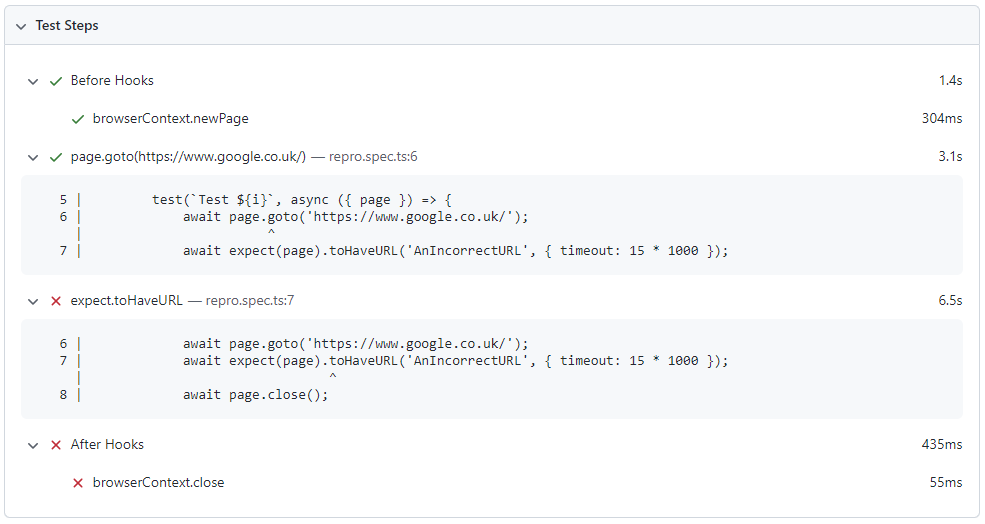
The close issues are present when a test has timed out on a prior step, should the browserContext.close step always pass even when a test has timed out?
 |
|---|
Failure: browserContext.close() |
repro.spec.ts
import { expect, test } from '@playwright/test';

test.describe('Repro', async () => {
    for (let i = 1; i <= 25; i++) {
        test(`Test ${i}`, async ({ page }) => {
            await page.goto('https://www.google.co.uk/');
            await expect(page).toHaveURL('AnIncorrectURL', { timeout: 15 * 1000 });
            await page.close();
        });
    }
});
playwright.config.ts
import { defineConfig, devices } from '@playwright/test';

export default defineConfig({
  testDir: './tests',
  fullyParallel: true,
  workers: 5,
  timeout: 10 * 1000,
  reporter: 'html',

  use: {
    headless: false,
    trace: 'off',
  },

  projects: [
    {
      name: 'chromium',
      use: { ...devices['Desktop Chrome'] },
    },

    {
      name: 'firefox',
      use: { ...devices['Desktop Firefox'] },
    },

    {
      name: 'webkit',
      use: { ...devices['Desktop Safari'] },
    },
  ],
});
The close issues are present when a test has timed out on a prior step, should the
browserContext.closestep always pass even when a test has timed out?
Yes, context.close() should not throw even if the test failed.
I cannot reproduce this on tip-of-tree.
@d-wezzer could you please try installing @playwright/test@next and running your navigation test? Does it repro for you?

@aslushnikov I was not able to reproduce this on @playwright/test@next or @playwright/[email protected].