
playwright
 playwright copied to clipboard
 microsoft
[FEATURE][VS CODE EXTENSION] Use all projects for starting the tree of tests
Context:
- Playwright Version: 1.25.2
- Operating System: Mac
- Node.js version: 16
- Visual Studio Code version: 1.66
- Playwright for VSCode extension version: 0.2.10 Preview
- Browser: All
- Extra: monorepo setup managed by TurboRepo
I imagine that there are many things planned for the Playwright extension for VS Code. But here is one suggestion.
I use a monorepo setup managed by TurboRepo. Ideally, to me, I would have Playwright working independently on each one of my packages, and the extension would detect the many files named playwright.config.ts at the root of each package.
Unfortunately, that does not seem to work with the VS extension.
Because of this, I have many projects listed in one single config file at the root of my monorepo. Each project uses a testMatch property to funnel the tests files of a single project, as such:
// Please nevermind the strings. I know they are supposed to be regexp.
projects: [
  {
    name: 'all'
    testMatch: '**/*.test.ts'
  },
  {
    name: 'client'
    testMatch: 'apps/client/**/*.test.ts'
  },
  {
    name: 'server'
    testMatch: 'apps/server/**/*.test.ts'
  },
  {
    name: 'package1'
    testMatch: 'packages/package-1/**/*.test.ts'
  },
  ...
]
But did you notice the first project named all? I do that because that is the only way to have all tests listed by the extension.
What I would like to do is to remove that project named all and have the extension listing all projects as starting points for their own tree of tests. That way, the extension would look like this (without the project named all):
> client
> server
  src/
    a.test.ts
    b.test.ts
> package1
I think this would be nice because each project has its own configuration, like outputDir and snapshotDir.
Please advise if you think this is a good approach or if I should have one config file for each project.

You can select different projects here:
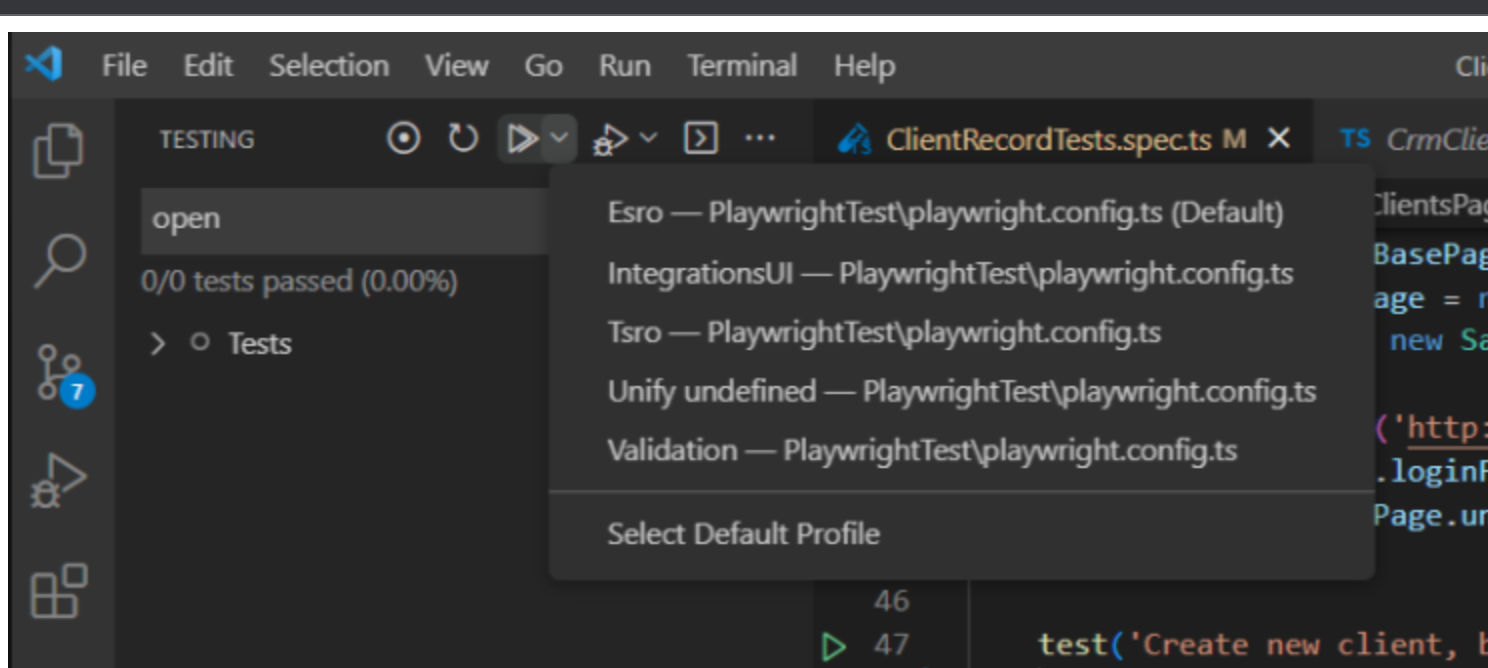
would that work for you? We have an issue for updating the docs accordingly here: https://github.com/microsoft/playwright.dev/issues/747

You can select different projects here:
would that work for you? We have an issue for updating the docs accordingly here: microsoft/playwright.dev#747
Yes, @mxschmitt, that will work for me. Thank you very much for your readiness.
I checked the issue you mentioned and I am studying how can I contribute to that.
If you are interested in contributing to the docs, you are more than welcome! The relevant file is here: https://github.com/microsoft/playwright/blob/main/docs/src/getting-started-vscode-js.md
@mxschmitt, I am sorry for taking this long to provide a PR, but I couldn't do it during working days this week.
Please take a look at the PR above.
