

 microsoft
[Feature] Browser name in testcase name in JUnit reporter
We run PW tests using Azure DevOps, and there is only one compatible reporter we can use so far, is JUnit.
It works fine, except that it doesn't write the browser name which was used for executing a test, to the <testcase name="">, leading to not very friendly view:
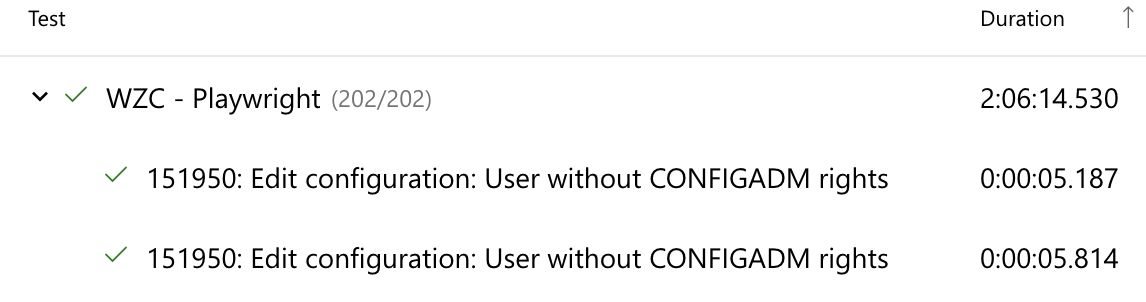
This is a single test run in two browsers, but there is no way to know which row was run on which of these two browsers. The only way to learn that, is to download the results XML and investigate it manually.
What we'd like to have, is an option (since not everybody is using Azure DevOps) to prepend a browser name to the name value in testcase node of XML, same as you already do for classname attribute:
<testcase name="151950: Edit configuration: User without CONFIGADM rights" classname="[chromium] › Configuration\151950.ts:5:1 › 151950: Edit configuration: User without CONFIGADM rights" time="5.811">
</testcase>
Alternatively, it could be a placeholder we can use in the test name, like _browser_:
test('[_browser_]: 151950: Edit configuration: User without CONFIGADM rights', async ({
	browser
}) => {
...
});

@creage AzureDevOps actually has a specific format - TRX. We'd be happy to have a built-in reporter for TRX, that should be able to support anything.
Would you be interested in implementing a TRX reporter?

https://github.com/microsoft/playwright/issues/11143 We know. But the TRX schema is not available for public AFAIK, thus we are limited by JUnit.
I was able to add the browser name to the test case title in the junit xml report, using a custom reporter..
// customReporter.ts
import { Reporter, TestCase } from '@playwright/test/reporter';

class MyReporter implements Reporter {
  onTestBegin(test: TestCase) {
    test.title += ` [${test.parent.parent!.title}]`
    console.log(`Starting test ${test.title} - ${test.parent.parent!.title}`);
  }
}
export default MyReporter;
Add the reporter to your playwright config..
// playwright.config.ts
reporter: [
    ['./path/to/customReporter.ts'],
    ['junit', { outputFile: 'reports/test-results.xml' }]
  ]
Then the junit xml report will have the browser name at the end of the test title, and will now show when the junit xml is published in an Azure DevOps pipeline

I was able to add the browser name to the test case title in the junit xml report, using a custom reporter..
// customReporter.ts
import { Reporter, TestCase } from '@playwright/test/reporter';

class MyReporter implements Reporter {
  onTestBegin(test: TestCase) {
    test.title += ` [${test.parent.parent!.title}]`
    console.log(`Starting test ${test.title} - ${test.parent.parent!.title}`);
  }
}
export default MyReporter;
Add the reporter to your playwright config..
// playwright.config.ts
reporter: [
    ['./path/to/customReporter.ts'],
    ['junit', { outputFile: 'reports/test-results.xml' }]
  ]
Then the junit xml report will have the browser name at the end of the test title, and will now show when the junit xml is published in an Azure DevOps pipeline
I wonder if this will work with allure reports

I'm in a similar situation where we upload our junit.xml to a tool to track test health over time and having the browser in the testcase name would be extremely helpful

@creage @fedorareis - Are you guys able to append the browser name or project name in the testcase name ? What solution works for this issue ? I also want to upload our junit.xml to a tool to track test health over time.

I have the same question: how can I add the browser to the test unit? Is it only with some custom reporter?


I have the same question: how can I add the browser to the test unit? Is it only with some custom reporter?
Hey @apis3445, I described a temporary solution here #27665.
