

 microsoft
3.0.6 collect not working on Win server 2012R2 - The specified procedure could not be found exception
Error with manual run:
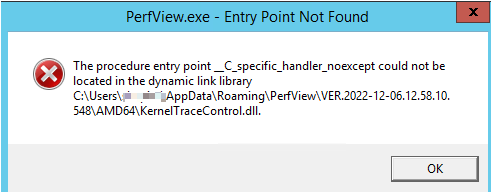
Log:
[EXECUTING: PerfView /DataFile:D:\EXTERNAL\PerfView\4.123.8370.28342_2022.12.09.11.00.38.etl /Merge:true /zip:true /BufferSizeMB:256 /StackCompression /CircularMB:500 /MaxCollectSec:20 /KernelEvents:ThreadTime /TplEvents:Default /FocusProcess:4732 /logFile=D:\EXTERNAL\PerfView\perfViewRun.log /AcceptEula collect]
[Kernel Log: D:\EXTERNAL\PerfView\4.123.8370.28342_2022.12.09.11.00.38.kernel.etl]
Kernel keywords enabled: ThreadTime
Aborting tracing for sessions 'NT Kernel Logger' and 'PerfViewSession'.
Ensuring .NET Allocation profiler not installed.
Detected 64 bit system, removing 32 bit keys.
[Exception Occurred: System.ComponentModel.Win32Exception (0x80004005): The specified procedure could not be found
   at Microsoft.Diagnostics.Tracing.Extensions.ETWKernelControl.LoadKernelTraceControl()
   at Microsoft.Diagnostics.Tracing.Extensions.ETWKernelControl.StartKernelSession(UInt64& TraceHandle, Void* propertyBuff, Int32 propertyBuffLength, STACK_TRACING_EVENT_ID* stackTracingEventIds, Int32 cStackTracingEventIds)
   at Microsoft.Diagnostics.Tracing.Session.TraceEventSession.EnableKernelProvider(Keywords flags, Keywords stackCapture)
   at PerfView.CommandProcessor.Start(CommandLineArgs parsedArgs)
   at PerfView.CommandProcessor.Collect(CommandLineArgs parsedArgs)
   at PerfView.CommandProcessor.ExecuteCommand(CommandLineArgs parsedArgs)]
2.0.77 working normally.
3.0.6 on win10 machine working normally too.
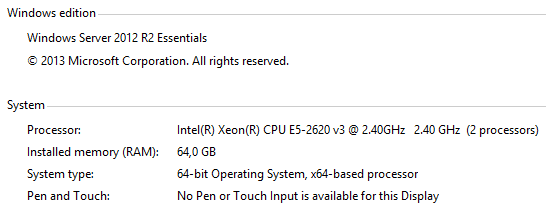
Sys. info:

Apologies if you have already tried this, but have you tried installing .NET 4.6.2 or above?
You can install Microsoft 4.8 .NET Runtime here.
Also with Windows Server 2012R2 you might not have the correct dev libraries since they are not available by default. You might need to install the Windows 8.1 SDK.
You can download the Windows 8.1 SDK here.
To fix the error you need to copy the correct KernelTraceControl.dll into the right directory.
Copy KernelTraceControl.dll,
from C:\Program Files (x86)\Windows Kits\8.1\Windows Performance Toolkit\kerneltracecontrol.dll
(or wherever you installed the Windows 8.1 Dev Kit)
to %APPDATA%\Roaming\PerfView\VER.2022-12-06.12.58.10.548\AMD64\KernelTraceControl.dll
(the directory where the KernelTraceControl.dll is "missing").
It should work when you try to collect data.
I was trying to run PerfView on my Windows Server 2012R2 instance and was getting this error. I read the User Guide and it mentioned:
PerfView is a V4.6.2 .NET application. Thus you need to have installed a V4.6.2 .NET Runtime on the machine which you actually run PerfView. On Windows 10 and Windows Server 2016 has .NET V4.6.2. On other supported OS you can install .NET 4.6.2 from standalone installer.
And the Microsoft .NET docs states that:
.NET Framework 4.8 is the latest version. It is supported on Windows 8.1 and Windows Server 2012 R2. It's included with Windows 11 and in Windows 10 starting with the May 2019 Update.
I am used to working in Windows Server 2016 and Windows 10 which have .NET included by default, but Windows 8.1 and Windows Server 2012R2 do not. When I checked the server I noticed I didn't have .NET installed. After I installed it, the entry point error was fixed for me, but I still ran into this issue. It wasn't until I copied the correct KernelTraceControl.dll from the Windows 8.1 SDK Performance Toolkit that the collection could run. I hope this helps!

@ogarci5
to %APPDATA%\Roaming\PerfView\VER.2022-12-06.12.58.10.548\AMD64\KernelTraceControl.dll (the directory where the KernelTraceControl.dll is "missing").
This dll was already there but of a different version:
But after I replaced it with one from 8.1 sdk performance kit - the problem was solved. Thank you 🙏