microsoft
Cant Login
i cant login? i started mssql using the below command on Ubuntu 22
sudo docker run -e "ACCEPT_EULA=Y" -e "SA_PASSWORD=YourPA$$w0o0o0ord" -p 1433:1433 --name mssql --hostname mssql -d mcr.microsoft.com/mssql/server:2022-latest
username=sa password=YourPA$$w0o0o0ord

How are you trying to login?
Try these two commands
docker run -e "ACCEPT_EULA=Y" -e "SA_PASSWORD= P@$$wo0ord" -p 1433:1433 -d mcr.microsoft.com/mssql/server:2022-latest
docker exec -it <container_name> /opt/mssql-tools/bin/sqlcmd -S localhost -U sa -P P@$$wo0ord

I think your $$-signs are replaced by PID (special variable). Try:
sudo docker run -e "ACCEPT_EULA=Y" -e "SA_PASSWORD=YourPA§§w0o0o0ord" -p 1433:1433 --name mssql --hostname mssql -d mcr.microsoft.com/mssql/server:2022-latest
with
username=sa
password=YourPA§§w0o0o0ord

Watch out when using double-quotes in pair with strings that include at least one dollar-sign.
Most shells will try to replace them since any $... will mean its an environment variable.
Better use single-quotes since those are representing "pure" strings and shells will just process them "as is":
sudo docker run -e "ACCEPT_EULA=Y" -e 'SA_PASSWORD=YourPA$$w0o0o0ord' -p 1433:1433 --name mssql --hostname mssql -d mcr.microsoft.com/mssql/server:2022-latest
Check these screenshots of my zsh session in Windows Terminal (bash will behave the same way):
 (The
(The $$ is highlighted because it will be processed in a different way)
 (The
(The $$ is not going to be processed)
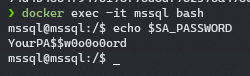
How does it look like inside the container?
When using it "your" way, the $$ will be replaced with the current PID (like @FootStark mentioned), and that's why your desired SA_PASSWORD will never match the one actually assigned to your container:
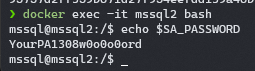
When using it "my" way, the SA_PASSWORD env variable will be how its supposed to be: