

 microsoft
ComboBox weirdly interacts with other controls defined in XAML
Describe the bug
If a ComboBox has its ItemSource bound to a collection in a viewmodel and its members DisplayMemberPath, SelectedValuePath and SelectedValue are also used to bind to a specific value, the ComboBox does not load/display the selected value on application start, depending on the XAML around the ComboBox. For example a simple TextBox control in front of the ComboBox breaks this scenario.
Sample: ComboBoxTest.zip
Steps to reproduce the bug
-
Open the provided sample and launch it.
-
You see the following window coming up, with no selected item displayed in the
ComboBoxdespite the viewmodel setting things up correctly: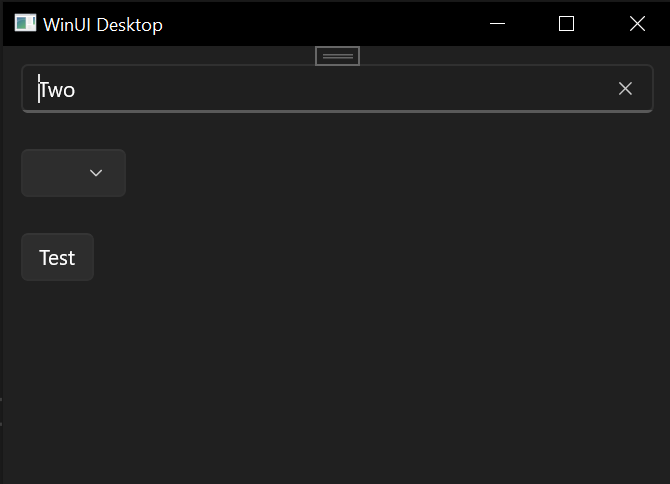
-
Now go into
PayerPage.xamland comment the textbox so the code looks like this:
<Page
  x:Class="ComboBoxTest.PayerPage"
  xmlns="http://schemas.microsoft.com/winfx/2006/xaml/presentation"
  xmlns:x="http://schemas.microsoft.com/winfx/2006/xaml"
  xmlns:d="http://schemas.microsoft.com/expression/blend/2008"
  xmlns:local="using:ComboBoxTest"
  xmlns:mc="http://schemas.openxmlformats.org/markup-compatibility/2006"
  Background="{ThemeResource ApplicationPageBackgroundThemeBrush}"
  mc:Ignorable="d">

  <Grid>

    <Grid.RowDefinitions>
      <RowDefinition Height="Auto" />
      <RowDefinition Height="Auto" />
      <RowDefinition Height="Auto" />
    </Grid.RowDefinitions>

    <!--<TextBox
      Grid.Row="0"
      Margin="12"
      Text="{x:Bind ViewModel.SelectedPayer.SelectedText, Mode=TwoWay, UpdateSourceTrigger=PropertyChanged, FallbackValue=''}" />-->
    <ComboBox
      Grid.Row="1"
      Margin="12"
      DisplayMemberPath="Description"
      ItemsSource="{x:Bind AvailablePayers}"
      SelectedValue="{x:Bind ViewModel.SelectedPayer.SelectedValue, Mode=TwoWay, UpdateSourceTrigger=PropertyChanged}"
      SelectedValuePath="PayerId" />
    <Button
      Grid.Row="2"
      Margin="12"
      Click="Button_Click"
      Content="Test" />

  </Grid>

</Page>
- Launch the application again and notice that now that only the
TextBoxwas commented out theComboBoxdisplays correctly: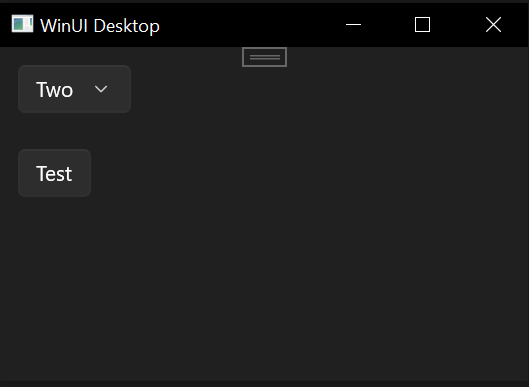
Expected behavior
The ComboBox should display correctly in any case when the xaml itself is valid.
Screenshots
No response
NuGet package version
WinUI 3 - Windows App SDK 1.2.2: 1.2.221209.1
Windows version
Windows 10 (21H2): Build 19044
Additional context
No response

Note: If you remove the binding from the TextBlock, things work as expected. So this probably has something to do with binding.
