

 microsoft
WinUI 3 hot reload stopped working after some Updates
Describe the bug
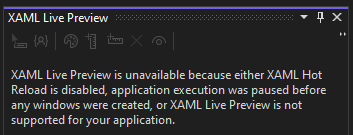
Hello. After installation some update via Windows Update Center Hot Reload for WinUI 3 apps stooped working. I have feeling that these ones:

Also xaml debug tools have disappeared from the app when it is on debug, and live visual tree shows nothing:

All settings are set. It (hot reload, debug tools, live tree) used to work several days ago until some updates are installed.
Steps to reproduce the bug
- Start Debugging some WinUI 3 project.
- See that hot reload is not working.
Expected behavior
No response
Screenshots
No response
NuGet package version
WinUI 3 - Windows App SDK 1.1.4
Windows app type
- [ ] UWP
- [ ] Win32
Device form factor
Desktop
Windows version
Windows 10 (21H1): Build 19043
Additional context
No response

I have the same issue. I tried the "repair" visual studio option which did not fix the problem.
Visual Studio Version
Version 17.4.0 Preview 1.0
NuGet package version
WinUI 3 - Windows App SDK 1.1.4
Windows version
Windows 10 (21H1): Build 19043

I created a fresh WinUI project and copied across all my source code and the hot-reload was once again available. However 3 days later I again have the same issue and am unsure how to get diagnostic information to resolve the problem. I haven't changed any settings in visual studio nor have I changed the csproj or the appsettings.
Is there are way to get further information with regards to why the xaml hot reload is unavailable?



This is difficult to do this as hlint has no way to know which parts of the parsed source are generated.

That's weird, are you sure you typed it correctly? And that it's an elevated command prompt?
I'm afraid that the "/d" is required since it uses "/r", so it cannot be ignored.

Ah my bad. My system is set to german so it required j for "Ja" instead of y for "yes"
@Trix07 After the first command it tells me that various files now belong to my user. This is right. After that I run the second command but it tells me that "Assignments of account names and security identifiers were not performed. 0 files processed."
Do you know what this problem is?
After I restarted Visual Studio the problem remained.
Not really, when I ran the last command I got the following: "Successfully processed 233 files; Failed processing 0 files". Perhaps you don't have the required permission?
Other than that the only thing I didn't mention was that I took ownership of the WindowsApps folder before running the commands. That was only to verify my installed WindowsAppRuntime version, but perhaps it's necessary. https://www.makeuseof.com/windows-access-windowsapps-folder/
I'm not sure where this is documented but I have now just realised that the issue I was having was due to debugging an x64 build. By switching to x86 build the xaml hot reload just worked.
I'm curious if this is the expected behaviour? i.e. xaml hot reload is only support for x86 builds?
@SoggyBottomBoy I don't think that's the case since x64 works fine for me, although now and then it breaks, and I have to run the command I posted earlier again.
This issue is stale because it has been open 180 days with no activity. Remove stale label or comment or this will be closed in 5 days.
![github-actions[bot] avatar](https://avatars.githubusercontent.com/in/15368?v=4 "Published by a pub.dev verified publisher")