

 microsoft
Targeting Windows 11 SDK (22000) breaks rendering of certain fonts
Describe the bug
Not sure where to post this but at simple terms, targeting a UWP application to the Windows 11 SDK (22000) breaks rendering of certain fonts in XAML.
Steps to reproduce the bug
Clone and run https://github.com/JohnnyWestlake/win-sdk-22000-fontdeath
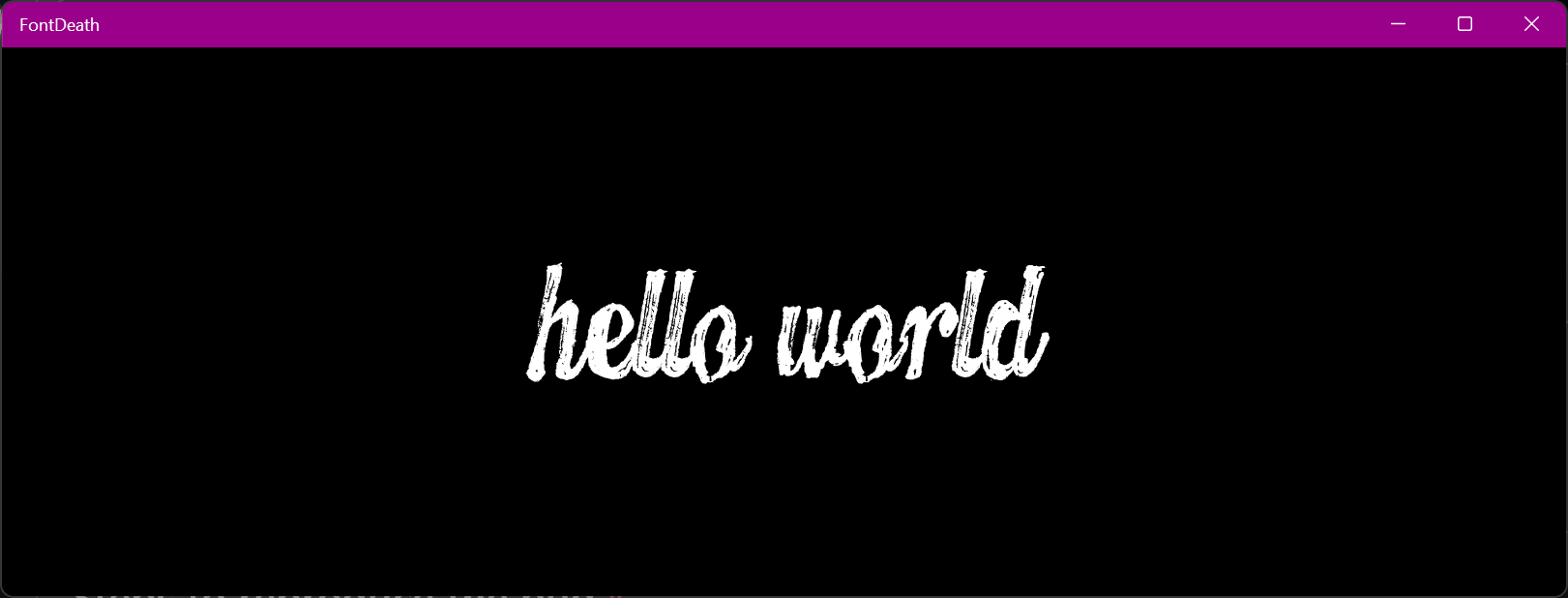
Observe text renders in Segoe UI.

Stop and retarget to a Windows 10 SDK (20348 for example, though anything lower should suffice), observe renders with custom font.
Expected behavior
No response
Screenshots
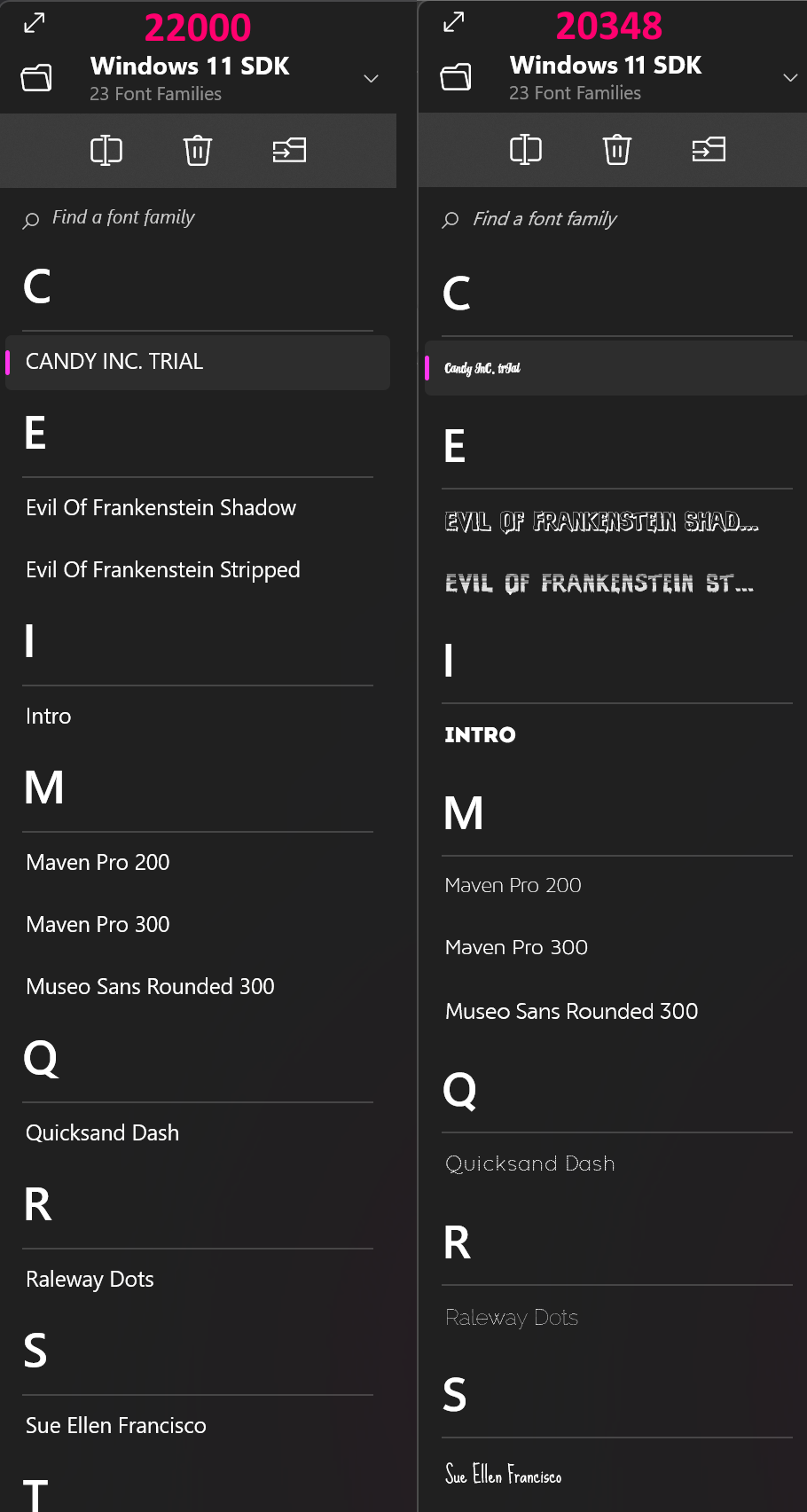
Examples of some fonts that break, though there are many more.
Windows app type
- [X] UWP
- [ ] Win32
Device form factor
Desktop
Windows version
No response
Additional context
No response


@StephenLPeters I think this is focusing on the Text font and not the icon font unless there are icons missing when the update happens.

I didn't have the SDK installed, so I don't verify it. From the app, it used custom font family, and may be related.


Fwiw, app-packaged font's being broken is just an example for the repro project. This also affects the font's listed in the screenshot above, which are all installed on the system (though I don't think any are installed by default with Windows, and I'm not sure of any particulars that relate them too each other)
Also worth nothing that the Windows 10 SDK version is correctly using the new Segoe UI Variable font as the default UI font on Windows 11, whereas the version targeting the Windows 11 SDK is for some reason using the Windows 10 default Segoe UI. You can notice the "Windows 11 SDK" text and the text for the large group headers are both using different versions of Segoe UI, and I would assume that using the Windows 11 SDK we would still want to be using Segoe UI Variable
@JohnnyWestlake it sounds like there was a change to how we map font names out of the font files (I don't know if there's more details about the difference between these two modes)
I was able to get the sample to work by changing the font name to "CANDY INC.", which is the font name I see when I install that font in Windows. This works:
FontFamily="ms-appx://CANDY INC . TRIAL Regular.otf#CANDY INC."
So @JohnnyWestlake where did you get the font name "CANDY INC. TRIAL"? Are you enumerating fonts from the system using DWrite then getting font names that way? If so, you might need to try to get the typographic family names versus the weight/stretch/style version.
But knowing this might help @codendone advise too.
@jevansaks So currently I get names from IDWriteFontFactory7->GetSystemFontSet, then get the familyNames from the contained IDWriteFontFaces (which will be WSS family names) as that's the only way to get correct XAML sources for Windows 10. That's fine, I can add version adaptive code and switch to IDWriteFontFactory7->GetSystemFontCollection(...) when the Windows 11 SDK is detected to get typographic family names instead. Not ideal but manageable.
However, this still leaves a problem with some other fonts when they're installed to the system / Windows. Take this font family, "Evil Of Frankenstein" - https://github.com/JohnnyWestlake/win-sdk-22000-fontdeath/tree/master/FrankensteinFonts (if you're wanting to test you'll have to install them)
Under the WSS model these 4 fonts create 3 font families, Evil of Frankenstein, Evil of Frankenstein Stripped, Evil of Frankenstein Shadow, which can all be referenced separately on Windows 10 SDK XAML. However, under the typographic model this creates just a single family, Evil of Frankenstein. Unless I'm missing something: I can't display the Stripped or Shadow variants in XAML any more for these system installed fonts, because the XAML has gone from WSS in Windows 10 SDK
<TextBlock FontFamily="Evil of Frankenstein" />
<TextBlock FontFamily="Evil of Frankenstein" FontWeight="UltraBlack" />
<TextBlock FontFamily="Evil of Frankenstein Shadow" />
<TextBlock FontFamily="Evil of Frankenstein Stripped" />
to Windows 11 SDK typographic families
<TextBlock FontFamily="Evil of Frankenstein" />
<TextBlock FontFamily="Evil of Frankenstein" FontWeight="UltraBlack" />
<TextBlock FontFamily="Evil of Frankenstein" />
<TextBlock FontFamily="Evil of Frankenstein" />
which ends up showing the base font for the last two because there's no longer any way in XAML to show the other family members?
@JohnnyWestlake Thanks for the great example. I'm forwarding your post to some font folks and will get back to you.
I have to move this one to @codendone. This was due to the typographic changes and it sounds like some of these faces may be inaccessible until the axis support is added to XAML.
@jevansaks @codendone I'm concerned about the regression here. Did I understand correctly that you're suggesting folks wait for new functionality as opposed to servicing the SDK / OS?

This issue is stale because it has been open 180 days with no activity. Remove stale label or comment or this will be closed in 5 days.
![github-actions[bot] avatar](https://avatars.githubusercontent.com/in/15368?v=4 "Published by a pub.dev verified publisher")
Well it looks too strange, while the other controls display the same font, but they are indeed diffrent
   <TextBlock Grid.Column="0" Name="NameTextBlock" Text="{x:Bind ViewModel.Name, Mode=OneWay}"
              Style="{StaticResource CommonTextStyle}"
              HorizontalAlignment="Left" VerticalAlignment="Top"
              FontWeight="Medium" FontSize="15" MaxLines="2"
              TextTrimming="WordEllipsis" TextWrapping="Wrap" />
   <TextBlock Grid.Column="1" Name="TransTextBlock" Text="{x:Bind ViewModel.Trans, Mode=OneWay}"
              Style="{StaticResource CommonTextStyle}"
              Visibility="{x:Bind ViewModel.TransVisibility, Mode=OneWay}"
              HorizontalAlignment="Left" VerticalAlignment="Top" Margin="4,0,0,0"
              FontWeight="Bold" FontSize="12" MaxLines="1"
              TextAlignment="Left" Opacity="0.8"
              TextTrimming="WordEllipsis" TextWrapping="Wrap" />
            <TextBlock Grid.Row="1" Name="Title"
                       Text="{x:Bind ViewModel.Title,Mode=OneWay}"
                       Style="{StaticResource CommonTextStyle}"
                       TextAlignment="Left" FontSize="17" FontWeight="Medium"
                       Width="224" Height="58" />
Here's the style settings
    <Style x:Key="CommonTextStyle" TargetType="TextBlock">
        <Setter Property="FontSize" Value="18" />
        <Setter Property="FontFamily" Value="MiSans" />
        <Setter Property="TextTrimming" Value="CharacterEllipsis" />
        <Setter Property="TextWrapping" Value="WrapWholeWords" />
        <Setter Property="Foreground" Value="{StaticResource CommonTextColor}" />
        <Setter Property="FontWeight" Value="Normal" />
    </Style>

It makes me so crazy that it also cannot using custom fonts (although using by ms-appx:// prefix) When using the popup (likes tooltip or flyout), you will find that its font are not same
不知道该怎么说,发现新 SDK 情况下无法使用自定义字体了,而且最近发现 TextBlock 直接写 Inlines会导致字体回退到最基本的英文字库,导致看起来字体很奇怪的感觉,尤其是Flyout Content / Tooltip 只能说 回退SDK版本能一定程度上解决这个问题 或者选择不要自定义字体了
Just like this image, It's able in WPF(remove prefix first) but WinUI not
idk
(Sora is a Variable font,but i selected "Medium" to save usage of memory)
4 minutes later: i edit the uri to "#Sora" and it fine.Why "#Sora" not "#Sora Medium" ? caused by space char?
