

 microsoft
Terminal appears garbled on Mac client
The terminal appears half-decoded on a participants' terminal.
What was your system configuration? Product and Version [VS/VSCode]: Version: 1.68.0-insider (user setup) Commit: d891b49fc0f8fc5e00591657ca225975952b09ca Date: 2022-05-25T05:16:10.962Z Electron: 17.4.4 Chromium: 98.0.4758.141 Node.js: 16.13.0 V8: 9.8.177.13-electron.0 OS: Windows_NT x64 10.0.22000
What was PARTICIPANTS' system configuration? Product and Version [VS/VSCode]: [10:22] Rafail Mladenov Version: 1.68.0-insider (Universal) Commit: 528ee1ae3daabe30c1307cf9dcd6e77eb96094bc Date: 2022-05-26T05:16:32.715Z Electron: 17.4.4 Chromium: 98.0.4758.141 Node.js: 16.13.0 V8: 9.8.177.13-electron.0 OS: Darwin x64 19.6.0
Live Share Extension Version: v1.0.5595 (both)
Steps to Reproduce / Scenario:
- Run a task which opens a terminal
- The terminal appears automatically on the participants' side
- The terminal appears wrong
If I run the same command manually in any of the other manually open terminals, it displays fine on the other side.
Please attach logs to this issue: You can access them via the Live Share: Export Logs command from the command palette (ctrl + shift + p) and attach them to this issue I am unable to attach the logs of the participant as the extension doesn't seem to save them anywhere. It says go to logs but that does not do anything. These are my logs (I am the host) logs.zip
Screenshots
Original terminal:
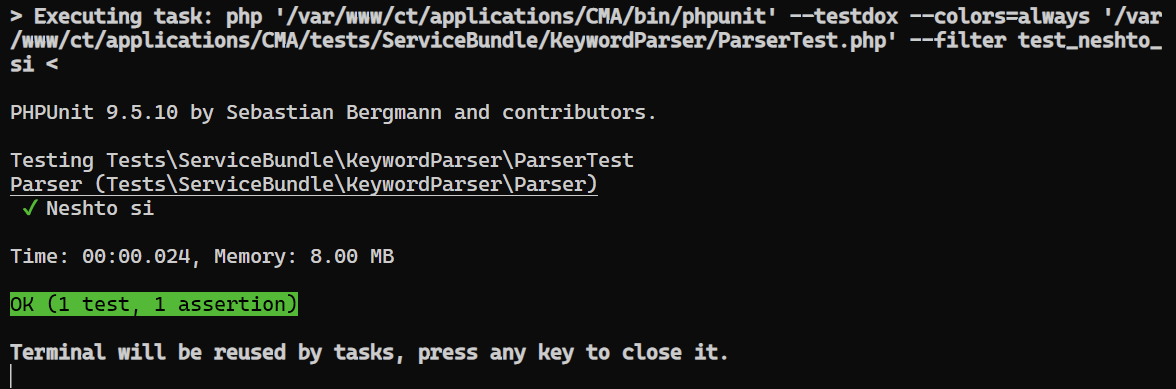 Participants' terminal:


While I was typing this an update arrived to:
Version: 1.68.0-insider (user setup)
Commit: 528ee1ae3daabe30c1307cf9dcd6e77eb96094bc
Date: 2022-05-26T05:16:43.433Z
Electron: 17.4.4
Chromium: 98.0.4758.141
Node.js: 16.13.0
V8: 9.8.177.13-electron.0
OS: Windows_NT x64 10.0.22000
and that solved the problem.
Maybe it is worth investigating as well because the terminal itself did not appear in the list of terminals in the Live Share window (I am guessing that had something to do with it).
Actually the problem is back. Right now I started a new session and the terminal that was automatically opened again was missing from the LiveShare tab in Shared Terminals. After reloading VS Code and staring a new session the terminal was visible and it is working again.
Just to add
- This is happening in release version of VS Code as well. If terminals are missing from
Shared terminals, it will not appear OK on the other end. - It doesn't matter what the other side OS is, it happens on both Windows and MacOS.
- In release version of VS Code, after a disconnect the terminals are always bugged and often just reloading the window does not fix them - a full restart of VSCode is needed.
تظهر المحطة نصف مفككة على محطة المشاركين.
**ماذا كان تكوين نظامك؟ ** المنتج والإصدار [VS / VSCode]: الإصدار: 1.68.0-insider (إعداد المستخدم) الالتزام: d891b49fc0f8fc5e00591657ca225975952b09ca التاريخ: 2022-05-25T05: 16: 10.962Z Electron: 17.4.4 Chromium: 98.0.4758.141 Node.js: 16.13 .0 V8: 9.8.177.13-electron.0 OS: Windows_NT x64 10.0.22000
**ماذا كان تكوين نظام PARTICIPANTS؟ ** المنتج والإصدار [VS / VSCode]: [10:22] إصدار Rafail Mladenov : 1.68.0-insider (Universal) الالتزام: 528ee1ae3daabe30c1307cf9dcd6e77eb96094bc التاريخ: 2022-05-26T05: 16: 32.715Z Electron: 17.4.4 Chromium: 98.0. 4758.141 Node.js: 16.13.0 V8: 9.8.177.13-electron.0 OS: Darwin x64 19.6.0
إصدار ملحق المشاركة المباشرة : v1.0.5595 (كلاهما)
خطوات إعادة الإنتاج / السيناريو:
- قم بتشغيل مهمة تفتح محطة طرفية
- تظهر المحطة تلقائيًا على جانب المشاركين
- يبدو أن المحطة خاطئة
إذا قمت بتشغيل نفس الأمر يدويًا في أي من المحطات الطرفية الأخرى المفتوحة يدويًا ، فسيتم عرضها بشكل جيد على الجانب الآخر.
**يرجى إرفاق السجلات بهذه المشكلة: ** _يمكنك الوصول إليها عبر أمر Live Share: Export Logs من لوحة الأوامر (ctrl + shift + p) وإرفاقها بهذه المشكلة ، لا يمكنني إرفاق _ _سجلات المشارك لأن الامتداد لا يبدو أنه لا ينقذهم في أي مكان. تقول اذهب إلى السجلات ولكن هذا لا يفعل شيئًا. _ هذه هي سجلاتي (أنا المضيف) logs.zip
لقطات الشاشة المحطة الأصلية: محطة المشاركين:

We’re not able to prioritize this issue over the other higher-impact issues we receive every week, based on the votes and comments from others in the community and our understanding of the issue. We understand this may be disappointing; we've all been there, whether in this project or others we've contributed to. However, rest assured that we love your input. If you feel it deserves to stay open, then clarify your use case and contact us to let us know how severe it’s for you.
