
live-share
 live-share copied to clipboard
 microsoft
Loss of Intellisense and syntax highlighting in VS for guest
Product and Version [VS/VSCode]: OS Version [macOS/Windows]: Live Share Extension Version: Target Platform or Language [e.g. Node.js]:
Steps to Reproduce / Scenario:
- Go to '...'
- Click on '....'
- Scroll down to '....'
- See error
Screenshots If applicable, add screenshots to help explain your problem.

Also, your logs may provide us with helpful information. You can access them via the Live Share: Export Logs command from the command palette (ctrl + shift + p) and attach them to this issue.
Product and Version: Visual Studio Enterprise 2019, version 16.4.3 OS Version: Windows 10 version 1909 build 18363.592 Live Share Extension Version: 1.0.1510.0 Target Platform or Language: C#, asp.net core 3.1
The guest intellisense, auto-complete, quick actions and syntax highlighting are completely not working.


Hi, the host is: IDE: Visual Studio Enterprise 2019 version 16.4.3 Live share extension: 1.0.1510.0
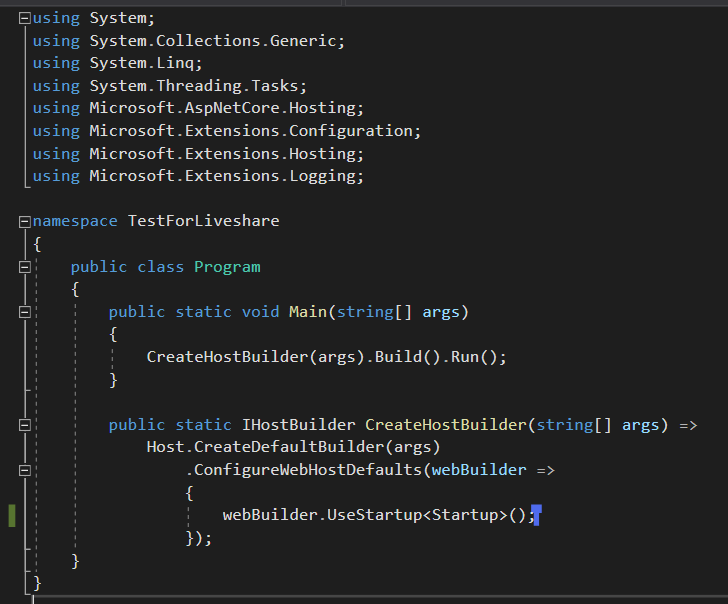
We've just tried with an empty vanilla ASP.NET core 3.1 and we've got the same result, you can see no highlighting and if I type no auto-completion, suggestions, go-to-definition, etc. And we tried to swap between host and guest as well. Thank you.
Hi there, I've suffered with this issue myself. I'm watching a Microsoft stream on Twitch hosted by @csharpfritz. We've seen this fail on a couple of guest sessions where the guest is unable to get intellisense.
Here's a screenshot of the stream


Ok, I'm able to repro, so should be pretty quick to clear up. We should have this resolved shortly! I'll keep you updated.

@VALLIS-NERIA , I believe this is fixed on newer versions of VS. Are you still seeing it repro? If so, what's your setup?
I'm seeing this in Visual Studio Community 2019 Version 16.9.4. The shared solution has multiple projects, including a C# library and a Blazor server app. Syntax highlighting doesn't work for the other VS 2019 user. We both use Windows.

Still experiencing this kind of issue. Could it be coming by different themes or editor setup?

Product and Version [VS/VSCode]: VSCode OS Version [macOS/Windows]: Windows 10 Live Share Extension Version: v1.0.4580 Target Platform or Language [e.g. Node.js]: Python
Steps to Reproduce / Scenario: 1 - Open folder with main.py 2 - Start Liveshare 3 - Connect to your own liveshare in a separate VSC window 4 - Loss of intellisense and syntax highlighting
Screenshots

I am on the latest VSC version as suggested by daytonellwagner By the way I did trust the workspace on the guest

Hey @Sim0nV , I just tried with the same setup and see that the colorization on the guest is a little off (as in your screenshot), but completion and other language services seem to be working. Is colorization the only issue you're seeing?
GIF:

Hi @daytonellwanger. Yes, that's right. The colorization is not working for me.

We are experiencing the same thing now in Golang, on VS Code 1.62.0 & LiveShare v1.0.5090.
Intellisense is broken most of the time for the guest user. Syntax highlighting is present though.
Other things we are seeing are "ghost errors" - red squiggly underlining where the host has none.

Hey @wfaler , would you mind opening a separate issue for that, since I believe it's unrelated to the issues discussed in this thread? (unrelated from a root-cause perspective. The symptoms definitely look the same)
Same here, no syntax error Highlighting in C# . No Error count at all. Unknown methods are written in default white color.
Latest version (1.0.5139.0) of LiveShare 2022 in VS 2022 Enterprise. Using direct mode Windows 10

Encountering the same issue here for C++.
Latest version (v1.0.5418) of LiveShare in VSCode 1.64.2 for M1 Mac


We’ve made improvements in this area since this issue was filed. We believe this may have improved your experience and are closing this issue. If this issue still persists for you, please comment on the issue and let us know. Thank you.

Hello, I'm experiencing the same issue with:
VSCode v1.78.2 LiveShare v1.0.5864 Apple Silicon M2 Pro macos Ventura 13.3.1 (a)
My coworker has:
VSCode v1.78.2 LiveShare v1.0.5864 Intel Processor macos Ventura 13.4
We're working with Vue 2 and Vetur if that makes any difference.

@tillsanders I have exactly the same issue with Vue 2 and Vetur. All other files are working.

@tillsanders on further investigation, this appears to be a Vetur issue:
Hello, I'm still experiencing this issue
Host:
VsCode 1.87.2 MacOS (Apple M3 Pro): 14.1 Live Share Extension Version: 1.0.5918 Target Platform or Language [e.g. Node.js]: C++20
Clients:
VsCode 1.87.2 Windows 10 Live Share Extension Version: 1.0.5918 Target Platform or Language [e.g. Node.js]: C++20
VsCode 1.86.1 Arch Linux x64 Live Share Extension Version: 1.0.5918 Target Platform or Language [e.g. Node.js]: C++20

@EthanGraber Yes we are seeing the same thing. Did you manage to fix it?
Liveshare works for all files. except .vue files that have no synax highlighting at all.
Downgrading to the vue language tools to the last major version (v2 => v1.8) doesn't fix the issue.
Same issue occurs if loaded in the browser.

